
The holiday shopping season is taking off. This means that scammers have also revved up their engines. They are primed and ready to take advantage of all those online transactions.
Don’t forget to stay safe online during the buying frenzy that occurs this time of year. An ounce of cybersecurity prevention is definitely worth a pound of cure. It can also save you from a financial or privacy nightmare.
Here are some of the most critical safety tips to improve your online holiday shopping.
Check for Device Updates Before You Shop
Computers, tablets and smartphones that have old software are vulnerable. While you may not want to wait through a 10-minute iPhone update, it is going to keep you more secure.
Hackers often use vulnerabilities found in device operating systems. Updates install patches for known vulnerabilities which reduces your risk. Make sure to install all updates before you use your device for online holiday shopping.
Don’t Go to Websites from Email Links
It may be a bit annoying to need to type in “amazon.com” rather than just clicking a link in an email. However, phishing scams are at an all-time high at this time of year. If you click on an email link to a malicious site, it can start an auto download of malware.
It is best to avoid clicking links. You can stay safe by visiting the website directly. If you want to make things easier, save sites as shopping bookmarks in your browser. This is safer than clicking on a text or email link.
Use a Wallet App Where Possible
It is always a risk when you give your debit or credit card to a website. The risk is even higher if you’re doing holiday shopping on a site where you haven’t purchased from before.
Try to buy items by using a wallet app or PayPal when it is possible to do so. This eliminates the need to give your payment card details directly to the merchant. Instead, you share them with the wallet app service (Apple Pay, Google Pay, PayPal, etc). The retailer doesn’t get them.
Remove Any Saved Payment Cards After Checking Out
There are many websites (including Amazon) that automatically save your payment card details. This is bad. It may make the next buy more convenient but it puts you at risk. A hacker with access to your device or account could make purchases.
There is also the risk of a data breach of the retailer. These are common and can leak sensitive customer payment information. The fewer databases that you allow to store your payment details means better security.
Immediately after you check out, remove your payment card from the site. You will usually need to go to your account settings to do this.
Make Sure the Site Uses HTTPS (Emphasis on “S”)
HTTPS has largely become the standard for websites now. This is instead of “HTTP” without the “S” on the end. HTTPS means that a website encrypts the data transmitted through the site including your name, address and payment information.
You should NEVER shop on a website that doesn’t use HTTPS in the address bar. An extra indicator is a small lock icon in front of the website address.
Double Check the Site URL
We all make typos from time to time (especially when typing on a small smartphone screen). One typo can land you on a copycat site (such as Amazonn(dot)com).
Hackers buy domains that are close to the real ones for popular retailers. Then they put up copycat sites designed to fool users that make a mistake when typing the URL.
Take those extra few seconds to double-check that you have landed on the correct website. Do this before you start shopping.
Never Shop Online When on Public Wi-Fi
When you connect your device to public Wi-Fi, you might as well expect a stranger to be stalking you. Hackers LOVE the holiday shopping season and will hang out in popular public Wi-Fi spots.
They spy on the activities of other devices connected to that same free hotspot. This can give them access to everything you type in (passwords, credit card information, etc).
Never shop online when you’re connected to a public Wi-Fi network. Instead, switch off Wi-Fi and move to your mobile carrier’s connection.
Be On High Alert for Brand Impersonation Emails & Texts
Phishing scammers were very active during the holiday shopping season of 2021. There was a 397% increase in typo-squatting domains connected to phishing attacks.
While you need to be careful all the time about phishing, it is even worse during the holiday season. Attackers know that people are expecting retailer holiday sales emails. They also get a flurry of order confirmations and shipping notices this time of year.
Hackers use these emails as templates. They impersonate brands like Target, UPS, Amazon, etc. Their emails look nearly identical to the real thing. They trick you to get you to click and/or log in to a malicious website.
Be on high alert for brand impersonation emails. This is another reason why it is always better to go to a site directly rather than by using an email link.
Enable Banking Alerts & Check Your Account
Check your bank account regularly. Look for any suspicious charges that could signal a breach. One way to automate a monitoring process is to set up banking alerts through your online banking app.
For example, many banks allow you to set up alerts for events such as:
- When a purchase occurs over a specified dollar amount
- When a purchase occurs from outside the country
How Secure Is Your Mobile Device?
Mobile malware is often deployed in holiday shopping scams. How secure is your device from malicious apps and malware?
Contact us today for a security checkup.
With the end of 2022 fast approaching, business owners may have started planning for the following year. Therefore, it is important to do a year-end technology review to have a clear picture of how the current year was spent and know what to prepare for in the future.Read more
Microsoft 365 is the most popular of all major office productivity software. It has 48.8% of the global market share (just edging out Google’s apps by a couple of percentage points).
It is used by individuals, small & mid-sized businesses and larger enterprise organizations. It does everything that a modern office needs including word processing and spreadsheet work as well as cloud storage and video conferencing.
Microsoft 365 is a vast platform containing over 20 apps in total. It can be easy to miss helpful features. People tend to stick with what is familiar. This often causes them to miss out on time and money-saving bonuses in M365 beyond the core apps.
Some of the many apps that you get (depending on your subscription plan) include:
- Excel
- Word
- PowerPoint
- Outlook
- To Do
- OneDrive
- Teams
- Forms
- Defender
- SharePoint
- Yammer
- Lists
- Access
- Bookings
- Intune
- Planner
- Visio
Do you want to get more value from your subscription? We will go through some of the most helpful apps and features in Microsoft 365 that you may now know about.
Get More Out of M365 With These Tips
1. Skip the Menu Bar by Using Search to Find Functions
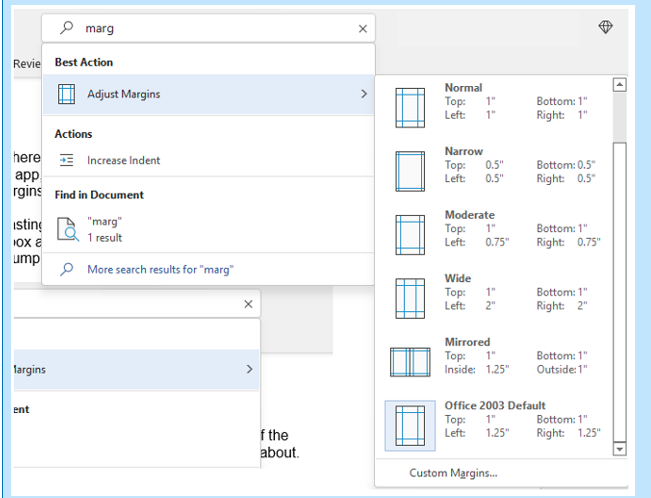
We have all been there at one time or another. You know there is a way to do something in an app but you can't find it in the menu. For example, you may be trying to change your margins in Microsoft Word to give you more space on the page.
You can stop wasting time clicking through one tab after another, and instead, use the search box at the top. It is not just for searching for help topics. You can use a search to quickly jump to settings like margins, page orientation, etc.
2. Leverage the Free Stock Images, Icons & Videos
Most businesses need to have nice-looking images from time to time. They’re used on websites, brochures and presentations. However, finding good business images can be expensive.
You can’t just do a Google search to find them because they may be copyrighted. You need to have images that you can use commercially without any problems.
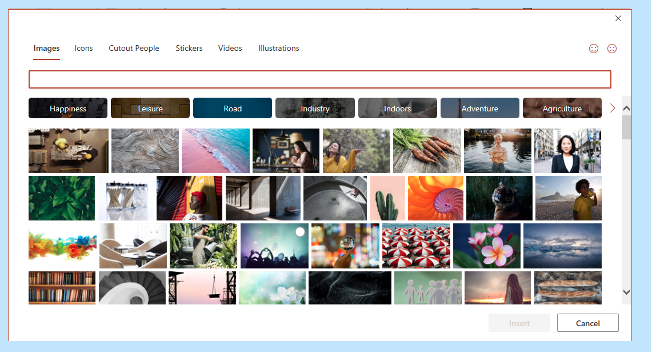
Inside the Word, Excel and PowerPoint, you have a treasure trove of images. These are free to use in your marketing. You also have videos, icons and even 3D models there for the picking.
Find them by going to Insert > Pictures > Stock Images.
Use the tab at the top to tab between the different media. Click to insert it directly into your document, spreadsheet or presentation.
3. Save Time by Using Data Types in Excel
Researching things like the population of a city or the nutrition value of a new menu can take days. Did you know that inside Excel you have access to several databases?
You can leverage facts and figures stored inside Excel’s “data types." They include topics on everything from chemistry to yoga poses. Use data types to populate tons of data in seconds for various topics.
- Start by adding your list (e.g. a list of menu items).
- Highlight your list.
- Click the Data tab.
- In the Data Types window, choose the type of data it is (e.g., Food, Plant, etc).
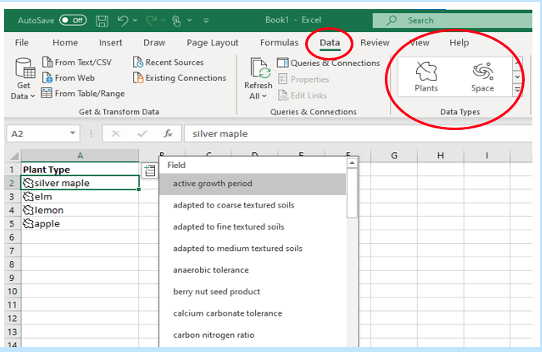
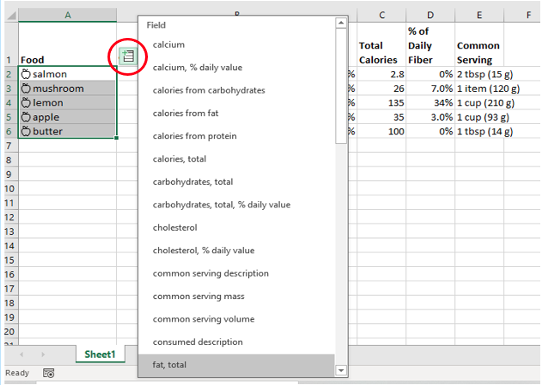
- Next, click the small database icon that appears at the top of the list.
- Choose the type of data you want.
- The details will populate into the next open column on the right for each list item.
4. Save Time on Customer Surveys with Microsoft Forms
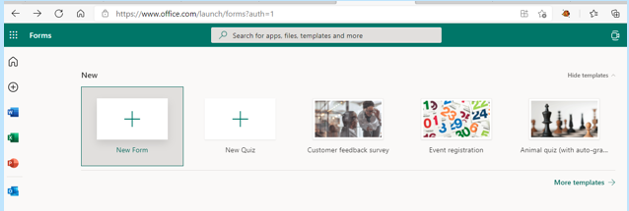
Microsoft Forms is one of the best-kept secrets of M365. This cloud-based survey and form builder makes it simple to send out surveys to people. You get the results back as soon as they click “submit” on the cloud-based form.
You can even download the results directly to Excel. Then you can use them for graphing or upload them into a software template.
5. Use PPT’s Presenter Coach to Improve Your Skills
Do you worry when it comes time to give a presentation to clients or your own team? Not everyone feels comfortable about public speaking even when it is virtual.
PowerPoint can help with a handy AI-powered feature called Presenter Coach. Turn this coach on when practicing your presentation. It will give you tips on your pacing, use of filler words (e.g. umm), repetitive language and much more!
Look for the “Rehearse with Coach” option on the Slide Show menu.
6. Save Recurring Email Text in Outlook’s Quick Parts
Do you have certain emails you send to customers that have the same paragraphs of text in them? For example, it might be directions to your building or how to contact support.
Stop retyping the same info every time. Outlook has a feature called Quick Parts that saves and then inserts blocks of text into emails.
- Create a Quick Part by highlighting the text to save in an email.
- On the Insert menu, click Quick Parts.
- Save Quick Part.
When ready to insert that text into another email, just use the same menu. Then click to insert the Quick Part.

7. Create a Keyboard Shortcut to Paste as Unformatted Text
Keyboard shortcuts are great for saving time. However, there is not always one there when you need it. One handy keyboard shortcut to add for MS Word is to paste as text only. This method removes any formatting that copied text might have had so your document isn’t messed up.
Here is how to make a keyboard shortcut for this:
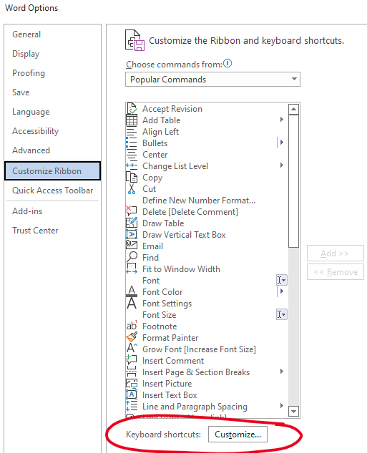
- In Word, click File > Options.
- Click Customize Ribbon.
- At the bottom of the panel (next to Keyboard shortcuts) click Customize.
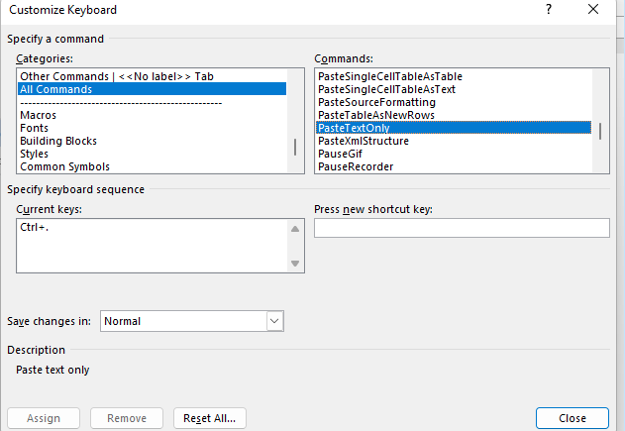
- Scroll in the left pane to All Commands.
- Look for “PasteTextOnly”.
- Type your keyboard command and click Assign.
Need Help Optimizing Microsoft 365?
Microsoft 365 has many security-enhancing, time-saving and dollar-saving features. Learn other ways that we can help by scheduling a consultation today. Give us a call at (860) 577-8060 or use our contact form.
The increased quantity and intensity of cyber security breaches in recent years have resulted in substantial changes in the cybersecurity insurance industry. The existing market in the cyber insurance sector has always been seen as "soft" because it was relatively simple for businesses to get coverage at cheaper costs. However, the increased cyber dangers and the exponential growth of ransomware assaults in the previous year induced a "hardening" in the industry.Read more
When you hear about Microsoft adding security apps to M365, it is often the business versions. However, the pandemic has changed the way that we see the workplace. It is now a hybrid world made up of several connected “mini-offices” located in employee homes.
The outsourcing market has also contributed to the change in company networks. Freelancers are often contracted to work the same hours as employees. This means less overhead and taxes to pay. Approximately 68% of large consumer products companies outsource a part of their workforce.
What we’re getting at is that the need for home devices and network security has never been greater. Company data is now at the mercy of employee devices situated in homes across the globe.
55% of employees use their own devices and software to work from home.
Microsoft has been at the forefront of this huge shift in the work environment. Their latest release is another example of how it has positioned its products to address new needs.
The latest security offering by Microsoft is not for business plans. It is for Personal and Family users of Microsoft 365. The company announced Microsoft Defender for Individuals on June 16, 2022. This is a brand-new digital home security tool.
The Basics of Microsoft Defender for Individuals
Microsoft Defender is a new app that Microsoft 365 subscribers can download. Anyone with a Personal or Family plan can access it for no extra cost.
According to Microsoft, there was a main driver for offering Microsoft Defender. It was to protect the digital life of small businesses and families. Small companies will often use consumer Microsoft 365 plans. This is because they are less expensive than the business plans.
This app brings many digital protections together into one dashboard. These include the following.
Online Security Visibility
Most families have several devices connected to their network. This includes computers, tablets and smartphones. It can be hard to know which are vulnerable before a hacked device infects the others.
Microsoft Defender gives you visibility into the security status of your devices. It does this in a single place. For example, you could see if that new phone of Sally’s has antivirus enabled. You can also easily add or remove devices.
Device Safeguards
The app includes extra protections from online threats. These are in the form of help from antivirus and anti-phishing protection.
You can use it to continually scan devices for both new and existing threats. You also gain control of scanning customization. For example, you can note certain apps as safe and tell Microsoft Defender what to scan.
Real-Time Alerts & Recommendations
Hackers use automation and AI to unleash their attacks and help them spread. This means that it is often a race against the clock to stop a breach from getting worse.
You need to know something is wrong to be able to act quickly. Microsoft Defender helps you by giving you real-time alerts. These also come with recommended actions so that you know something is wrong and what to do about it.
What Else Should You Know?
Here are a few other important things you should know about using Microsoft Defender for Individuals.
Where Can You Download It?
You can download Microsoft Defender for Individuals from Microsoft here. You need to have a Microsoft 365 subscription to either the Personal or Family plan.
What Devices Can Use It?
You can use Defender to secure and monitor the following devices:
- Windows: Windows 10 version 19041.0 and higher
- Mac: Intel Macs from Catalina 10.15 and higher, and Apple silicon-based devices from 11.2.3 and up
- iPhone: iOS 13.0 or later
- Android: Android OS 6.0 or later
How Many Devices Can You Add?
Microsoft Defender allows you to watch the security of many of your home or work devices. The M365 plan you have will dictate how many.
- If you have the Microsoft 365 Personal plan, you can receive protection on up to 5 devices at the same time.
- If you have the Microsoft 365 Family plan, you can receive protection on up to 30 devices at the same time (5 devices per person, 6 people total).
What Are the Key Differences Between the Personal & Family Plans?
Both plans can access the many different Office and other Microsoft applications. The main difference is how many people and devices can use the Microsoft 365 services.
- Microsoft 365 Personal: $69.99 US/year, 1 person, 5 devices
- Microsoft 365 Family: $99.99 US/year, 6 people, 5 devices per person
If you want to sign up at least 2 people, you’re saving quite a bit with the Family plan. You save even more if you have six people total using the service.
What is the Difference Between Microsoft Security on Windows & Microsoft Defender?
Most Windows users are already familiar with the Microsoft Security app. It comes pre-installed on Windows. Microsoft Defender differs from this app in several ways.
Microsoft Defender:
- Is not pre-installed on Windows. You must download it.
- It is a cross-device application used on many different devices.
- It includes features for online security.
- It includes alerts and security tips.
Learn More About Defender & Microsoft 365 Today
Are you looking to get more from your Microsoft 365 subscription? We can help! Reach out today to schedule a technology consultation with our M365 experts. Give us a call at (860) 577-8060 or use our convenient contact form.
It is Cybersecurity Awareness Month in October which means that it is time to review your organization’s training program and promote good cybersecurity habits to your employees.
Here are four key messages you can use to drive home the importance of personal responsibility in cybersecurity.
Using Strong Passwords and a Password Manager
One of the first things that businesses should do is to require their employees to use strong passwords. A strong password is at least eight characters long and includes a mix of upper and lowercase letters, numbers and symbols.
Using a strong password is one of the best ways to help protect your account from being hacked.
In addition to requiring strong passwords, businesses should also encourage their employees to use a password manager. A password manager is a software that helps you to manage your passwords and keep them safe.
Password managers can help to make it easier for you to use strong passwords by generating them for you and storing them in a secure location.
Enabling Multi-Factor Authentication
When it comes to online security, there is no such thing as being too cautious. That is why more and more businesses are implementing multi-factor authentication(MFA) as an extra layer of protection for their employees. MFA can help prevent unauthorized access to company data and systems even if an employee’s password is compromised.
Before MFA can do the job, employees need to be properly trained on how to enable and use it. Otherwise, they may find it more of a nuisance than a security measure.
Here are a few tips for training employees on MFA:
- Make sure employees understand why MFA is important.
- Explain to employees why MFA is being implemented and how it will help protect the company’s data. It is also important to stress that MFA is not a replacement for other security measures like strong passwords. It is an additional layer of protection.
- Keep the instructions simple.
- When employees are being trained on how to enable MFA, make sure the instructions are clear and concise. Use step-by-step instructions with screenshots (if possible).
- Allow employees to test MFA before using it for real.
- To help employees get comfortable with MFA, create a test environment where they can try it out without affecting live data. This will let them get used to the MFA process without needing to worry about making a mistake.
Updating Software
Software updates will often include security patches that can help to protect your system from being hacked. However, if employees don’t know how to update software, they might inadvertently leave your system vulnerable.
There are a few different methods that you can use to train employees on how to update software. Some of them are:
- Create a training video that goes over the steps involved.
- Creating a written step-by-step guide that employees can reference when they need to update software.
- One-on-one training with an I.T. professional.
Whichever method you choose, it is important to make sure that employees understand the importance of updating software.
Cybersecurity is only going to become more important in the years to come so it is essential that your employees are properly trained on how to keep your system safe.
Recognizing and Reporting Phishing
Phishing is a type of online attack that uses fraudulent emails or other communications in an attempt to trick people into revealing sensitive information like passwords or credit card numbers.
93% of modern breaches involve a phishing attack.
If an employee receives a suspicious email, they should not respond to it or click on any of the links contained within it. Instead, they should report it to their IT department or another designated point of contact. By doing so, businesses can help protect themselves from phishing attacks and other cyber threats.
While it is important for businesses to have security measures in place to protect their data, it is equally important for employees to be aware of the dangers of phishing and how to prevent themselves from becoming victims. By taking the time to train employees on how to recognize and report phishing attempts, businesses can go a long way in protecting themselves from cyberattacks.
Help Your Team Adopt a Culture of Cybersecurity
As we all become more reliant on technology, it is important to remember that we need to be vigilant about our cybersecurity. By following the tips above and staying alert, you can help to keep your company’s data safe from cyberattacks.
It is urgent that we all do our part to protect ourselves and our businesses from cybercrime.
Cybersecurity Awareness Month is the perfect time to make sure that your employees are up-to-date on the latest cybersecurity threats and how to protect against them.
Cybersecurity is vital regardless of the size of your company. Contact us at (860) 577-8060 or via our contact form to learn more about how we can help.

Software vulnerabilities are an unfortunate part of working with technology. A developer puts out a software release with millions of lines of code. Hackers then look for loopholes that allow them to breach a system through that code.
The developer issues a patch to fix the vulnerability. It is not long before a new feature update causes more. It’s like a game of “whack-a-mole” to keep your systems secure.
Keeping up with new vulnerabilities is one of the top priorities of IT management firms. It is important to know which software and operating systems are being attacked.
Without ongoing patch and update management, company networks are vulnerable. These attacks are completely avoidable. 82% of U.S. cyberattacks in Q1 of 2022 were due to exploiting patchable vulnerabilities. This is a global problem.
What new vulnerabilities are lurking in products from Microsoft, Google, Adobe, etc? We will go through several. These were recently noted in a warning by the Cybersecurity and Infrastructure Security Agency (CISA).
Make Sure to Patch Any of These Vulnerabilities in Your Systems
Microsoft Vulnerabilities
Microsoft vulnerabilities include those in three of its products. Internet Explorer (IE) is one of them. Microsoft discontinued IE in June of 2022. You should remove this from any computers that still have it installed.
You will see the acronym “CVE” used in the vulnerability names. This is an industry-standard naming structure. It stands for Common Vulnerabilities and Exposures.
Here is a rundown of these vulnerabilities and what a hacker can do:
CVE-2012-4969: This Internet Explorer vulnerability allows the remote execution of code. This is a “critical” vulnerability because of the damage it enables. Hackers can release this via a website. Formerly safe sites can become phishing sites when hackers exploit this loophole.
- CVE-2013-1331: This is a flaw in the code for Microsoft Office 2003 and Office 2011 for Mac. It enables hackers to launch remote attacks. It exploits a vulnerability in Microsoft’s buffer overflow function. This allows hackers to execute dangerous code remotely.
- CVE-2012-0151: This issue impacts the Authenticode Signature Verification function of Windows. It allows user-assisted attackers to execute remote code on a system. “User-assisted” means that they need the user to assist in the attack by opening a malicious file attachment in a phishing email.
Google Vulnerabilities
Google Chrome and applications built using Google’s Chromium V8 Engine are also on the list. These applications are targets of the following vulnerabilities.
- CVE-2016-1646 & CVE-2016-518: These both allow attackers to conduct denial of service attacks. They do this against websites through remote control. This means they can flood a site with so much traffic that it crashes.
- Those are not the only two code flaws that allow hackers to crash sites this way. Two others (CVE-2018-17463 and CVE-2017-5070) both do the same thing. They have patches already issued that users can install to fix these holes.
Adobe Vulnerabilities
People use Adobe Acrobat Reader widely to share documents. It makes it easy to share them across different platforms and operating systems. However, it is also a tool that is on the list of popular vulnerabilities.
- CVE-2009-4324: This is a flaw in Acrobat Reader that allows hackers to execute remote code via a PDF file. This is why you can’t trust that a PDF attachment is going to be safer than other file types. Remember this when receiving unfamiliar emails.
- CVE-2010-1297: This is a memory corruption vulnerability. It allows remote execution and denial of service attacks through Adobe Flash Player. Similar to IE, the developer retired Flash Player. It no longer receives support or security updates. You should uninstall this from all PC's and websites.
Netgear Vulnerability
Netgear is a popular brand of wireless router. The company also sells other internet-connected devices. These are also vulnerable due to the following flaws.
- CVE-2017-6862: This flaw allows a hacker to execute code remotely. It also enables bypassing any needed password authentication. It is present in many different Netgear products.
Cisco Vulnerability
- CVE-2019-15271: This is a vulnerability in the buffer overflow process of Cisco RV series routers. It gives a hacker “root” privileges. This means they can basically do anything with your device and execute any code they like.
Patch & Update Regularly!
These are a few of the security vulnerabilities listed on the CISA list. You can see all 36 that were added here.
How do you keep your network safe from these and other vulnerabilities? You should patch and update regularly. Work with a trusted IT professional to manage your device and software updates. This ensures you don’t have a breach waiting to happen lurking in your network.
Automate Your Cybersecurity Today
Patch and update management is just one way that we can automate your cybersecurity. Learn how else we can help by scheduling a consultation today. You can reach us at (860) 577-8060 or use our contact form.
As a small business owner, you know that every penny counts. When it comes to making a large purchase like a new PC, you want to be sure that you’re getting the best possible value for your money while also offering the performance you need to keep your operation running.
In this blog post, we will outline some of the most important features to look for when buying a new PC so that you can avoid any post-purchase regrets.
Where to Start?
First and foremost, you will want to make sure that the computer you are buying is powerful enough to handle all of your business needs. If you’re planning on using demanding software or running complex calculations, you will need a machine with a robust processor and a healthy amount of RAM.
If you’re mostly just using your PC for tasks like email and web browsing, you can get away with something a bit less powerful and save some money in the process.
Let us take a closer look at some of these components:
CPU
The central processing unit (CPU) is the brain of the operation. It is responsible for carrying out all the instructions that make your software run. It is important to pay attention to the CPU type and speed when shopping for a new PC. Intel and AMD are the two most popular CPU manufacturers and you will often see references to “i3”, “i5” and “i7” processors. These refer to the Intel Core line of CPUs which are divided into the budget, mid-range and high-end models. AMD’s Ryzen line offers similar options with their Ryzen 3, Ryzen 5, Ryzen 7 and so on.
Generally, faster is better. However, if you’re on a tight budget, you can always start with a mid-range model and upgrade to a faster processor down the road. Just make sure the motherboard in your new PC can accommodate a faster CPU.
Memory
One of the most important things to consider when buying a new PC is the amount of memory (or RAM) that it has. Memory is what allows your computer to store and access information quickly and more memory will always result in better performance.
For small businesses, it is recommended to have a minimum of 8GB of RAM. However, 16GB or more is even better.
Storage Space
Another important consideration is storage space. There are two main types of drives in this category:
- Hard Drives (HDD)
- Solid-State Drives (SSD)
The kinds of files you work with will determine which is the best option for you. If you’re working with large files or dealing with a lot of data, you will need a computer with a sizable storage solution.
Hard drives are generally slower than solid-state drives but they offer more storage for the price. Solid-state drives are much faster than hard drives. If speed is a priority, you will want to choose a computer with an SSD.
Both HDD and SSD drives come in a variety of form factors so you will need to choose the right size for the needs of your specific build.
Display
Displays are your window into the work you’re doing. You will want to make sure that it is the right fit for your needs.
If you are going to be doing a lot of graphics work, you will want to make sure you get a higher resolution. If you are just going to be doing basic work, you can save some money and go with a lower resolution.
There are also other considerations like display size and color accuracy.
Display size is simply how large the physical display is. If you have a small workspace, then you will want to make sure that you get a smaller display. If you are doing any sort of color work, you will want to make sure that the display’s colors are as accurate as possible. This is usually not a problem with higher-end displays but it can be an issue with lower-end ones.
Peripherals
Once you have decided on the specs of your new computer, you will also need to think about the peripherals. In addition to a monitor, keyboard and mouse, you may need additional devices like a printer, scanner or an external hard drive for portable storage needs. Make sure to factor in the cost of these items when budgeting for your new PC.
Warranty
As a small business owner, the last thing you want is to need to shell out more money for a new PC because something went wrong with the one you just bought. Make sure the PC that you are buying comes with a warranty that will cover you in case of any unforeseen problems.
Assess Your Needs
Before making a decision, sit down and assess your specific needs.
- What type of software will you be using?
- How much storage space do you need?
- What is your budget?
Once you have answers to these questions, you will be in a much better position to choose the right PC for your business.
We Can Help You Choose the Best PC For Your Needs
No matter what size company you have, picking out the right computer is important. Contact us at (860) 577-8060 or via our contact form to learn more.
Have you felt more secure from cyberattacks because you have a smaller business? Maybe you thought that you couldn’t possibly have anything that hackers could want? Maybe you didn’t think they even knew about your small business.
A new report by cybersecurity firm Barracuda Networks debunks this myth. Their report analyzed millions of emails across thousands of organizations. It found that small companies have a lot to worry about when it comes to their IT security.
Barracuda Networks found something alarming. Employees at small companies saw 350% more social engineering attacks than those at larger ones. It defines a small company as one with less than 100 employees. This puts small businesses at a higher risk of falling victim to a cyberattack. We will explore why below.
Why Are Smaller Companies Targeted More?
There are many reasons why hackers see small businesses as low-hanging fruit. They are becoming larger targets of hackers out to score a quick illicit buck.
Small Companies Tend to Spend Less on Cybersecurity
When you’re running a small business, it is often a juggling act of where to prioritize your cash. You may know cybersecurity is important but it may not be at the top of your list. At the end of the month, cash runs out and it is moved to the “next month” wish list of expenditures.
Small business leaders often don’t spend as much as they should on their IT security. They may buy an antivirus program and think that is enough to cover them. However, with the expansion of technology to the cloud, that is just one small layer. You need several more for adequate security.
Hackers know all this and see small businesses as an easier target. They can do much less work to get a payout than they would trying to hack into an enterprise corporation.
Every Business Has “Hack-Worthy” Resources
Every business (even a 1-person shop) has data that is worth scoring for a hacker. Credit card numbers, SSN's, tax ID numbers and email addresses are all valuable. Cybercriminals can sell these on the Dark Web. From there, other criminals use them for identity theft.
Here are some of the data that hackers will go after:
- Customer records
- Employee records
- Bank account information
- Emails and passwords
- Payment card details
Small Businesses Can Provide Entry Into Larger Ones
If a hacker can breach the network of a small business, they can often make a larger score. Many smaller companies provide services to larger companies. This can include digital marketing, website management, accounting, etc.
Vendors are often digitally connected to certain client systems. This type of relationship can enable a multi-company breach. While hackers don’t need that connection to hack you, it is a nice bonus. They can get two companies for the work of one.
Small Business Owners Are Often Unprepared for Ransomware
Ransomware has been one of the fastest-growing cyberattacks of the last decade. So far in 2022, over 71% of surveyed organizations experienced ransomware attacks.
The percentage of victims that pay the ransom to attackers has also been increasing. An average of 63% of companies pay the attacker money in hopes of getting a key to decrypt the ransomware.
Even if a hacker can’t get as much ransom from a small business as they can from a larger organization, it’s worth it. They often can breach more small companies than they can larger ones.
When companies pay the ransom, it feeds the beast and more cyber criminals join in. Those newer to ransomware attacks will often go after smaller, easier-to-breach companies.
Employees at Smaller Companies Usually Aren’t Trained in Cybersecurity
Employee cybersecurity training is not usually high on the list of priorities for a small business owner. They may be doing all they can just to keep good staff. Priorities are often sales and operations.
Training employees on how to spot phishing and password best practices often isn’t done. This leaves networks vulnerable to one of the biggest dangers - human error.
In most cyberattacks, the hacker needs help from a user. It’s like the vampire needing the unsuspecting victim to invite them inside. Phishing emails are the device needed to get that unsuspecting cooperation.
Phishing causes over 80% of data breaches.
A phishing email sitting in an inbox can’t usually do anything. It needs the user to either open a file attachment or click a link that will take them to a malicious site. This then launches the attack.
Teaching employees how to spot these ploys can significantly increase your cybersecurity. Security awareness training is as important as having a strong firewall or antivirus.
Need Affordable IT Security Services for Your Small Business?
Reach out today to schedule a technology consultation. We offer affordable options for small companies. This includes many ways to keep you protected from cyber threats.
Give us a call at (860) 577-8060 or use our convenient contact form.
We all know that customer experience is the key to success. Improving customer experience can be a challenge. It is important to stay ahead of the curve and make it a priority. Improving the experience that prospects and customers have when interacting with your company directly impacts your bottom line. It can also be done through the use of modern technology.Read more