

The global pandemic put a big emphasis on the need to run a business from anywhere. Enabling employees to work remotely requires cloud solutions. This includes collaborative platforms like Google Workspace and Microsoft 365. VoIP (Voice over Internet Protocol) phone systems have also become critical.
VoIP allows companies to stay in contact with customers and potential customers. Employees can work from anywhere and still answer the business phone line. Callers get a similar experience regardless of where employees may be working (office or home).
When you have people working from home, those old landline systems are inefficient. This has led to a large movement by businesses to VoIP because of necessity and cost-savings.
According to Microsoft, 82% of organizations have reported saving money after implementing VoIP.
While VoIP is the way to go for the future, this doesn’t mean that it is foolproof. Companies that don’t set up their system efficiently can experience issues. This includes things like dropped calls, low bandwidth and features left unused.
If you have been struggling to make your cloud phone system more efficient, check out these tips below. They provide the best setup practices for VoIP. Use these to positively impact your bottom line.
1. Check Network Capabilities
You can’t just assume that you can enable a VoIP system and all will be well. Your network may not be able to handle the extra bandwidth needs without adjustments.
Things that you want to look at include jitter and packet loss. Additionally, review router settings to make sure it can handle peak traffic times. Experiencing dropped calls or choppy audio shows a need to address issues. These may include adjusting network hardware and/or increasing your ISP bandwidth.
2. Prioritize Your VoIP Software Using QoS Rules
Quality of Service (QoS) is a router settings area that allows you to say which traffic is most important. If QoS is not in place, it means resource issues. A large cloud backup could kick in and interrupt your calls because it is taking up bandwidth.
QoS sets up “traffic lanes” that give priority to certain functions. You will want to have your VoIP software prioritized to get the bandwidth it needs. This avoids issues with less critical processes hogging up internet resources.
Using QoS keeps your calls smooth. It also improves the reliability of your cloud phone system. It is also a good idea to use these rules for other important cloud activities.
3. Provide Quality Headsets for Your Team
A cheap headset can ruin the call experience for a potential customer. If someone calls in and can’t hear anything or gets choppy reception, they will quickly get frustrated. They will most likely figure that your company doesn’t have its act together.
Your employees may not be able to afford high-quality headsets. They also may not know what type to buy. Head off potential problems by issuing quality headsets for your team to use.
4. Set Up Departments & Ring Groups
One of the great features of VoIP phone systems is the ability to set up ring groups. You first set up your department groups (accounting, marketing, etc). Then set up the included employee extensions.
Creating a ring group allows you to have a call go to your customer support department as a whole. This is better than one person who may be busy. This way the whole group gets the ring and the first available person can pick up.
Ring groups improve the caller experience by reducing the wait time. It can also mitigate the need for the caller to leave a voicemail and get stuck waiting on a call back.
5. Create Your Company Directory
Auto assistants are extremely helpful and nearly all VoIP systems have them. You set up your company directory first and then record messages to prompt the caller.
For example, you can set up a message that prompts them to input the last name of the person that they are trying to reach. If they aren’t calling a specific person, they can be routed to a department.
While setting up a company directory takes a little effort up front, it will save much more. You no longer will need to have someone specifically routing every call. Callers can also get to the person or department they need faster. This improves the customer experience and boosts office productivity.
6. Have Employees Set Up Their Voicemail & VM to Email
When you get out of a long meeting, going through a bunch of voicemails can take time. Instead of needing to listen to each one to see which calls are a priority, you could simply read through them.
The voicemail to email feature in VoIP phone systems will automatically transcribe voicemails. They are then emailed to the recipient. This improves efficiency. It also eliminates wasted time spent on listening to entire messages to know who called.
Have employees set up this feature with their extension and email address. Some VoIP systems also offer an option to have transcribed voicemails sent via SMS.
7. Train Your Team on the Call Handling Process
Don’t leave your employees to jump in and learn a VoIP system themselves. It is important to train them on the features and the company calling process. This ensures that your team can enjoy all of those time-saving features.
Get Help Enhancing Your Business Phone System
Need help improving your business phone system? Looking for a better customer experience? Give us a call and schedule a consultation. We can help!

The evolution of technology has frequently been consistent and current leading technologies tend to get quickly outdated. Statista's forecast on emerging technology trends shows that there would be a 104% increase between 2018 and 2023. Fields in these emerging techs include AR/VR, Internet of things software, metaverse, etc.
With this advancement, any business that wants to stay relevant and competitive will need to be ahead technologically and adopt the provisions of the new technologies to advance its operations.
As a result, knowing and understanding the technological trends anticipated for 2023 will help you know which one you can leverage in the coming months to improve your organization's efficiency, increase customer satisfaction, innovation and profitability and enable maximum productivity.
Although predicting how trends will develop can be difficult, some emerging technologies appear to have potential and are headed in the right direction for growth. They have potential and will support businesses as they set their path to growth and innovation.
This article contains the top 2023 technological trends your business can leverage in the coming months.
Top 2023 Technology Trends You Should Take Advantage Of
Adopting advanced technology trends for your business will inevitably lead it to get better. Leveraging them will optimize general operations, build business and system resilience and build trust in your industry. They will also increase your product delivery and enhance your customer interactions.
Here are some of these technology trends.
- Digital Immune System
The digital immune system incorporates a variety of risk reduction strategies and technologies to improve user experience and lower system failures that affect performance.
Observability, Chaos engineering, AI-augmented testing, Site Reliability Engineering (SRE), auto-remediation and Software Supply Chain Security are some of the key ideas behind digital immunity. They work together to guarantee that services are provided continuously, that systems don't crash and that errors are quickly fixed.
- Platform Engineering
Through self-service features and automation, platform engineering increases the developer experience, boosts productivity and speeds up the delivery of apps while fostering improved communication between operators and software developers. Through reusable tools and capabilities, it seeks to modernize enterprise software delivery.
Platform engineering seeks to create and redesign a platform utilizing standardized parts and automated procedures that are in tune with its end users' requirements, thereby improving end-user productivity and lessening the burden of the development team of your enterprise.
- Super-Apps
By creating super-apps, businesses can explore new approaches to client engagement. A super-app combines the features of a regular app with those of an app platform and an ecosystem. It creates a platform that enables end users to make their mini-apps.
Super apps have features that vary depending on the need of the customers. For example:
- Users can purchase and sell products and services within the app.
- The apps make provisions for users to order food and other things that will be delivered to their homes.
- The apps can be used to book transportation services.
- The apps can be used for payment, other financial transactions, and more.
This super-app technology can improve customer experience, general brand engagement and loyalty. They have the advantage of giving businesses access to a more significant client. Customers need to use the app to access various services and super apps allow companies to sell their goods and services and gather users' data. Also, users can quickly receive what they need due to the seamless customer experience created.
There are many benefits that super apps bring to your business which makes it a technology that you should leverage.
- Metaverse
The metaverse creates an online space where humans have a more engaging and immersive way and mode of communication. With a metaverse, you can virtually replicate physical activities. This can be achieved by transferring or extending real-world activities into virtual ones and altering the latter. It is a combined innovation composed of numerous technological capabilities and concepts.
In 2023, the metaverse will completely alter the customer experience. A more interconnected, immersive and secure digital world will be created where businesses and people can simulate real-life scenarios such as virtual houses, virtual business offices and shops, virtual roads and simulated travel experiences. AR/VR, AI/ML, Blockchain and IoT will work together to make this possible and significantly impact personal and commercial lives.
The metaverse also aids in creating new venues for customers to interact with brands and their products/services. They also allow new currencies to circulate widely in the market and develop innovative methods for collaboration among workers.
- AI TRiSM
Organizations are adopting an increasing number of Artificial Intelligence models. This increase may lead to an expansion in complexities for enterprises adopting this model. They must intensify efforts to ensure the credibility of the AI models they have chosen. Thus, there is a need for AI TRiSM.
AI TRiSM means AI Trust Risk and Security Management. It guarantees that AI model technologies perform their intended functions efficiently and safely. To preserve crucial operations of an organization, AI TRiSM helps to protect the shared data, protects privacy, manages governance and detects anomalies.
Ready To Adopt Technology Trends To Help Your Organization?
One of the best actions you can take for your organization is to invest in all it takes to grow. The technological growth of your organization is crucial to overall development and productivity.
At Sound Computers, we offer professional IT services with experts who can guide you into adopting new technological trends that can give you the best experience within the coming months and beyond.
Contact us for professional guidance at (860) 577-8060.

One constant struggle in offices is the balance between user productivity and security. If you give users too much freedom in your network, risk increases. Add too many security gates and productivity can dwindle.
It is a fine balance between the two but you can achieve it. Organizations need to recognize the importance of both and not sacrifice one for another.
A recent report from Microsoft notes a dangerous lack of authentication security. Just 22% of Azure Active Directory users had multi-factor authentication (MFA) enabled. This means that over three-quarters were at a much higher risk of an account breach.
Why do organizations fail to adopt important security protocols like MFA? We know that it is as much as 99.9% effective at stopping fraudulent sign-ins. However, many companies aren’t adopting it.
User inconvenience is the biggest reason. MFA is not expensive. In fact, it is free to enable in nearly all cloud applications. However, if users say that it is hurting productivity and is a pain to use, companies may not bother with it.
Sacrificing security can hurt productivity worse. Downtime due to a data breach is expensive and can put smaller companies out of business. The main cause of data breaches is credential compromise. If you’re not protecting your authentication process, the risk of becoming a breach victim is high.
35% of data breaches initiate from breached login credentials.
There are ways to have both secure and productive users. It simply takes adopting some solutions that can help. These are tools that improve authentication security and do it in a way that keeps user convenience in mind.
Solutions to Improve Security Without Sacrificing Convenience
Use Contextual Authentication Rules
Not every user needs to go through the same authentication process. If someone is working in your building, they have a certain trust factor. If someone is attempting to log in from outside the country, they do not have that same trust.
Contextual authentication is used with MFA to target users that need to reach a higher bar. You may choose to limit or block system access to someone attempting to log in from a certain region or you may need to add an additional challenge question for users logging in after work hours.
Companies don't need to inconvenience people working from normal locations during typical hours but they can still verify those logging in under non-typical circumstances. Some of the contextual factors you can use include:
- Time of day
- Location
- The device used
- Time of the last login
- Type of resources accessed
Install a Single Sign-on (SSO) Solution
A report on U.S. employees found that they use a lot of apps. Workers switch between an average of 13 apps 30 times per day. That is a lot of inconvenience if they need to use an MFA action for each of those logins.
Single sign-on applications solve this problem. They merge the authentication process for several apps into just one login. Employees log in once and can go through MFA a single time.
Using multi-factor authentication isn’t nearly as inconvenient. Users gain access to everything at the same time. SSO solutions help organizations improve their security without all the pushback from users.
Recognize Devices
Another way to better secure network access is to recognize devices. This is typically done using an endpoint device manager. This automates some of the security behind user authentication. It doesn’t inconvenience the person.
First, register employee devices in the endpoint device manager. Once completed, you can then set up security rules such as blocking unknown devices automatically.
You can also put device scanning for malware and automated updates in place. Both these things increase security without sacrificing productivity.
Use Role-Based Authentication
Your shipping clerk may not have access to sensitive customer information but your accounting team does. One can have a lower barrier to authentication.
Using role-based authentication saves time when setting up new employee accounts. Authentication and access happen based on the person’s role. Admins can program permissions and contextual authentication factors once. Then the process automates as soon as an employee has their role set.
Consider Adding Biometrics
One of the most convenient forms of authentication is biometrics. This would be a fingerprint, retina or facial scan. The user doesn’t need to type in anything. It also takes just a few seconds.
Biometric hardware can be costly depending on the size of your organization. However, you can introduce it over time. Consider using biometrics with your most sensitive roles first and then expanding.
Additionally, many apps are now incorporating things like facial scanning. Users can authenticate using a typical smartphone which makes it much more affordable.
Need Help Improving Authentication Security?
Don’t give up important security because you are afraid of user pushback. Give us a call and schedule a security consultation.

Although the idea of the metaverse is prevalent, few people are knowledgeable about it and businesses are unsure if they should pay attention to it. Can something so publicized and 'unreal' even be relevant to their industry? The quick response is yes.
In reality, a number of metaverse notions are already taking physical form. According to a report, by 2026, 25% of users will use one or more hours surfing the metaverse. Many businesses are making investments to increase revenue, deepen customer trust and engage with their communities creatively.
Options to improve consumer experiences, develop virtual-only products and promote both digital and physical goods and services are some of the promises that the metaverse makes. It will carry out all of this using its own financial and payment systems and implement all these functions, applications and hardware that will be required.
The metaverse isn't created for only top brands like Adidas, Louis Vuitton or Dolce & Gabbana. Every company will be able to integrate it into their daily operations.
This new virtual world is more about experiences and every business should be prepared. The benefits that the metaverse presents to business is unlimited and will undoubtedly boost the business visibility and productivity.
Not yet persuaded? We will explore why your brand/business should prepare now.
How Your Business Needs to Prepare
Businesses can access the metaverse and gain publicity for their company by being visible in a virtual environment. These steps can help your company prepare for the impacts of the metaverse if you want to be amongst one of the top players in your business:
-
Boost Your Online Visibility
Different businesses will interpret entering the metaverse differently. For one business, it can include creating more intelligent AI to respond to client inquiries. Another possibility is a complete VR environment. Since the metaverse is the future web version, boosting your online presence now should be the first step toward success.
-
Conduct Customer Satisfaction Surveys
Planning for future innovations is crucial because research rounds might take some time. Who are the target demographics for your business? Which consumer behaviors (present and potential) are currently in vogue and suggestive of potential metaverse participation?
Conducting customer surveys is a great technique to estimate when your target audience will be prepared for metaverse technologies, how they will feel if it is implemented in your business and how well they will respond to it.
-
Stay Prepared and Adaptable
Moving your brand into the metaverse can be a daunting and unbelievable process due to the fact that your businesses should be responsive to the evolving nature of the virtual worlds. However, this might also be a fantastic chance to test out the adaptability of the metaverse and get prepared.
You could use the community that it provides to develop and assess your products virtually rather than taking control of the entire creative process.
-
Concentrate More on Experience
Clients and customers who access the metaverse want to do more than just observe things. They want to feel them. Create a direct experience for your clients using various approaches that could depict the metaverse world and give your customers more experience. This gets both you and your customers prepared for the impacts of the metaverse.
Consider the scenario where you wish to start a business in the gaming industry. The ideal course of action would be for you to let the controls inspire actual actions. You could also start dimensioning your object beyond two components if you intend to open a metaverse store.
Determine the mood that your customers want to be in when they enter the space. That enables you to provide a fantastic experience and build an emotional flow that will lead them to that experience. Customer loyalty is a result of user engagement so you should aim for it.
Don't Wait!
The opportunities involved when you launch your business into the metaverse are numerous. You give room to more visibility both locally and internationally and provide your customers with the chance to interact with your products and services in more unique ways.
As a result, getting your business ready as soon as possible to fully understand the world of the metaverse and investigate it strategically and tactically gives you and your business the tools needed to succeed.
Note: Your business should select some short-term strategies to get your business prepared. Currently, the metaverse is a whole new world filled with lots of amazing experiences and endless possibilities for businesses to grow, expand and be productive.
Prepare Your Business for Impacts of the Metaverse with Sound Computers
Sound Computers can help your Connecticut business prepare for the metaverse and develop the technology strategies needed to boost business productivity.
Contact us today to schedule a free consultation. Call 860-577-8060 or reach us online.
It seems that nearly as long as passwords have been around, they have been a major source of security concern. Eighty-one percent of security incidents happen due to stolen or weak passwords. Additionally, employees continue to neglect the basics of good cyber hygiene.
For example, 61% of workers use the same password for multiple platforms and 43% have shared their passwords with others. These factors are why compromised credentials are the main cause of data breaches.
Access and identity management have become a priority for many organizations. This is largely due to the rise of the cloud as well as the practice of people needing to only enter a username and password to access systems.
Once a cybercriminal gets an employee’s login information, they can access the account and any data that it contains. This is especially problematic when it is an account like Microsoft 365 or Google Workspace. These accounts can access things like cloud storage and user email.
So what is conditional access and how does it work with multi-factor authentication (MFA)? What are the advantages of moving to a conditional access process?
What Is Conditional Access?
Conditional access is also known as contextual access. It is a method of controlling user access. You can think of it as several “if/then” statements (meaning “if” this thing is present, “then” do this).
For example, conditional access allows you to set a rule that would state the following. “If a user is logging in from outside the country, require a one-time-passcode.”
Conditional access allows you to add many conditions to the process of user access to a system. It is typically used with MFA. This is to improve access security without unnecessarily inconveniencing users.
Some of the most common contextual factors used include:
- IP address
- Geographic location
- Time of day
- The device used
- Role or group the user belongs to
Conditional access can be set up in Azure Active Directory. It can also be set up in another identity and access management tool. It is helpful to get the assistance of your IT partner. We can help with setup and the conditions that would make the most sense for your business.
The Benefits of Implementing Conditional Access for Identity Management
Improves Security
Using conditional access improves security. It allows you more flexibility in challenging user legitimacy. It doesn't just grant access to anyone with a username and password. Instead, the user needs to meet certain requirements.
Contextual access could block any login attempts from countries where no employees are located. It could also present an extra verification question when employees use an unrecognized device.
Automates the Access Management Process
Once the if/then statements are set up, the system takes over. It automates the monitoring for contextual factors and takes the appropriate actions. This reduces the burden on administrative IT teams. It also ensures that no one is falling between the cracks.
Automated processes are more accurate and reliable than manual processes. Automation removes the human error component. This helps ensure that each condition is being verified for every single login.
Allows Restriction of Certain Activities
Conditional access isn’t only for keeping unauthorized users out of your accounts. You can use it in other ways. One of these is to restrict the activities that legitimate users can do.
For example, you could restrict access to data or settings based on a user’s role in the system. You can also use conditions in combination (such as lowering permissions to view-only). You could trigger this if a user holds a certain role and is logging in from an unknown device.
Improves the User Login Experience
Studies show that as many as 67% of businesses don’t use multi-factor authentication. This is despite the fact that it is one of the most effective methods to stop credential breaches.
One of the biggest reasons it is not used is because of the inconvenience factor for employees. They may complain that it interferes with productivity or say that it makes it harder for them to use their business applications.
Using conditional access with MFA can improve the user experience. For example, you can require MFA only if users are outside of the premises. You can put in place extra challenge questions on a role or context-based basis. This keeps all users from being inconvenienced.
Enforces the Rule of Least Privilege
Using the rule of least privilege is a security best practice. It means only granting the lowest level of access in a system as necessary for a user to do their work. Once you have roles set up in your identity management system, you can base access on those roles.
Conditional access simplifies the process of restricting access to data or functions. You can base this on job needs. It streamlines identity management. This is because it contains all functions in the same system for access and MFA rules. Everything stays together which makes management easier.
Get Help Implementing Conditional Access Today!
Once conditional access is set up, the automated system takes over. It improves your security and reduces the risk of an account breach. Contact us today for a free consultation to enhance your cybersecurity.
Cloud misconfiguration has become one of the most significant threats to cloud security. Cloud vulnerabilities have increased by 28% since last year. There was an increase in the offer of cloud accounts on the dark web of 200%. The catastrophic impact of cloud misconfiguration has made it clear that proper cloud security and configuration is of the utmost importance.
Cloud breaches constantly make news headlines and the ambiguity that surrounds cloud misconfiguration can seem daunting. Many businesses have lost sensitive data and have been open to cyber-attacks and malware due to cloud misconfiguration.
According to the Business wire, cloud misconfiguration issues are responsible for 80% of data breaches.
With businesses relying on the cloud to store and secure their data, hackers have found much of their success in targeting companies due to misconfigured clouds. The question arises: Is misconfiguration leaving your cloud accounts at risk and its resources being advertised to malicious hackers?
What is cloud misconfiguration?
Cloud misconfiguration is errors, gaps or glitches in the cloud environment that could expose your business to risk. These risks come in the form of insider threats and attacks, cloud breaches, data breaches, malware, security breaches, ransomware or external hackers that could leverage the vulnerabilities available in your cloud environment to gain access to your network.
According to the National Security Agency (NSA), cloud misconfiguration is among the top vulnerabilities in the cloud environment. Cloud misconfiguration is quite complicated and can be very challenging to detect and manually remediate.
How Cloud Misconfigurations Occur
Cloud misconfigurations happen in various ways and for various reasons. Many cloud misconfigurations occur due to human errors and factors such as not enough understanding of the security practices and complex infrastructure.
- Human Error
According to Gartner, until 2025, 99% of cloud issues will be due to human error. Due to the complexity of the cloud infrastructure, employees or customers frequently grant many unrestricted accesses and fill in personal information on any website they open. When many businesses attempt to use tools from cloud vendors to manage identity and access, there may still be gaps.
- Not Enough Understanding of the Security Practices
When creating and managing apps and infrastructure, the majority of developers and DevOps teams do not place a high priority on security. These teams primarily concentrate on ensuring that the cloud environment and services work properly and offer effective functionality to users.
- Complex Infrastructure
When the cloud environment becomes complex, mistakes are bound to happen that open up a way for cyber-attacks to occur. These errors can occur due to adding or creating new containers, creating resources and altering the configurations.
Without some kind of uniformity within your cloud environment, it can be challenging to navigate and use.
What Can Happen When Cloud Misconfiguration Occurs?
Here are some things that happen when cloud misconfiguration occurs:
- Causes Data Breaches
Many businesses are unaware of the number of users in their cloud environment with excessive access to permissions. As a result of this, they are unable to know if there is a problem until after an attack. This can result in severe data loss.
- Opens a Channel for Cyber Criminals to Exploit
Once cloud misconfigurations occur, your environment is open to various vulnerabilities which opens a channel for cyber criminals to exploit and makes it easy for them to access cloud-stored data, steal it, ransom it, install malware and sometimes sell it on the dark web.
- Install Digital Skimming Code
Digital skimming attacks include inserting malicious code into a website's scripts which are loaded when a user attempts to access the site in their browser. This code intercepts sensitive information entered by the users such as account numbers, social security numbers, credit card details, etc. This information is then sent to a server controlled by the hacker. This information is then gathered, sold and otherwise illegally exploited.
- Exposing Sensitive Data
Cloud misconfigurations can lead to the exposure of confidential and sensitive data or put important files at risk of theft. Cloud misconfiguration gives hackers access to your database or cloud storage, puts your business at risk of corporate espionage and exposure of user data and makes it possible for them to erase crucial data.
- Services Disruption
Once hackers gain access to your servers or network, they have the ability to disrupt your service. This disruption can include malware, insider or ransomware attacks.
How to Protect your Cloud and Prevent Cloud Misconfiguration
The good news is that if misconfiguration is leaving your cloud accounts at risk, you can implement several best practices to protect your cloud-based assets better and prevent a misconfiguration attack.
- Implement Log-Tracking Practices
Enabling logging to control the number of users making changes in your cloud environment can protect your cloud. By tracking changes made, you will be able to identify the root cause of any misconfiguration incidents.
- Enable Encryption
Enabling encryption using cloud computing services keeps your data safe from unauthorized viewing.
- Check Permissions
Reduce permissions to only people who need access to carry out their jobs. Widespread access weakens your business security.
- Perform Regular Misconfiguration Audits
Performing regular audits ensures your cloud environment is always secure. This helps to look for signs of misconfigurations and other cloud threats.
- Practice Strong Security Policies
Set up strong security policies for all cloud infrastructure processes. Also, your employees should be informed about the policies so they don't misconfigure the cloud setting without knowing.
- Standardize Your Environments
Instead of having a complex cloud infrastructure for every deployed component, standardize some components and deploy them using templates. Once they are standardized, team members can quickly see various component configurations and boost environment management.
- Document Everything
Ensure your environment configurations and documentation are documented and backed up. This lets you compare the new environment with the intended one and also play an essential role in helping your business track what goes wrong, troubleshoot and figure out what to do.
Secure Your Cloud Environment from Misconfigurations
Sound Computers can help your Connecticut business stay protected from cloud misconfigurations while boosting your business productivity.
Contact us today to schedule a free consultation. Call 860-577-8060 or reach us online.

BYOD programs (bring your own device) is a concept that took hold after the invention of the smartphone. When phones got smarter, software developers began creating apps for those phones. Mobile device use has now overtaken desktop use at work.
According to Microsoft, mobile devices make up about 60% of the endpoints in a company network. They also handle about 80% of the workload. However, they are often neglected when it comes to strong cybersecurity measures.
This is especially true with employee-owned mobile devices. BYOD programs differ from corporate-owned mobile use programs. Instead of using company tools, employees are using their personal devices for work. Many businesses find this to be the most economical way to keep their teams productive.
Purchasing phones and wireless plans for staff is often out of reach financially. It can also be a pain for employees to carry around two different devices (personal and work).
It is estimated that 83% of companies have some type of BYOD policy.
You can run BYOD programs securely if you have some best practices in place. Many times business owners don’t even know all the devices that are connecting to business data or which ones may have data stored on them.
Here are some tips to overcome the security and challenges of BYOD. These should help you enjoy a win-win situation for employees and the business.
Define Your BYOD Policy
If there are no defined rules for BYOD, you can’t expect the process to be secure. Employees may leave business data unprotected or they may connect to public Wi-Fi and then enter their business email password which exposes it.
If you allow employees to access business data from personal devices, you need a policy. This policy protects the company from unnecessary risk. It can also lay out specifics that reduce potential problems. For example, it can explain the compensation for employees that use personal devices for work.
Keep Your Policy “Evergreen"
As soon as a policy gets outdated, it becomes less relevant to employees. Someone may look at your BYOD policy and note that one directive is old. They may think that they should ignore the entire policy for that reason.
Make sure that you keep your BYOD policy “evergreen.” This means updating it regularly if any changes impact those policies.
Use VoIP Apps for Business Calls
Before the pandemic, 65% of employees gave their personal phone numbers to customers. This often happens due to the need to connect with a client when away from an office phone. Clients may also save a personal number for a staff member if the employee calls the customer from their own device.
Customers having employees’ personal numbers is a problem for everyone. Employees may leave the company and no longer answer those calls. The customer may not realize why.
You can avoid the issue by using a business VoIP phone system. These services have mobile apps that employees can use. VoIP mobile apps allow employees to make and receive calls through a business number.
Create Restrictions on Saved Company Data
Remote work has exasperated the security issue with BYOD programs. While BYOD may have meant mobile devices in the past, it now means computers too. Remote employees often will use their own PCs when working outside the office.
Regardless of the type of device, you should maintain control of business data. It is a good idea to restrict the types of data that staff can store on personal devices. You should also ensure that it is backed up from those devices.
Require Device Updates
When employee devices are not updated or patched, they invite a data breach. Any endpoint connected to your network can enable a breach. This includes those owned by employees.
It can be tricky to ensure that a device owned by an employee is kept updated. Therefore, many businesses turn to endpoint management solutions. An endpoint device manager can push through automated updates. It also allows you to protect business data without intruding on employee privacy.
The monitoring and management capabilities of these tools improve security. This includes the ability to safelist devices. Safelisting can block devices not added to the endpoint manager.
Include BYOD in Your Offboarding Process
If an employee leaves your company, you need to clean their digital trail. Is the employee still receiving work email on their phone? Do they have access to company data through persistent logins? Are any saved company passwords on their device?
These are all questions to ask when offboarding a former staff member. You should also make sure to copy and remove any company files on their personal device. Additionally, ensure that you deauthorize their device(s) from your network.
Let Us Help You Explore Endpoint Security Solutions
We can help you explore solutions to secure a BYOD program. We will look at how your company uses personal devices at your business and recommend the best tools. Contact us today for a free consultation.
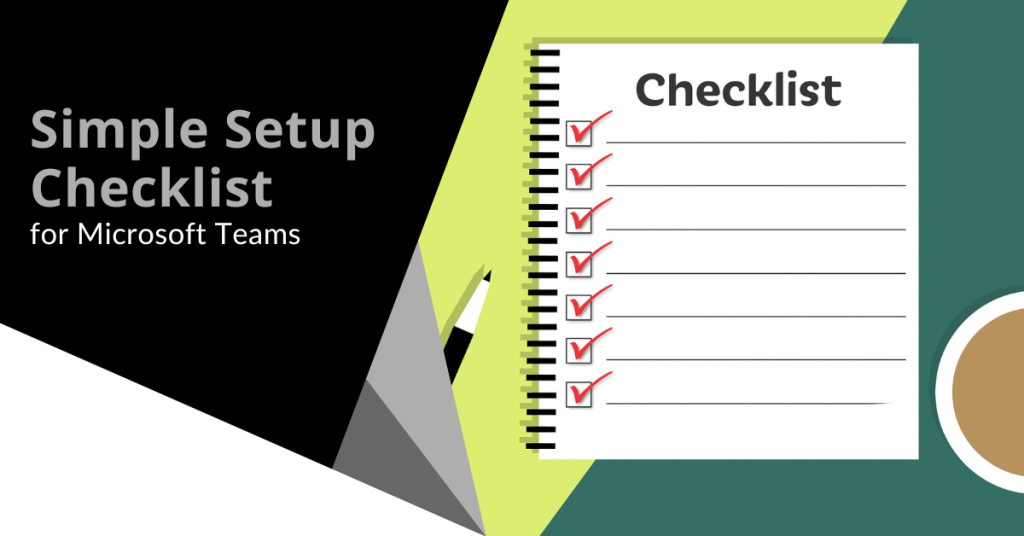
Microsoft Teams is a lot of things. It is a video conferencing tool, a team messaging channel and a tool for in-app co-authoring. During the pandemic, the popularity of Teams skyrocketed.
User numbers for MS Teams jumped from 20 million in November 2019 to 75 million in April 2020. As of this year, Microsoft reports a user count of 270 million for the platform. This makes it the most popular business tool for team communications.
One of the things that makes the app popular is also one that can make the setup complex. Microsoft Teams has many moving parts. To use them effectively, they need to be well organized. Additionally, users need to have a chance to learn the system and train on best practices.
What Can Microsoft Teams Do?
Let us look at the different areas of Microsoft Teams and what it can do. Then we will give you a simple setup checklist to help your team get up and running productively.
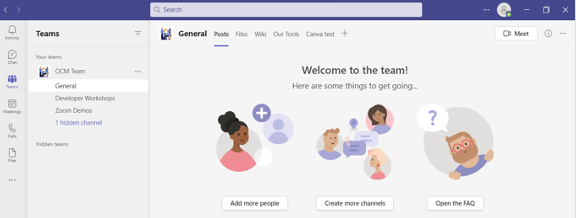
You can think of Teams as a virtual office in the cloud. It is a centralized hub where teams can communicate, collaborate and manage tasks. There is also an external communication component to Teams. You can use the app to video conference with anyone. You can also invite guests to a chat channel.
Here are some of the features of MS Teams:
- Siloed chat channels
- Security for team communications
- Integration with Office apps
- Integration with 3rd party apps
- File sharing
- Video and audio conferencing
- VoIP phone system (with an extra add-on)
- Keep all team resources in a single place
Microsoft Teams Versions
Some good news for small businesses is that there is a free version of Microsoft Teams. If you sign up for a Microsoft 365 business plan, you get the app included with a few extra features.
Microsoft has also been pushing MS Teams for personal use. You can use it to keep your departments better coordinated at work, manage family video calls or collaborate for a PTA meeting. It is a versatile and scalable virtual office platform.
Easy Checklist for Setting Up Microsoft Teams
1. Set Up Your Teams/Departments
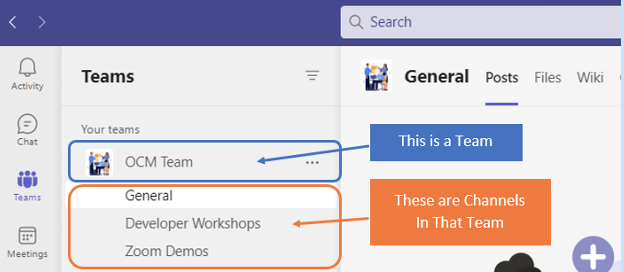
One of the advantages of Teams is that it allows you to set up specific areas for your groups to collaborate. You do not want everyone to set these teams up on their own or you could end up with an unorganized mess.
Some ideas for setting these up:
- Set up teams by department (accounting, marketing, etc.)
- Add a company-wide team (where everyone can collaborate)
- Set up teams by role (office managers, executives, etc.)
Typically, if you mirror the hierarchy of your organization, that is a good place to start. Team areas are secured so that only those users who are invited can see or access any of the content in that team.
2. Add Team Members
For each team, add the members allowed to take part in that team. These would be people that can see the resources posted in that team area. It would normally be the members of the department or group that the team is designed for.
3. Set Up Team Channels
The next level beneath the Team is the Channels. These team channels help organize conversations. For example, within a team set up for your marketing department, you may decide to add three channels. This keeps conversations more focused and makes it easier to find things.
For instance, you could have channels for:
- Website Management
- Social Media
- Offline Advertising
Team channels are another area that you want to control. Don’t let everyone set up channels without a plan. Otherwise, things can get messy fast.
4. Set Up Team Labs
Tabs are a great way to foster productivity. Say that employees on your accounting team need to access a tax reporting website. Inevitably, there can be time wasted asking for that link or a login. This is especially true if someone is filling in for a co-worker.

You can add that website link and info to the Tabs area at the top of the team channels. Just click the plus sign to add a new resource and consolidate things for your team members.
5. Schedule MS Teams Training
One of the reasons that company initiatives fail is that users weren’t properly enabled. If users aren’t trained on using MS Teams, then they will revert to using whatever they used before. This negates the benefits of moving to Teams when not everyone is on board.
Work with a Microsoft professional to train your teams. We can provide tips on the most productive features as well as short-cut their learning curve quite a bit! Make sure to have a realistic timeframe. You should also survey users on whether they feel they need more training.
Need Some Help Implementing Teams in Your Organization?
We can help you over many of the roadblocks that organizations face when starting with Teams. Contact us today for a free consultation to enhance your collaboration and productivity.

Have you ever bought a new computer and then had buyer’s remorse a few months later? Maybe you didn’t pay attention to the storage capacity and ran out of space. You may have glossed over memory and experienced constant freeze-ups.
An investment in a new PC isn’t something you want to do lightly. Doing your research ahead of time and consulting with a trusted friend or IT shop can help. It will keep you from making major mistakes that could come back to haunt you later.
Here are several things to consider before you put down your hard-earned money on a new computer.
The Amount of Memory (RAM)
One of the big mistakes that people make when looking for a new computer is to ignore the RAM. Random access memory may be called RAM on the specification or “memory.” If your system has low memory, you run into all sorts of problems.
These issues can include:
- Browser freezing up when you have too many tabs open
- Issues watching videos
- Some software not working properly
- Sluggish behavior
- Inability to open multiple applications
- Constant freezes
Memory is the “thought process” of the PC. If there isn’t enough, it can’t take on another task until it completes the current processing tasks. This can cause frustration and ruin your productivity.
People often go for those low-priced computer deals when looking for a new device. However, these can include only 4GB of RAM. That is not a lot if you do much more than staying in a single application or just a few browser tabs.
The higher the RAM means the more responsive the system performance. Look for PCs with at least 8GB of RAM or higher if you do any graphics/video or other processing-intensive activities.
User Reviews for Longevity
Buying a new computer is an investment. It is natural to want that investment to last as long as possible. You don’t want to spend $700 on a new computer only to begin experiencing problems when it is just two years old.
Take your time to research user reviews on the specific models that you are considering. You will begin to see patterns emerging. Steer clear of models that have consistent complaints about breakdowns sooner than expected.
You may need to pay a little more for a system that has a better track record of performance but it will save you in the long run when you have more years of usable life before that device needs replacement.
Whether the PC is for Personal or Business Use
If you have a small business or are a freelancer, you may try to save money by buying a consumer PC. This could end up costing you more in the long run.
Consumer PCs are not designed for continuous “9-to-5” use. They also often lack certain types of firmware security present in business-use models. The price gap has also shortened between good consumer computers and business versions. If you’re not looking at the cheap systems, you will find that it is not that much more to get a business-grade device.
The Processor Used
It can be confusing to read through the processor specifications on a computer. How do you know if Intel Core i7 or i3 is best for your needs? What is the performance difference between AMD and Intel processors?
If you don’t want to do the research yourself, you could call up your local IT shop. We will be happy to steer you in the right direction. We will explain the differences in layman’s terms as well as which processor makes the most sense for your intended use.
For Laptops: The Case Type
If you’re looking for a laptop computer, it is important that it is durable. Laptops have some unique characteristics that differ from desktops. For example, the screen is often folded down one or more times per day. Additionally, the keyboard is part of the case and is not easily replaced by the user.
If you get a laptop with a cheap plastic case, it is likely to break during normal use. Keys could also easily pop off the keyboard which will require a trip to a computer repair shop.
You want to consider the materials used for the case. Paying an extra $20-$30 upcharge for a better casing is definitely worth it. It can help you avoid unneeded headaches.
Storage Capacity
Storage capacity can be a pain point that you experience after the fact. If you buy a computer without paying attention to hard drive space, you could regret it. You may not be able to transfer over all of your “stuff” from the old system.
Storage capacity can also be an area where you can save some money. If you store most of your files in the cloud, you may not need a lot of hard drive space. The less space you need means the lower the price.
Hard Drive Type
If you can get a computer with a solid-state drive (SSD) rather than a traditional hard disk drive (HDD), you should. SSDs are faster and less likely to have read/write issues. They have no moving parts so they are quieter as well.
Solid-state drives have come down in price quite a bit recently. There are many affordable options and you will also find some PCs with both a hard drive and SSD.
Come to Us Before You Spend Money on a New Computer
Don’t blindly invest in a new computer without some expert guidance. Contact us today for a free consultation to save you from a bad new PC experience.

Business owners often face a battle between productivity and cost efficiency. This is especially true when it comes to the question of replacing their employees’ desktops and laptop computers. At the end of the day, you want to get the most out of these expensive devices. However, if you don’t upgrade your hardware regularly then you actually run the risk of your older devices costing even more than brand new ones due to the expenses of downtime, repairs and maintenance. There is also the intangible losses of harmed employee productivity to consider. Read more