
Business owners often face a battle between productivity and cost efficiency. This is especially true when it comes to the question of replacing their employees’ desktops and laptop computers. At the end of the day, you want to get the most out of these expensive devices. However, if you don’t upgrade your hardware regularly then you actually run the risk of your older devices costing even more than brand new ones due to the expenses of downtime, repairs and maintenance. There is also the intangible losses of harmed employee productivity to consider. Read more

Paying attention to your customer experience directly impacts your bottom line. Companies that are “customer-centric” are 60% more profitable than those that are not. In this digital age, customers also expect more from those that they do business with.
In today’s world, people can order something on their phones and see it on their doorstep by the next day. Keeping up with expectations means leveraging the right technology.
2023 is on the horizon and it is the perfect time to improve your customer experience. Cloud technology allows you to do it without needing to spend a fortune. Just put in place some of the applications below. These apps focus on making leads and customers happy.
1. Online Survey Application
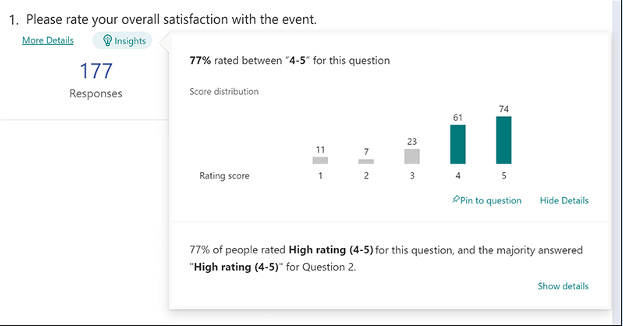
Doing an annual customer satisfaction survey is a great way to check in with customers. Successful businesses take the feedback that they get and use it to make their company better.
But doing these surveys through a Word document attached to an email is so last decade! Use an online survey application to make the process seamless for you and your customers.
Many online survey tools are available online. If you have Microsoft 365, you will find one included. These allow people to fill out surveys on any device and not worry about sending them back in an attachment.
On the receiving end, there is no long process of collating data. Just open your form survey tool and see the results instantly.
2. Smart Chat Bot
Most businesses have a limit on how many hours per day that they can pay staff to answer questions. Customer service hours are typically the same as business hours and staff can get busy. This means that answers may take longer to send back to an inquiry.
Putting a smart chatbot on your business website can improve customer satisfaction. It allows people to get an answer right away. They can also get that answer any time of day or night.
68% of consumers like chatbots because they give them fast answers to questions. While they can’t answer every single question, they can handle quite a few. For example, in healthcare and banking, chatbots can take 75-90% of questions.
3. Business Mobile App
People tend to live on their mobile phones these days. They carry them with them everywhere. Mobile apps are often the preferred method of connecting with data and businesses. More Google searches are now done via mobile devices than by desktops.
Think about creating a business mobile app. You want one that allows customers to connect with you to order products and services. You can use it for customer support, initiating virtual calls, etc.
4. Facebook Messenger Support
Facebook Messenger is the 2nd most popular iOS app of all time. This Facebook-connected application makes it easy to communicate with friends, family and companies.
Many businesses now use Messenger to connect with leads and provide customer support. When you use an app that is so popular in this way, you make it easier for customers to reach you. The ability to get a quick answer through Messenger can boost a customer’s opinion of your company.
5. VoIP Phone System with Good Mobile App
When customers must juggle different numbers for your staff, it gets confusing. Should they call your sales rep at their desk line or mobile number? Using a VoIP phone system simplifies the entire process.
Employees can have a single number that they use when at their desks, at their home office or anywhere else. Make sure the VoIP service has a good mobile app. You want one that is easy for employees to use. This ensures that they can easily handle customer calls using their smartphone. It also keeps them from reverting to using their number.
6. Text Notification Apps
SMS is becoming the new email for many companies. Retailers like Shoe Carnival and World Market have customers opt-in to text messaging. Customers like this for shipping notifications and to get sale and coupon alerts.
There are several services online that you can use for this purpose. Offering text updates can significantly improve your customers’ experience. Use them for appointment reminders, sale notices or shipping alerts.
7. All-in-One CRM & Sales Platform
One thing that frustrates customers is a disconnect between sales and support. They may have had a conversation with a salesperson to customize an order only to find out that customer service knows nothing about it.
To streamline the information flow, look for an all-in-one CRM/Sales platform. These are cloud services that offer a CRM module and a sales module and both connect. There is a single customer record so that all notes from the sales and customer support side are in the same place. Both teams can view all customer interactions.
This improves the customer experience and results in fewer dropped balls. Efficiency and productivity improve as well because everyone is on the same page.
Get Help with Customer-Facing Technology Support
It is easy to get lost in a sea of different cloud applications. Let us help you navigate to a better customer experience. Contact us today for a free consultation.

Aging servers are a huge risk to company profitability and productivity. If you don’t proactively upgrade your servers regularly, you may find that you face unplanned downtime because your server breaks down out of the blue. It costs you time and money to fix a broken server and that downtime eats away at your profit margin. In fact, it can cost about $5,600 per minute according to estimates! Read more

Modern video surveillance systems contain a number of critical components including IP (Internet Protocol) cameras. IP surveillance cameras (that transmit and receive information through a computing network and via the internet) offer organizations a range of advantages over analog closed-circuit cameras. They can watch and manage their video security system remotely and store video footage in the cloud to allow for significant cost savings.Read more
With the end of 2022 fast approaching, business owners may have started planning for the following year. Therefore, it is important to do a year-end technology review to have a clear picture of how the current year was spent and know what to prepare for in the future.Read more
As a small business owner, you know that every penny counts. When it comes to making a large purchase like a new PC, you want to be sure that you’re getting the best possible value for your money while also offering the performance you need to keep your operation running.
In this blog post, we will outline some of the most important features to look for when buying a new PC so that you can avoid any post-purchase regrets.
Where to Start?
First and foremost, you will want to make sure that the computer you are buying is powerful enough to handle all of your business needs. If you’re planning on using demanding software or running complex calculations, you will need a machine with a robust processor and a healthy amount of RAM.
If you’re mostly just using your PC for tasks like email and web browsing, you can get away with something a bit less powerful and save some money in the process.
Let us take a closer look at some of these components:
CPU
The central processing unit (CPU) is the brain of the operation. It is responsible for carrying out all the instructions that make your software run. It is important to pay attention to the CPU type and speed when shopping for a new PC. Intel and AMD are the two most popular CPU manufacturers and you will often see references to “i3”, “i5” and “i7” processors. These refer to the Intel Core line of CPUs which are divided into the budget, mid-range and high-end models. AMD’s Ryzen line offers similar options with their Ryzen 3, Ryzen 5, Ryzen 7 and so on.
Generally, faster is better. However, if you’re on a tight budget, you can always start with a mid-range model and upgrade to a faster processor down the road. Just make sure the motherboard in your new PC can accommodate a faster CPU.
Memory
One of the most important things to consider when buying a new PC is the amount of memory (or RAM) that it has. Memory is what allows your computer to store and access information quickly and more memory will always result in better performance.
For small businesses, it is recommended to have a minimum of 8GB of RAM. However, 16GB or more is even better.
Storage Space
Another important consideration is storage space. There are two main types of drives in this category:
- Hard Drives (HDD)
- Solid-State Drives (SSD)
The kinds of files you work with will determine which is the best option for you. If you’re working with large files or dealing with a lot of data, you will need a computer with a sizable storage solution.
Hard drives are generally slower than solid-state drives but they offer more storage for the price. Solid-state drives are much faster than hard drives. If speed is a priority, you will want to choose a computer with an SSD.
Both HDD and SSD drives come in a variety of form factors so you will need to choose the right size for the needs of your specific build.
Display
Displays are your window into the work you’re doing. You will want to make sure that it is the right fit for your needs.
If you are going to be doing a lot of graphics work, you will want to make sure you get a higher resolution. If you are just going to be doing basic work, you can save some money and go with a lower resolution.
There are also other considerations like display size and color accuracy.
Display size is simply how large the physical display is. If you have a small workspace, then you will want to make sure that you get a smaller display. If you are doing any sort of color work, you will want to make sure that the display’s colors are as accurate as possible. This is usually not a problem with higher-end displays but it can be an issue with lower-end ones.
Peripherals
Once you have decided on the specs of your new computer, you will also need to think about the peripherals. In addition to a monitor, keyboard and mouse, you may need additional devices like a printer, scanner or an external hard drive for portable storage needs. Make sure to factor in the cost of these items when budgeting for your new PC.
Warranty
As a small business owner, the last thing you want is to need to shell out more money for a new PC because something went wrong with the one you just bought. Make sure the PC that you are buying comes with a warranty that will cover you in case of any unforeseen problems.
Assess Your Needs
Before making a decision, sit down and assess your specific needs.
- What type of software will you be using?
- How much storage space do you need?
- What is your budget?
Once you have answers to these questions, you will be in a much better position to choose the right PC for your business.
We Can Help You Choose the Best PC For Your Needs
No matter what size company you have, picking out the right computer is important. Contact us at (860) 577-8060 or via our contact form to learn more.

We all know that customer experience is the key to success. Improving customer experience can be a challenge. It is important to stay ahead of the curve and make it a priority. Improving the experience that prospects and customers have when interacting with your company directly impacts your bottom line. It can also be done through the use of modern technology.Read more
You know how it goes. We are working on our PC's at one moment and enjoying how things are going. The next moment there is a notification that pings. You need to allow the most recent updates. Without thinking, we hit the "remind me later" button. We say we are busy and there is so much to do today. We say we can always do it later. Read more
To capitalize on a future of work that is more flexible, Google is releasing improvements to its suite of productivity tools. Managing a business has never been simple. Companies have faced various difficulties in the last couple of years ranging from adjusting to a remote world to reduced innovation and teamwork. Read more
Over the past two years, there has been a profound and significant impact on work experience. The expectations of employees concerning where, how and when they work has changed and continues to evolve. While these work evolutions affect all workforces, they have had a particular impact on sales professionals' expectations since they have needed to adjust to a more digital workplace while using outdated sales tools. As a result, Microsoft came up with a solution called Viva Sales. Read more