
Productivity can be challenging to track regardless of where employees are working. How do you know they’re using their tools as effectively as possible? How can you enable them to adopt best practices?
These are questions that managers often ask themselves. If they’re looking at the wrong things, it can get in the way of empowering their team. For example, you can’t grade productivity simply by “clock in/clock out” times.
In today’s hybrid and mobile offices, the value and work product an employee brings is a better gauge. However, you also must look at what may be getting in the way of great employees doing great work.
Technology tools can slow down dedicated workers if they’re not familiar with them. Employees may be doing things the way that they always have done them and not realize that there is a better (and faster) way.
But productivity can be a tricky area to address. You don’t want to invade a remote employee’s privacy by tracking their every keystroke. That wouldn't boost morale either.
What is the answer?
If your company uses Microsoft 365, you have a tool that you can use to find nuggets of productivity gold. This tool is Microsoft Productivity Score.
What Does Microsoft Productivity Score Do?
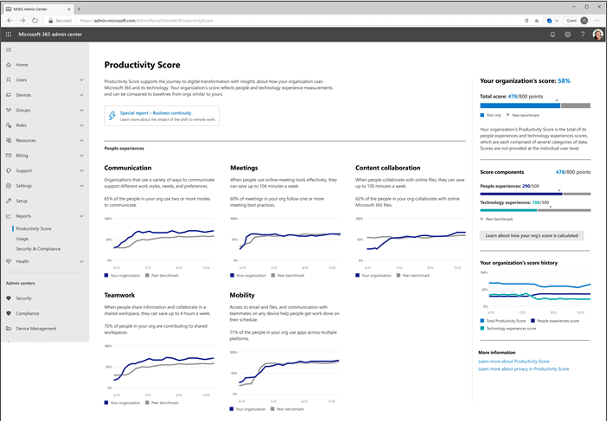
Microsoft Productivity Score looks at some core areas of your employees’ workflow. It also looks at them in aggregate. Because it’s looking at your team as a whole, you avoid issues with employees feeling personally spied on.
The tool gives you helpful insights that you can share with your staff. These insights help to boost their performance. It also includes hardware-related information. You can use this to see if your company tools are holding people back.
MS Productivity Score looks at the following areas.
People Experiences
This category looks at how people work. Are they using best practices for collaboration or are they doing things the hard way? Do meetings go on forever? Are employees still emailing attachments instead of using shared cloud storage links?
One example of an insight from this category is as follows. Each employee can save an average of 100 minutes per week by collaborating with online files. Productivity Score can show you where your team stands in this metric and many others.
Saving 100 minutes per week is equal to approximately 86.6 hours per year. That is over 2 full weeks of work!
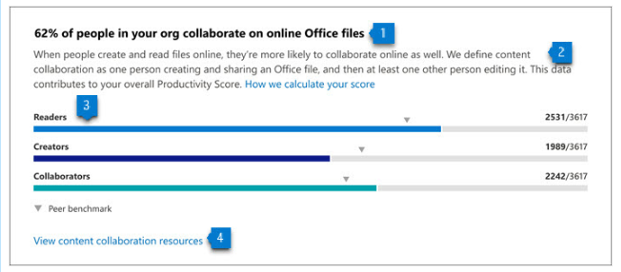
All Productivity Score images are from Microsoft.
The subcategories within people experiences are:
- Communication
- Content Collaboration
- Mobility
- Meetings
- Teamwork
Technology Experiences
Technology experiences look at the health and performance of your devices. Do you have hardware and software on endpoints that are causing issues? Is it slowing your team down? Are there network connectivity problems? Are apps updated as they should be?
This category will look at the technology that your team works with and let you know of any risk areas. When technology is not functioning well or isn’t secure, it can slow your business down.
You will find these three subcategories in the technology experiences area:
- Endpoint analytics (You need Intune for these)
- Network connectivity
- Microsoft 365 apps health
Special Reports
Besides the people and technology experiences, Microsoft Productivity Score has a special reports area. It provides details on business continuity.
This report can show you how employee collaboration and other activities are changing. It looks at these as your company goes through transitions (such as when you transition to remote working or back to in-office work). This report tells you how these changes impact your team’s productivity.
How Productivity Score Helps Your Company
Automatic Metrics Tracking
Microsoft Productivity Score tracks your team’s use of Microsoft 365 applications automatically. It then will provide you with helpful information on how staff use their digital tools.
These metrics give you a good picture of whether employees are using best practices. They may simply need guidance to learn a more efficient way of doing something.
Insights to Understand the Data
The tool provides you with helpful insights to understand the data. You won’t only get the metrics. You will get the context. This allows you to educate yourself. Then you can educate your employees on things that improve workflow and save time.
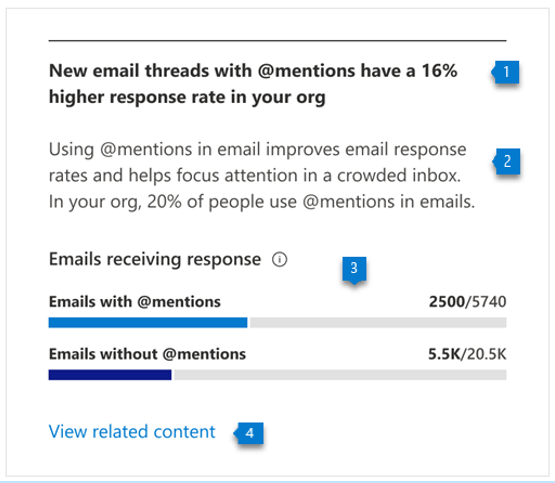
For example, getting a response quickly to a question saves time. You may not realize that using @mentions can help achieve that. Productivity Score will tell you how many people use @mentions in team communications and how much this increases the response rate.
Recommended Actions to Take
The third piece of guidance that you gain is what to do about the information. Productivity Score will give you actionable recommendations to improve a metric. This helps you to improve productivity.
The combination of the metric, insight and recommendation make this a comprehensive tool.
Would You Like to Get Started with Microsoft Productivity Score?
We can help you get your organization started with this great tool and provide solutions to increase company productivity. Give us a call at (860) 577-8060 or use our convenient contact form to get in touch.
Over the past two years, there has been a profound and significant impact on work experience. The expectations of employees concerning where, how and when they work has changed and continues to evolve. While these work evolutions affect all workforces, they have had a particular impact on sales professionals' expectations since they have needed to adjust to a more digital workplace while using outdated sales tools. As a result, Microsoft came up with a solution called Viva Sales. Read more
Context-Based access uses analytical data gathered by an identity platform during the authorization and authentication process to enhance authentication procedures. These analytics-enhanced authentication techniques are more effective in improving customer safety and lowering online fraud. Context-Based access is a way of providing access to an account based on the user's context. This can be done through location, time and data usage.
Many small businesses make the mistake of skipping policies. They feel that things don’t need to be so formal. They will just tell staff what is expected when it comes up and think that is good enough.
This way of thinking can cause issues for small and mid-sized business owners. Employees are not mind readers. Things that you think are obvious might not be to them.
Not having policies can also leave you in poor legal standing should a problem occur. This includes things like a lawsuit due to misuse of a company device or email account.
Did you know that 77% of employees access their social media accounts while at work? 19% of them average 1 full working hour per day spent on social media. In some cases, employees are ignoring a company policy. In others, there is no specific policy for them to follow.
IT policies are an important part of your IT security and technology management. No matter what size your business is, you should have them. We will get you started with some of the most important IT policies that your company should have in place.
Do You Have These IT Policies? (If Not, You Should)
Password Security Policy
About 77% of all cloud data breaches originate from compromised passwords. Compromised credentials are also now the number one cause of data breaches globally.
A password security policy will lay out for your team how to handle their login passwords. It should include things like:
- How long passwords should be
- How to construct passwords (e.g. using at least one number and symbol)
- Where and how to store passwords
- The use of multi-factor authentication (if it’s required)
- How often to change passwords
Acceptable Use Policy (AUP)
The Acceptable Use Policy is an overarching policy. It includes how to properly use technology and data in your organization. This policy will govern things like device security. For example, you may need employees to keep devices updated. If this is the case, you should include that in this policy.
Another thing to include in your AUP would be where it is acceptable to use company devices. You may also restrict remote employees from sharing work devices with family members.
Data is another area of the AUP. It should dictate how to store and handle data. The policy might require an encrypted environment for security.
Cloud & App Use Policy
The use of unauthorized cloud applications by employees has become a big problem. It is estimated that the use of this “shadow IT” ranges from 30% to 60% of a company’s cloud use.
Employees often use cloud apps on their own because they don’t know any better. They don’t realize that using unapproved cloud tools for company data is a major security risk.
A cloud and app use policy will tell employees what cloud and mobile apps are okay to use for business data. It should restrict the use of unapproved applications. It should also provide a way to suggest apps that would enhance productivity.
Bring Your Own Device (BYOD) Policy
Approximately 83% of companies use a BYOD approach for employee mobile use. Allowing employees to use their own smartphones for work saves companies money. It can also be more convenient for employees because they don’t need to carry around a second device.
If you don’t have a policy that dictates the use of BYOD, there can be security and other issues. Employee devices may be vulnerable to attack if the operating system isn’t updated. There can also be confusion about compensation for the use of personal devices at work.
The BYOD policy clarifies the use of employee devices for business. This should include the required security of those devices. It may also note the required installation of an endpoint management app. It should also cover compensation for business use of personal devices.
Wi-Fi Use Policy
Public Wi-Fi is an issue when it comes to cybersecurity. 61% of surveyed companies say employees connect to public Wi-Fi from company-owned devices.
Many employees won’t think twice about logging in to a company app or email account (even when on a public internet connection). This could expose those credentials and lead to a breach of your company network.
Your Wi-Fi use policy will explain how employees need to ensure that they have safe connections. It may dictate the use of a company VPN. Your policy may also restrict the activities employees can do when on public Wi-Fi such as not entering passwords or payment card details into a form.
Social Media Use Policy
With social media use at work so common, it’s important to address it. Otherwise, endless scrolling and posting could steal hours of productivity every week.
Include details like these in your social media policy:
- Restricting when employees can access personal social media
- Restricting what employees can post about the company
- Noting “safe selfie zones” or facility areas that are not okay for public images
Get Help Improving Your IT Policy Documentation & Security
We can help your organization address IT policy deficiencies and security issues. Reach out today at (860) 577-8060 or via our contact form to schedule a consultation to get started.
There is a reason why phishing is usually at the top of the list for security awareness training. For the last decade or two, it has been the main delivery method for all types of attacks. Ransomware, credential theft, database breaches and more launch via a phishing email.
Why has phishing remained such a large threat for so long? Because it continues to work. Scammers evolve their methods as technology progresses. For example, they use AI-based tactics to make targeted phishing more efficient.
If phishing didn’t continue working, scammers would move on to another type of attack. That hasn’t been the case. People continue to get tricked. They open malicious file attachments, click on dangerous links and reveal passwords.
In May of 2021, phishing attacks increased by 281%. Then in June, they spiked another 284% higher.
Studies show that as soon as 6 months after training, phishing detection skills wane. Employees begin forgetting what they have learned and cybersecurity suffers as a result.
Want to give employees a “hook” they can use for memory retention? Introduce the SLAM method of phishing identification.
What is the SLAM Method for Phishing Identification?
One of the mnemonic devices known to help people remember information is the use of an acronym. SLAM is an acronym for four key areas of an email message to check before trusting it.
These are:
S = Sender
L = Links
A = Attachments
M = Message text
By giving people the term “SLAM” to use, it’s quicker for them to check suspicious email. This device helps them avoid missing something important. All they need to do is use the cues in the acronym.
Check the Sender
It is important to check the sender of an email thoroughly. Often scammers will either spoof an email address or use a look-alike. People often mistake a spoofed address for the real thing.
In this phishing email below, the email address domain is “@emcom.bankofamerica.com.” The scammer is impersonating Bank of America. This is one way that scammers try to trick you. They put the real company’s URL inside their fake one.
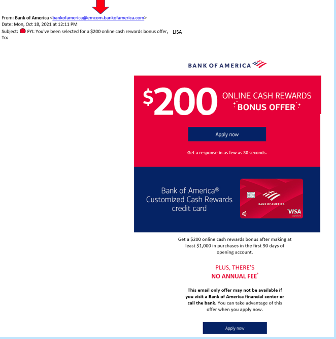
You can see that the email is very convincing. It has likely fooled many people into divulging their personal details. People applying for a credit card provide a Social Security Number, income and more.
Doing a quick search on the email address quickly reveals it to be a scam and a trap used in both email and SMS phishing attacks.
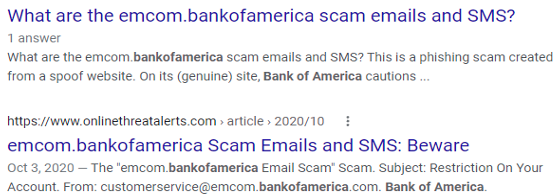
It only takes a few seconds to type an email address into Google. This allows you to see if any scam warnings come up indicating a phishing email.
Hover Over Links Without Clicking
Hyperlinks are popular to use in emails. They can often get past antivirus/anti-malware filters. Those filters are looking for file attachments that contain malware. However, a link to a malicious site doesn’t contain any dangerous code. It links to a site that does.
Links can be in the form of hyperlinked words, images and buttons in an email. When on a computer, it’s important to hover over links without clicking on them to reveal the true URL. This often can immediately call out a fake email scam.
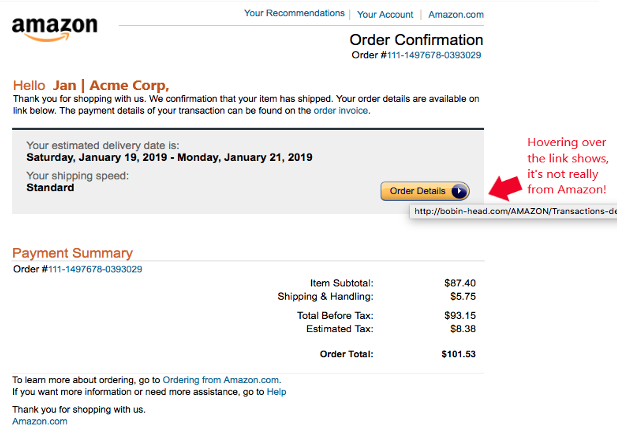
When looking at email on a mobile device, it can be trickier to see the URL without clicking on it. There is no mouse like there is with a PC. In this case, it’s best not to click the URL at all. Go to the purported site to check the validity of the message.
Never Open Unexpected or Strange File Attachments
File attachments are still widely used in phishing emails. Messages may have them attached and promise a large sales order. The recipient might see a familiar word document and open it without thinking.
It is getting harder to know what file formats to avoid opening. Cybercriminals have become savvier about infecting all types of documents with malware. There have even been PDFs with malware embedded.
Never open strange or unexpected file attachments. Use an antivirus/anti-malware application to scan all attachments before opening.
Read the Message Carefully
We have become savvier at scanning through text as technology has progressed. It helps us quickly process a lot of incoming information each day. But if you rush through a phishing email, you can miss some telltale signs that it is a fake.
Look at the phishing example posted above in the “Links” section. There is a small error in grammar in the second sentence. Did you spot it?
It says, “We confirmation that your item has shipped,” instead of “We confirm that your item has shipped.” These types of errors can be hard to spot but are a big red flag that the email is not legitimate.
Get Help Combatting Phishing Attacks
Both awareness training and security software can improve your defenses against phishing attacks. Contact us today at (860) 577-8060 or use our contact form and we will be happy to discuss your email security needs.
Large companies and small businesses are seeing an ever-growing number of cyber threats that attack their endpoints. Their regular endpoint security software may fail against advanced cyberattacks and render them ineffective and outdated. According to a report by Ponemon Institute, 2018 placed a destructive hit on 64% of organizations due to endpoint attacks. Read more
You have completed your annual phishing training. This includes teaching employees how to spot phishing emails. You’re feeling good about it. That is until about 5-6 months later. Your company suffers a costly ransomware infection due to a click on a phishing link.
You wonder why you seem to need to train on the same information every year. You still suffer from security incidents. The problem is that you’re not training your employees often enough.
People can’t change behaviors if training isn’t reinforced. They can also easily forget what they have learned after several months go by.
How often is often enough to improve your team’s cybersecurity awareness? It turns out that training every four months is the “sweet spot.” This is when you see more consistent results in your IT security.
Why Is Cybersecurity Awareness Training Every 4-Months Recommended?
Where does this four-month recommendation come from? There was a study presented at the USENIX SOUPS security conference recently. It looked at users’ ability to detect phishing emails versus training frequency. It looked at training on phishing awareness and IT security.
Employees took phishing identification tests at several different time increments:
- 4-months
- 6-months
- 8-months
- 10-months
- 12-months
The study found that scores were still good four months after their training. Employees were still able to accurately identify and avoid clicking on phishing emails. However, after 6-months, their scores started to get worse. Scores continued to decline as the months passed after their initial training.
To keep employees well prepared, they need training and refreshers on security awareness. This will help them to act as a positive agent in your cybersecurity strategy.
Tips on What & How to Train Employees to Develop a Cybersecure Culture
The gold standard for security awareness training is to develop a cybersecure culture. This is one where everyone is cognizant of the need to protect sensitive data as well as avoid phishing scams and keep passwords secured.
This is not the case in most organizations. According to the 2021 Sophos Threat Report, one of the biggest threats to network security is a lack of good security practices.
The report states the following:
“A lack of attention to one or more aspects of basic security hygiene has been found to be at the root cause of many of the most damaging attacks we've investigated.”
Well-trained employees significantly reduce a company’s risk. They reduce the chance of falling victim to any number of different online attacks. To be well-trained doesn’t mean you need to conduct a long day of cybersecurity training. It is better to mix up the delivery methods.
Here are some examples of engaging ways to train employees on cybersecurity. You can include these in your training plan:
- Self-service videos that get emailed once per month
- Team-based roundtable discussions
- Security “Tip of the Week” in company newsletters or messaging channels
- Training session given by an IT professional
- Simulated phishing tests
- Cybersecurity posters
- Celebrate Cybersecurity Awareness Month in October
When conducting training, phishing is a big topic to cover. However, it’s not the only one. Here are some important topics that you want to include in your mix of awareness training.
Phishing by Email, Text & Social Media
Email phishing is still the most prevalent form. SMS phishing (“smishing”) and phishing over social media are both growing. Employees must know what these look like so that they can avoid falling for these sinister scams.
Credential & Password Security
Many businesses have moved most of their data and processes to cloud-based platforms. This has led to a steep increase in credential theft because it’s the easiest way to breach SaaS cloud tools.
Credential theft is now the #1 cause of data breaches globally. This makes it a topic that is critical to address with your team. Discuss the need to keep passwords secure and the use of strong passwords. Also, help them learn tools like a business password manager.
Mobile Device Security
Mobile devices are now used for a large part of the workload in a typical office. They’re handy for reading and replying to an email from anywhere. Most companies will not even consider using software these days if it doesn’t have a great mobile app.
Review security needs for employee devices that access business data and apps such as securing the phone with a passcode and keeping it properly updated.
Data Security
Data privacy regulations are something else that has been rising over the years. Most companies have more than one data privacy regulation requiring compliance.
Train employees on proper data handling and security procedures. This reduces the risk that you will fall victim to a data leak or breach that can end up in a costly compliance penalty.
Need Help Keeping Your Team Trained on Cybersecurity?
Take training off your plate and train your team with cybersecurity professionals. We can help you with an engaging cybersecurity awareness training program that helps your team change their behaviors to improve cyber hygiene. You can reach us at (860) 577-8060 or use our convenient contact form.
Insider Threats have been on the rise lately and companies find it hard to figure out the best security service or strategy that will thwart them. According to research, incidents associated with insider attacks had a 44% rise in the last two years. Employees contribute to about 40% of these threats with easy access to sensitive information. Business owners must deal with such incidents by wielding weapons as strong as those used against external attackers. Read more
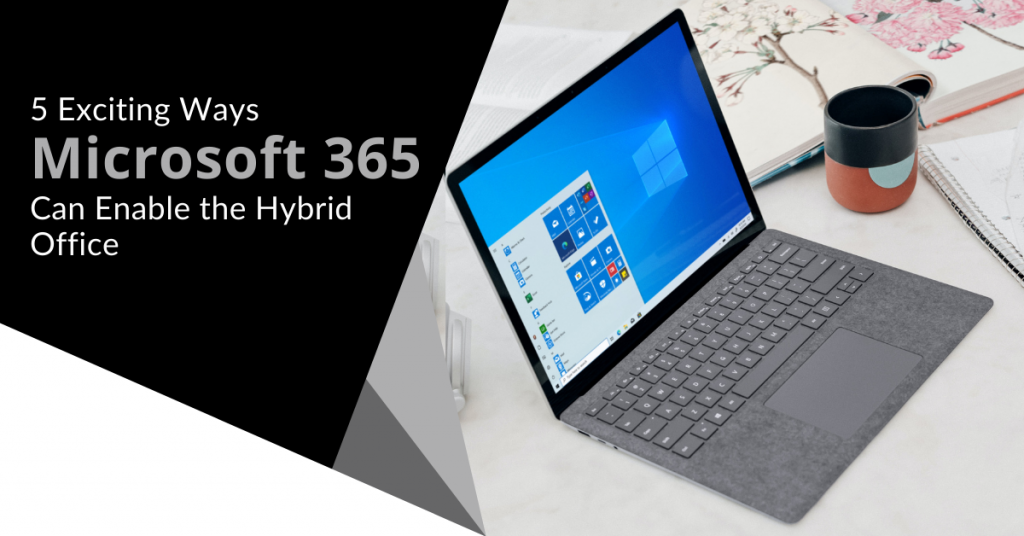
“Hybrid office” is the new buzzword you will hear in business discussions. It’s the mix of having employees both working at the office and working from home. This has become more than a buzzword and is now the reality for many companies.
There was a survey of employees with remote-capable jobs. The survey found that as of February of 2022, 42% of them were working a hybrid schedule and 39% were working from home full time.
The global pandemic brought on this hybrid office transition. It forced companies to operate with teams that could no longer safely come to the office. During this time, employers and employees experienced the benefits of hybrid work firsthand.
These benefits of remote teams included cost savings for both workers and employers. It also allowed the company to operate with more flexibility. Improving worker morale was another advantage.
Many employers feared that remote work would tank productivity. It actually increased in many circumstances.
63% of high-growth companies use a “productivity anywhere” hybrid work approach.
In order for hybrid teams to be productive, they need to stay connected. No matter where they work, the right technology tools should enable them.
One of the leaders in this space has been Microsoft. The company plans to add several exciting updates this year. These updates will provide more tools for companies to enable their hybrid teams.
Here are some of the ways that you can use Microsoft 365 to optimize a productive hybrid office. Please note that some of these features are already out and others should release later this year.
1. Microsoft Teams & Expanded Features
Microsoft Teams is much more than a team messaging app. The application combines the best features of virtual video meetings and messaging channels. It brings them together into a platform designed to be a secure online work hub.
MS Teams has come a long way in the last five years and the company continues to add more features to enable hybrid offices. Some of the recent feature updates include:
- The ability to do webinar registration
- Presenter modes that provide a more professional virtual presence
- Increased security through features like smart links and smart attachments
- A full business VoIP phone system add-on
- The addition of a “metaverse” component called Mesh for Teams

New Meeting Options for RSVP in Outlook
One of the challenges when everyone isn’t working in the same place is how to know when to “clock in” and “clock out.” You may also wonder how to let colleagues know whether you are working at home next week or in the office.
To help hybrid teams better coordinate, Outlook is getting an update. It will allow users to RSVP to meetings. This can let team members know whether they are attending virtually or in person.
Better Framing for More Engaging Meetings
One thing that can distract from the purpose of a meeting is someone’s background at home. Positioning of the camera can also be problematic. One person might have their face taking up 80% of the video screen. Another may only take up 20% because they’re sitting farther away from their PC’s camera.
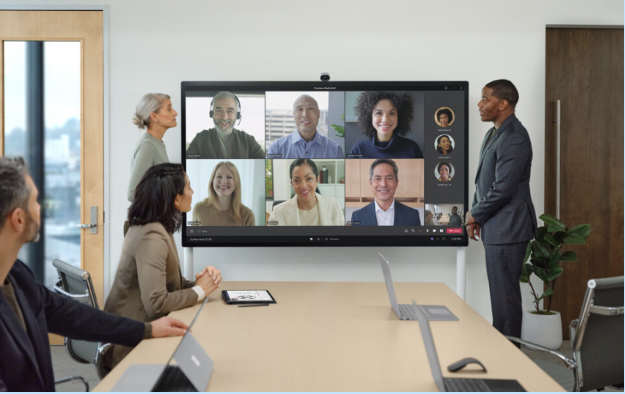
A new Surface Hub 2S Smart Camera will allow for better face framing. This will affect when people are meeting virtually in Microsoft Teams. Features include adjusting the room view so people’s faces will be clearer as well as having more consistent sizing.
The video display will also automatically adjust as people join or leave a physical room.
Get Better Control of Your Video Using PowerPoint to Present
People often share a screen in a video call and present a PowerPoint presentation. It can be difficult to keep everyone as engaged as when you’re presenting in person.
For example, in person you can maintain eye contact. People can clearly see your facial expressions as you emphasize various things. That is not always the case when presenting virtually. The app may push your video feed into a tiny box.
There is a new upcoming feature for Teams called Cameo. It will allow you to seamlessly integrate PowerPoint with MS teams. You can decide exactly how you want your video feed to appear in relation to your presentation.
Another addition is Recording Studio. This new feature for PowerPoint allows you to record professional-looking on-demand videos. You can do it right inside the app.
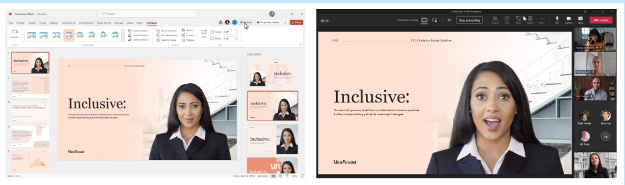
Cameo in PowerPoint & MS Teams
Get Help With Your Presentation Skills
Microsoft has poured a lot of AI capabilities into Microsoft 365 over the last several years. One that will soon help you deliver better virtual presentations is Speaker Coach.
This is a private and personalized coach. It can help you hone your presentation skills. This improves your switch to the differences between presenting online versus in person.
Some of the feedback it can provide include:
- Use of repetitive language
- Use of filler words (Ummm)
- Speaking pace
- Pausing for input
- Intonation
- Speaker overlaps
- And more
Ask Us About Improving Your Hybrid Office Capabilities with Microsoft 365
Microsoft 365 has a ton of helpful features. However, it does help to have an expert guide to help you navigate these capabilities. Contact us at (860) 577-8060 or via our convenient contact form today to set up a chat about how Microsoft 365 can help your business grow.
The security of IT services has been reduced over the years. This is due to traditional authentication methods like usernames and passwords. While this has been considered the best security strategy for decades, the increased susceptibility to cyber-attacks means it is time to switch lanes. Passwordless authentication is one of the go-to security options in recent times. According to research in 2021, it has positively impacted the security of many companies in the U.S. and Canada. Why is it creating such a buzz?Read more