
In the digital age, data is the lifeblood of businesses. It fuels operations, decision-making and customer interactions. However, there is a dark underbelly of this data-centric landscape. It is the persistent threat of a data breach.
The repercussions of a data breach extend far beyond the immediate aftermath. They often haunt businesses for years. Only 51% of data breach costs occur within the first year of an incident. The other 49% happen in year two and beyond.
We will take a look at the long-term consequences of a data breach as well as examine a real-world example. You will see how a single breach can have enduring implications that impact a business' reputation, finances and regulatory standing.
The Unseen Costs of a Breach
Introduction to the First American Title Insurance Co. Case
The 2019 cybersecurity breach at First American serves as a stark illustration. It reminds us of the far-reaching consequences of a data breach. In this case, the New York Department of Financial Services (NYDFS) imposed a $1 million fine. Cybersecurity sites announced the fine in the fall of 2023. The company’s fine was for failing to safeguard sensitive consumer information.
The breach exposed over 880 million documents. These files contained personal and financial data. The breach represented a significant violation of data protection standards.
This is one example of how costs can come long after an initial breach. Here are some other ways security incidents can haunt businesses for years.
Lingering Impacts of a Breach
Financial Repercussions
The financial toll of a data breach is significant. Immediate costs include things like:
- Breach detection
- Containment
- Customer notification
Beyond those, businesses face long-term expenses. These relate to legal battles, regulatory fines and reparations. Regulatory penalties are just one facet of the financial repercussions. Others include potential legal actions from affected individuals as well as class-action lawsuits adding to the monetary strain.
Reputation Damage
The impact on a business' reputation is arguably the most enduring consequence. Customers lose trust in a company's ability to protect their sensitive information. This loss of trust can result in a decline in customer retention as well as acquisition difficulties and long-lasting damage to the brand image.
Rebuilding a tarnished reputation takes time. It also takes concerted efforts. These may involve public relations campaigns and enhanced security measures. These actions help assure stakeholders of renewed commitment to data protection.
Regulatory Scrutiny
Regulatory bodies increasingly hold businesses accountable for safeguarding consumer data. A data breach triggers regulatory scrutiny. This may lead to fines and ongoing compliance requirements.
Regulatory authorities take a stringent stance on data security as well as on companies that fail to meet cybersecurity standards. The fallout includes financial penalties as well as increased oversight and mandatory security improvements.
Operational Disruption
The aftermath of a data breach disrupts normal business operations. Companies must take remediation efforts and put in place enhanced security measures. These can divert resources away from core business functions.
The company feels the impact across departments and it affects productivity and efficiency. The ripple effect of operational disruption can extend for years. This impedes growth and hinders the organization's ability to adapt to market changes.
Customer Churn and Acquisition Challenges
A data breach often leads to customer churn. Individuals lose confidence in the business' ability to protect their data. Acquiring new customers becomes challenging. Potential clients are wary of associating with a brand that has suffered a breach. The prolonged effects on customer acquisition can hinder the company's growth as well as its market competitiveness.
A Cautionary Tale for Businesses Everywhere
The repercussions of a data breach extend far beyond the immediate incident. They can impact the financial health and reputation of a business for years as well as its regulatory standing.
The frequency and sophistication of cyber threats continue to rise. Proactive cybersecurity measures are not just a necessity. They are a strategic imperative for safeguarding the long-term success of businesses.
The true cost of a data breach is not always immediately evident. It is a complex interplay of things like:
- Financial penalties
- Reputation damage
- Regulatory consequences
- Operational disruption
These impacts can persist for years. It is important to learn from real-world examples as well as focusing on robust cybersecurity measures. This helps businesses mitigate the risks associated with data breaches as well as safeguard their immediate interests and their long-term viability.
Need a Cybersecurity Assessment to Prevent an Unexpected Breach?
There are many ways that hackers can breach a network. From endpoints to cloud tools, you must run a tight security ship. Need some help?
Schedule a cybersecurity assessment today. This is the first positive step toward understanding and addressing your risk as well as avoiding the consequences of a data breach.
Give us a call today to schedule a chat.

The integration of Internet of Things (IoT) devices in the workplace has become increasingly prevalent as businesses seek to streamline operations, enhance productivity and improve overall efficiency. However, the successful deployment of IoT solutions hinges heavily on robust network infrastructure and careful consideration of various factors. Read more
In an era of technological advancements, companies are constantly seeking innovative solutions to navigate challenges. One pressing concern for businesses is how to manage workforce fluctuations without resorting to layoffs. Artificial Intelligence (AI) emerges as a key player in this scenario and offers diverse strategies to not only prevent layoffs but also to strengthen existing staff structures.Read more
Cybersecurity has become paramount for businesses across the globe. As technology advances, so do the threats. The U.S. Securities and Exchange Commission (SEC) recognizes this and has introduced new rules. They revolve around cybersecurity. These new requirements are set to significantly impact businesses.
These rules are a response to the growing sophistication of cyber threats as well as the need for companies to safeguard their sensitive information.
Let’s delve into the key aspects of these new SEC regulations. We will review what they are and discuss how they may affect your business.
Understanding the New SEC Cybersecurity Requirements
The SEC's new cybersecurity rules emphasize the importance of proactive cybersecurity measures. These are for businesses operating in the digital landscape. One of the central requirements is the timely reporting of cybersecurity incidents. The other is the disclosure of comprehensive cybersecurity programs.
The rules impact U.S. registered companies as well as foreign private issuers registered with the SEC.
Reporting of Cybersecurity Incidents
The first rule is the disclosure of cybersecurity incidents deemed to be “material.” Companies disclose these on a new item 1.05 of Form 8-K.
Companies have a time limit for disclosure. This is within four days of the determination that an incident is material. The company should disclose the nature, scope and timing of the impact. It also must include the material impact of the breach. One exception to the rule is where disclosure poses a national safety or security risk.
Disclosure of Cybersecurity Protocols
This rule requires extra information that companies must report. They report this on their annual Form 10-K filing.
The extra information companies must disclose includes:
- Their processes for assessing, identifying and managing material risks from cybersecurity threats.
- Risks from cyber threats that have or are likely to materially affect the company.
- The board of directors’ oversight of cybersecurity risks.
- Management’s role and expertise in assessing and managing cybersecurity threats.
Potential Impact on Your Business
Is your business subject to these new SEC cybersecurity requirements? If it is, it may be time for another cybersecurity assessment. Penetration tests and cybersecurity assessments identify gaps in your protocols. They help companies reduce the risk of cyber incidents and compliance failures.
Here are some of the potential areas of impact on businesses from these new SEC rules.
- Increased Compliance Burden
Businesses will now face an increased compliance burden. This is as they work to align their cybersecurity policies with the new SEC requirements. This might cause a significant overhaul of existing practices, policies and technologies. Ensuring compliance will likely mean a large amount of time and resources. This impacts both large corporations and smaller businesses.
- Focus on Incident Response
The new regulations underscore the importance of incident response plans. Businesses will need to invest in robust protocols. These are protocols to detect, respond to and recover from cybersecurity incidents promptly. This includes having clear procedures for notifying regulatory authorities, customers and stakeholders. This would be a notification in the event of a data breach.
- Heightened Emphasis on Vendor Management
Companies often rely on third-party vendors for various services. The SEC's new rules emphasize the need for businesses to assess vendor practices. This means how vendors handle cybersecurity. This shift in focus necessitates a comprehensive review. That review should be of existing vendor relationships. It may mean finding more secure alternatives.
- Impact on Investor Confidence
Cybersecurity breaches can erode investor confidence and damage a company's reputation. With the SEC's spotlight on cybersecurity, investors are likely to take note. This includes scrutinizing businesses' security measures more closely. Companies with robust cybersecurity programs may instill greater confidence among investors. This can potentially lead to increased investments and shareholder trust.
- Innovation in Cybersecurity Technologies
As businesses strive to meet the new SEC requirements, they will seek innovation. There is bound to be a surge in the demand for advanced cybersecurity solutions. This increased demand could foster a wave of innovation in the cybersecurity sector. This could lead to the development of more effective cyber protection solutions.
The SEC Rules Bring Challenges as Well as Possibilities
The new SEC cybersecurity requirements mark a significant milestone. This is a milestone in the ongoing battle against cyber threats. While these regulations pose challenges, they also present opportunities. The opportunities are for businesses to strengthen their cybersecurity posture as well as enhancing customer trust and fostering investor confidence.
By embracing these changes proactively, companies can meet regulatory expectations. They can also fortify their defenses against the ever-evolving landscape of cyber threats. Adapting to these regulations will be crucial in ensuring long-term success as well as the resilience of your business.
Need Help with Data Security Compliance?
When it comes to ensuring compliance with cybersecurity rules, it is best to have an IT pro by your side. We know the ins and outs of compliance and can help you meet requirements affordably.
Give us a call today to schedule a chat.
In today’s hyper-connected digital landscape, data breaches have become an unfortunate reality for businesses of all sizes. The repercussions of a single data breach can extend far beyond the immediate aftermath and haunt a company for years to come. Read more

In our tech-driven world, electronic devices have become indispensable. But what happens to the old gadgets with all the constant upgrades? They tend to pile up and eat up storage space. You can’t just throw them in the trash. E-waste poses a significant environmental threat if not disposed of responsibly.
E-waste is a term that refers to electronic devices that are no longer useful or wanted. These include things like:
- Computers
- Laptops
- Smartphones
- Tablets
- Printers
- Cameras
- TVs
E-waste can contain hazardous materials such as lead, mercury, cadmium and brominated flame retardants. These can harm the environment and human health if they are not disposed of properly.
E-waste comprises about 70% of toxic waste. People only recycle 12.5% of it.
What can you do to responsibly get rid of e-waste at your home or office? Here are some tips.
1. Understand What Makes Up E-Waste
E-waste includes old computers, smartphones, printers and other electronic devices. It also comprises batteries, chargers and even cables. Understanding what makes up e-waste is the first step towards responsible disposal.
Most people simply aren’t aware of what e-waste includes. This is a big reason that most of it ends up in landfills. That is not good for us or for the environment.
2. Reduce Your E-Waste
The next step is to reduce the amount of e-waste you generate in the first place. This means buying only what you need. You should also choose durable and energy-efficient products as well as extend the lifespan of your devices by repairing them when possible.
Before buying a new electronic device, ask if it is necessary. Can more than one person share a company tablet? In some cases, everyone in a family or office might not need a duplicate device.
3. Explore Recycling Programs
Many electronics retailers and manufacturers have recycling programs. Research local options. Retailers often collect old gadgets which ensures that they are recycled or disposed of properly. These programs are convenient and eco-friendly.
Here are a couple you can check out:
4. Use E-Waste Recycling Centers
E-waste recycling centers specialize in disposing of electronic devices safely. They dismantle gadgets, recycle valuable components and dispose of hazardous materials responsibly. Locate a certified e-waste recycling center near you for proper disposal.
Here are a few sites where you can find recycling centers:
5. Consider Donating or Selling Functioning Devices
If your old devices are still functional, consider donating them. Many charities and schools accept functional electronics or you can sell them online through reputable platforms. This gives gadgets a new life and reduces e-waste.
Make sure you properly clean data from old devices first. You don’t want someone having access to your online banking app or all of your family photos. Keep reading for tips on doing this properly.
6. Dispose of Batteries Separately
Batteries (especially rechargeable ones) contain hazardous materials. Many retailers and recycling centers have dedicated bins for battery disposal. Always separate batteries from other e-waste for proper handling.
7. Try Manufacturer Take-Back Programs
Several electronic manufacturers offer take-back programs. When you buy a new device, inquire about their disposal programs. Some manufacturers take back old gadgets to ensure responsible recycling or refurbishment.
8. Opt for Certified E-Waste Recyclers
When using e-waste recycling services, choose certified recyclers. Look for certifications like R2 or e-Stewards. These certifications ensure that the recycling process meets high environmental standards as well as data security protocols.
9. Educate Your Office or Household
Awareness is key. Educate your office or household about the importance of responsible e-waste disposal. Encourage everyone to take part and follow proper disposal methods.
10. Repurpose or Upcycle
Get creative. You can often repurpose or upcycle old electronics. Turn an old computer monitor into a digital photo frame. Use smartphone parts for DIY projects. Upcycling reduces waste and adds a touch of innovation.
11. Encourage Manufacturer Responsibility
Support companies that take environmental responsibility seriously. Choose products from manufacturers committed to sustainable practices and responsible e-waste management.
Make Sure to Secure Data Before Disposal, Sale or Donation
Before parting with your devices, wipe all data. Otherwise, you could become the victim of cybercrime. It is not unusual for criminals to troll dumps for old electronics. Remove all traces of your data to keep yourself protected.
Use reliable data erasure software or consult with an IT professional to securely wipe information from old gadgets. Data security is crucial even in disposal.
Get Help Backing Up & Cleaning Devices
It is important to both back up and remove all data from devices before you get rid of them. We can help with expert data migration from the old device to the new one as well as thorough data cleaning to ensure all information is removed.
Give us a call today to schedule a chat.
In the ever-evolving landscape of technology, artificial intelligence (AI) has become an integral part of various industries and reshaped the way businesses operate. As AI adoption grows, it is crucial for organizations to establish clear guidelines and rules to ensure ethical and effective use of AI within their teams. In this article, we will explore the importance of setting AI rules and provide practical tips for creating a framework that fosters responsible AI practices within your organization.
The Significance of AI Rules in the Workplace
1. Maintaining Ethical Standards
Artificial intelligence is powerful but it comes with ethical considerations. Establishing AI rules helps ensure that your team operates within ethical boundaries and addresses issues such as bias, privacy concerns and the potential impact on employment. Clearly defined rules act as a compass to guide your team to make decisions that align with ethical standards.
2. Enhancing Transparency
Transparency is key when it comes to AI implementation. Clearly communicated rules help demystify the use of AI within your organization and foster trust among employees and stakeholders. This transparency not only helps in compliance with regulations but also encourages a culture of openness and collaboration.
Crafting Effective Rules
1. Involve Cross-Functional Teams
When formulating AI rules, it is essential to involve individuals from various departments including legal, IT and data science. This interdisciplinary approach ensures a comprehensive understanding of potential challenges and opportunities. Collaborative efforts lead to more holistic rules that consider diverse perspectives.
2. Prioritize Ease of Explaining and Accountability
Ensure that your rules prioritize the ease of explaining. Every AI decision should be understandable and traceable to allow your team to identify the reasoning behind specific outcomes. Additionally, assign clear accountability for AI-related decisions to avoid ambiguity and facilitate learning from both successes and failures.
3. Regularly Update Rules Based on Learnings
The field of AI is dynamic because of continuous advancements and evolving ethical considerations. Regularly revisit and update your AI rules to adapt to changing circumstances. Create a feedback loop that encourages employees to share insights and experiences and fosters a culture of continuous improvement.
Implementing AI Rules in Practice
1. Educate Your Team
One of the fundamental steps in implementing AI rules is educating your team. Ensure that everyone understands the principles behind the rules and the potential impact of AI on their work. This education not only enhances compliance but also empowers your team to contribute to the responsible use of AI.
2. Provide Accessible Resources
Facilitate easy access to resources that explain the AI rules. Develop user-friendly documentation, conduct training sessions and establish a central repository for guidelines. This accessibility ensures that team members can quickly refer to the rules when faced with AI-related decisions.
3. Integrate Rules into Workflows
Make these rules an integral part of your team’s daily workflows. Integration ensures that employees naturally consider the rules when working with AI technologies. Whether it is during the development phase or when making strategic decisions, embedding the rules into workflows helps create a seamless and ethical AI-driven environment.
Overcoming Common Challenges
1. Addressing Bias in AI
AI algorithms can inadvertently perpetuate biases present in training data. Mitigate this challenge by regularly auditing and updating training datasets. Implementing diversity and inclusion measures in data collection can also contribute to reducing biases in AI outcomes.
2. Balancing Innovation and Regulation
Finding the right balance between encouraging innovation and adhering to regulations can be challenging. Establish a framework that encourages experimentation while respecting ethical boundaries. Engage with regulatory bodies to stay informed about evolving compliance standards.
Set Clear AI Guidelines For Your Team Today
Setting AI guidelines for your team is not only a responsible practice but also a strategic move to ensure long-term success in the age of artificial intelligence. By prioritizing ethical considerations, enhancing transparency and involving cross-functional teams, you lay the foundation for a culture that embraces the benefits of AI while mitigating potential risks. Implementing and regularly updating these rules (along with addressing common challenges) will position your organization as a leader in responsible AI practices.
Remember that the journey towards ethical AI is ongoing. Embrace it with enthusiasm, learn from experiences and continuously refine your rules to stay ahead in the rapidly evolving technological landscape.
If you have any questions or need assistance in developing AI rules for your organization, feel free to contact us at Sound Computers. We are here to help you navigate the exciting and challenging world of artificial intelligence.
Breached or stolen passwords are the bane of any organization’s cybersecurity. Passwords cause over 80% of data breaches. Hackers get in using stolen, weak or reused (and easily breached) passwords. So how do you share passwords safely with employees?
Passwords are a part of life. Technologies like biometrics or passkeys haven’t yet replaced them. We use them for websites, apps and more. Companies need a secure way to share passwords with employees as well as help them manage those passwords more effectively.
Cybersecurity threats are rampant and safeguarding sensitive information has never been more critical. Properly managing passwords securely is a top priority. At the same time, employees deal with more passwords than ever. LastPass estimates that people have an average of 191 work passwords.
Since you can’t get around passwords, how do you share them with employees safely? One solution that has gained popularity in recent years is using password managers.
Let’s explore the benefits of password managers next. We will also delve into why it is one of the most secure ways to share passwords with employees.
Why Use a Business Password Management App?
Password managers give you a secure digital vault for safeguarding passwords. The business versions have setups for separating work and personal passwords. They also have special administrative functions so companies never lose a critical password.
Here are some of the reasons to consider getting a password manager for better data security.
Centralized Password Management
A primary advantage of password managers is their ability to centralize password management. They keep employees from using weak or repetitive passwords and from storing them in vulnerable places. Instead, a password manager stores all passwords in an encrypted vault. This enhances security. It also streamlines the process of sharing passwords securely within a team.
End-to-End Encryption
Leading password managers use robust encryption techniques to protect sensitive data. End-to-end encryption scrambles passwords. It turns them into unreadable text when stored and transmitted. This makes it nearly impossible for unauthorized users to access the information.
When sharing passwords with employees, encryption provides an extra layer of security. It helps ensure that the data remains confidential even during transmission.
Secure Password Sharing Features
Password managers often come with secure password-sharing features. They allow administrators to share passwords with team members and to do this without revealing the actual password.
Instead, employees can access the required credentials without seeing the characters. This ensures that employees do not have direct access to sensitive information. This feature is particularly useful when onboarding new team members as well as when collaborating on projects that require access to specific accounts.
Multi-Factor Authentication (MFA)
Many password managers support multi-factor authentication. This adds an extra and important layer of security. MFA requires two or more forms of verification before accessing an account.
MFA significantly reduces the risk of unauthorized access. According to Microsoft, it lowers the risk by 99.9%. This makes it an essential feature for businesses looking to enhance password security and especially when sharing sensitive information with employees.
Password Generation and Complexity
Password managers often come with built-in password generators. They create strong and complex passwords that are difficult to crack. When sharing passwords with employees, employers can use these generated passwords. They ensure that employees are using strong and unique passwords for each account.
This eliminates the common practice of using weak passwords as well as reusing passwords across many accounts. This feature mitigates the risk of security breaches.
Audit Trails and Activity Monitoring
Monitoring is a valuable feature offered by many password managers. It provides the ability to track user activity and access history. Admins can track who accessed which passwords and when. This provides transparency and accountability within the organization.
This audit trail helps in identifying any suspicious activities. It also allows companies to take prompt action. This ensures the security of the shared passwords.
Secure Sharing with Third Parties
Password managers offer secure methods for sharing credentials with third-party collaborators or contractors. Companies can grant these external parties limited access to specific passwords. They can do this without compromising security.
This functionality is particularly useful for businesses and especially those working with external agencies or freelancers on various projects. It keeps control of the passwords within the organization.
You also never have to worry about losing a password when the only employee who knows it leaves.
Ready to Try a Password Manager at Your Office?
Password managers offer a secure and convenient way to share passwords with employees. They are an indispensable tool for businesses aiming to enhance their cybersecurity posture.
By adopting password managers, businesses can protect their sensitive information. They also promote a culture of security awareness among employees. Investing in password management solutions is a proactive step toward safeguarding valuable data.
Need help securing a password manager? Give us a call today to schedule a chat.

In today’s rapidly evolving digital landscape, small businesses must adapt to modern technology to remain competitive and relevant. The right technological tools and strategies can enhance efficiency, boost productivity and provide a competitive edge. Read more
There is no escaping the relentless march of AI and Generative AI. Software companies are rapidly incorporating it into many business tools. This includes tools like Microsoft 365, Salesforce and others.
Many people are still concerned about where AI will go. There is no denying that it makes certain work more efficient. It can generate custom images on demand or write a company device policy draft in seconds.
Staying ahead of the curve often means embracing cutting-edge technologies even if you are a little wary about what the future holds.
Generative Artificial Intelligence (GenAI) is unique from the AI of a few years back. It can create, innovate and optimize. These functions have become a game-changer for businesses of all sizes.
Leveraging Generative AI means small businesses can unlock a world of possibilities. This includes everything from enhancing customer experiences to streamlining operations.
Have you felt bombarded with AI tool options? Unsure where to begin with leveraging it for your business? Let’s explore some smart and practical ways to incorporate Generative AI.
1. Personalized Customer Experiences
Generative AI algorithms can analyze customer data and preferences. Using these, it can create personalized experiences.
48% of customers expect specialized treatment for being loyal to a company.
Some of the ways AI can help you improve customer experience include:
- Tailored product recommendations
- Customized marketing messages
- Custom coupons
- Proactive engagement
These things help small businesses enhance customer satisfaction and foster brand loyalty.
2. Presentations & Graphics Creation
Generating a great sales presentation can be time-consuming. AI tools can automate this process. Microsoft Copilot is one of these. It can take meeting notes and prompts and create a presentation (and that includes images!).
Have you ever had trouble finding a promotional image? Tell Bing’s new AI tool what you need. You will get several options tailored to your description.
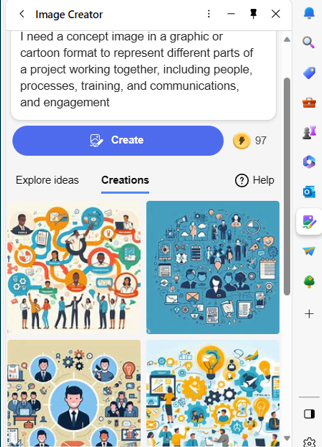
AI-driven platforms can produce relevant and engaging graphics. This frees up valuable time and saves money for business owners.
3. Chatbots for Customer Support
AI-powered chatbots on websites and social media platforms are becoming commonplace. This is because they enable small businesses to provide instant customer support which is exactly what people expect these days.
These chatbots can handle frequently asked questions. They can also assist with product inquiries and customer transactions.
They help small companies provide round-the-clock help for customers without needing to pay for extra staff hours.
4. Data Analysis and Insights
Generative AI can process vast datasets to extract meaningful insights. Small businesses can use AI algorithms to analyze important data.
Such as:
- Market trends
- Customer behavior
- Operational data
These insights can inform strategic decision-making which helps businesses refine their offerings and marketing strategies.
5. Product Design and Prototyping
AI in product design process allows businesses to explore many design variations rapidly. AI algorithms can generate prototypes and simulations. They do this based on specified parameters. This enables small businesses to visualize products before investing in physical prototypes.
6. Supply Chain Optimization
AI can optimize supply chain operations. It can predict demand, identify inefficiencies and suggest inventory levels. It takes away the human error component as well as fees up teams from tedious administrative work.
Small businesses can reduce costs and improve efficiency. AI automates a lot of the supply process. This helps ensure products are readily available when customers need them.
7. Dynamic Pricing Strategies
AI-driven pricing algorithms can help companies make better pricing decisions. Pricing your products and services can be tricky. You don’t want to go too low or too high.
AI helps businesses quickly analyze:
- Market trends
- Competitor pricing
- Customer behavior
These data insights help companies optimize pricing strategies. Small businesses can also dynamically adjust prices based on demand. This maximizes profits while remaining competitive in the market.
8. Human Resources and Recruitment
Generative AI can streamline the recruitment process. The hiring process includes a lot of work reviewing resumes. Many candidates don’t make the interview stage.
AI can help by analyzing resumes and screening candidates for you. It can even help with conducting initial interviews. Small businesses can find the best talent to drive their growth faster.
9. Predictive Maintenance
Downtime on a production line is costly. Proactive maintenance is vital. It is another area where Generative AI can help.
The technology can predict maintenance needs based on data analysis. It helps businesses avoid costly downtimes. It proactively addresses maintenance requirements as well as helps to ensure smooth operations.
Unsure How to Get Started with AI at Your Business?
Generative AI opens a world of opportunities for small businesses. It can also add to the complexity of a technology infrastructure.
We can help you use it effectively and affordably. Give us a call today to schedule a chat.