
The global pandemic put a big emphasis on the need to run a business from anywhere. Enabling employees to work remotely requires cloud solutions. This includes collaborative platforms like Google Workspace and Microsoft 365. VoIP (Voice over Internet Protocol) phone systems have also become critical.
VoIP allows companies to stay in contact with customers and potential customers. Employees can work from anywhere and still answer the business phone line. Callers get a similar experience regardless of where employees may be working (office or home).
When you have people working from home, those old landline systems are inefficient. This has led to a large movement by businesses to VoIP because of necessity and cost-savings.
According to Microsoft, 82% of organizations have reported saving money after implementing VoIP.
While VoIP is the way to go for the future, this doesn’t mean that it is foolproof. Companies that don’t set up their system efficiently can experience issues. This includes things like dropped calls, low bandwidth and features left unused.
If you have been struggling to make your cloud phone system more efficient, check out these tips below. They provide the best setup practices for VoIP. Use these to positively impact your bottom line.
1. Check Network Capabilities
You can’t just assume that you can enable a VoIP system and all will be well. Your network may not be able to handle the extra bandwidth needs without adjustments.
Things that you want to look at include jitter and packet loss. Additionally, review router settings to make sure it can handle peak traffic times. Experiencing dropped calls or choppy audio shows a need to address issues. These may include adjusting network hardware and/or increasing your ISP bandwidth.
2. Prioritize Your VoIP Software Using QoS Rules
Quality of Service (QoS) is a router settings area that allows you to say which traffic is most important. If QoS is not in place, it means resource issues. A large cloud backup could kick in and interrupt your calls because it is taking up bandwidth.
QoS sets up “traffic lanes” that give priority to certain functions. You will want to have your VoIP software prioritized to get the bandwidth it needs. This avoids issues with less critical processes hogging up internet resources.
Using QoS keeps your calls smooth. It also improves the reliability of your cloud phone system. It is also a good idea to use these rules for other important cloud activities.
3. Provide Quality Headsets for Your Team
A cheap headset can ruin the call experience for a potential customer. If someone calls in and can’t hear anything or gets choppy reception, they will quickly get frustrated. They will most likely figure that your company doesn’t have its act together.
Your employees may not be able to afford high-quality headsets. They also may not know what type to buy. Head off potential problems by issuing quality headsets for your team to use.
4. Set Up Departments & Ring Groups
One of the great features of VoIP phone systems is the ability to set up ring groups. You first set up your department groups (accounting, marketing, etc). Then set up the included employee extensions.
Creating a ring group allows you to have a call go to your customer support department as a whole. This is better than one person who may be busy. This way the whole group gets the ring and the first available person can pick up.
Ring groups improve the caller experience by reducing the wait time. It can also mitigate the need for the caller to leave a voicemail and get stuck waiting on a call back.
5. Create Your Company Directory
Auto assistants are extremely helpful and nearly all VoIP systems have them. You set up your company directory first and then record messages to prompt the caller.
For example, you can set up a message that prompts them to input the last name of the person that they are trying to reach. If they aren’t calling a specific person, they can be routed to a department.
While setting up a company directory takes a little effort up front, it will save much more. You no longer will need to have someone specifically routing every call. Callers can also get to the person or department they need faster. This improves the customer experience and boosts office productivity.
6. Have Employees Set Up Their Voicemail & VM to Email
When you get out of a long meeting, going through a bunch of voicemails can take time. Instead of needing to listen to each one to see which calls are a priority, you could simply read through them.
The voicemail to email feature in VoIP phone systems will automatically transcribe voicemails. They are then emailed to the recipient. This improves efficiency. It also eliminates wasted time spent on listening to entire messages to know who called.
Have employees set up this feature with their extension and email address. Some VoIP systems also offer an option to have transcribed voicemails sent via SMS.
7. Train Your Team on the Call Handling Process
Don’t leave your employees to jump in and learn a VoIP system themselves. It is important to train them on the features and the company calling process. This ensures that your team can enjoy all of those time-saving features.
Get Help Enhancing Your Business Phone System
Need help improving your business phone system? Looking for a better customer experience? Give us a call and schedule a consultation. We can help!

The evolution of technology has frequently been consistent and current leading technologies tend to get quickly outdated. Statista's forecast on emerging technology trends shows that there would be a 104% increase between 2018 and 2023. Fields in these emerging techs include AR/VR, Internet of things software, metaverse, etc.
With this advancement, any business that wants to stay relevant and competitive will need to be ahead technologically and adopt the provisions of the new technologies to advance its operations.
As a result, knowing and understanding the technological trends anticipated for 2023 will help you know which one you can leverage in the coming months to improve your organization's efficiency, increase customer satisfaction, innovation and profitability and enable maximum productivity.
Although predicting how trends will develop can be difficult, some emerging technologies appear to have potential and are headed in the right direction for growth. They have potential and will support businesses as they set their path to growth and innovation.
This article contains the top 2023 technological trends your business can leverage in the coming months.
Top 2023 Technology Trends You Should Take Advantage Of
Adopting advanced technology trends for your business will inevitably lead it to get better. Leveraging them will optimize general operations, build business and system resilience and build trust in your industry. They will also increase your product delivery and enhance your customer interactions.
Here are some of these technology trends.
- Digital Immune System
The digital immune system incorporates a variety of risk reduction strategies and technologies to improve user experience and lower system failures that affect performance.
Observability, Chaos engineering, AI-augmented testing, Site Reliability Engineering (SRE), auto-remediation and Software Supply Chain Security are some of the key ideas behind digital immunity. They work together to guarantee that services are provided continuously, that systems don't crash and that errors are quickly fixed.
- Platform Engineering
Through self-service features and automation, platform engineering increases the developer experience, boosts productivity and speeds up the delivery of apps while fostering improved communication between operators and software developers. Through reusable tools and capabilities, it seeks to modernize enterprise software delivery.
Platform engineering seeks to create and redesign a platform utilizing standardized parts and automated procedures that are in tune with its end users' requirements, thereby improving end-user productivity and lessening the burden of the development team of your enterprise.
- Super-Apps
By creating super-apps, businesses can explore new approaches to client engagement. A super-app combines the features of a regular app with those of an app platform and an ecosystem. It creates a platform that enables end users to make their mini-apps.
Super apps have features that vary depending on the need of the customers. For example:
- Users can purchase and sell products and services within the app.
- The apps make provisions for users to order food and other things that will be delivered to their homes.
- The apps can be used to book transportation services.
- The apps can be used for payment, other financial transactions, and more.
This super-app technology can improve customer experience, general brand engagement and loyalty. They have the advantage of giving businesses access to a more significant client. Customers need to use the app to access various services and super apps allow companies to sell their goods and services and gather users' data. Also, users can quickly receive what they need due to the seamless customer experience created.
There are many benefits that super apps bring to your business which makes it a technology that you should leverage.
- Metaverse
The metaverse creates an online space where humans have a more engaging and immersive way and mode of communication. With a metaverse, you can virtually replicate physical activities. This can be achieved by transferring or extending real-world activities into virtual ones and altering the latter. It is a combined innovation composed of numerous technological capabilities and concepts.
In 2023, the metaverse will completely alter the customer experience. A more interconnected, immersive and secure digital world will be created where businesses and people can simulate real-life scenarios such as virtual houses, virtual business offices and shops, virtual roads and simulated travel experiences. AR/VR, AI/ML, Blockchain and IoT will work together to make this possible and significantly impact personal and commercial lives.
The metaverse also aids in creating new venues for customers to interact with brands and their products/services. They also allow new currencies to circulate widely in the market and develop innovative methods for collaboration among workers.
- AI TRiSM
Organizations are adopting an increasing number of Artificial Intelligence models. This increase may lead to an expansion in complexities for enterprises adopting this model. They must intensify efforts to ensure the credibility of the AI models they have chosen. Thus, there is a need for AI TRiSM.
AI TRiSM means AI Trust Risk and Security Management. It guarantees that AI model technologies perform their intended functions efficiently and safely. To preserve crucial operations of an organization, AI TRiSM helps to protect the shared data, protects privacy, manages governance and detects anomalies.
Ready To Adopt Technology Trends To Help Your Organization?
One of the best actions you can take for your organization is to invest in all it takes to grow. The technological growth of your organization is crucial to overall development and productivity.
At Sound Computers, we offer professional IT services with experts who can guide you into adopting new technological trends that can give you the best experience within the coming months and beyond.
Contact us for professional guidance at (860) 577-8060.
One constant struggle in offices is the balance between user productivity and security. If you give users too much freedom in your network, risk increases. Add too many security gates and productivity can dwindle.
It is a fine balance between the two but you can achieve it. Organizations need to recognize the importance of both and not sacrifice one for another.
A recent report from Microsoft notes a dangerous lack of authentication security. Just 22% of Azure Active Directory users had multi-factor authentication (MFA) enabled. This means that over three-quarters were at a much higher risk of an account breach.
Why do organizations fail to adopt important security protocols like MFA? We know that it is as much as 99.9% effective at stopping fraudulent sign-ins. However, many companies aren’t adopting it.
User inconvenience is the biggest reason. MFA is not expensive. In fact, it is free to enable in nearly all cloud applications. However, if users say that it is hurting productivity and is a pain to use, companies may not bother with it.
Sacrificing security can hurt productivity worse. Downtime due to a data breach is expensive and can put smaller companies out of business. The main cause of data breaches is credential compromise. If you’re not protecting your authentication process, the risk of becoming a breach victim is high.
35% of data breaches initiate from breached login credentials.
There are ways to have both secure and productive users. It simply takes adopting some solutions that can help. These are tools that improve authentication security and do it in a way that keeps user convenience in mind.
Solutions to Improve Security Without Sacrificing Convenience
Use Contextual Authentication Rules
Not every user needs to go through the same authentication process. If someone is working in your building, they have a certain trust factor. If someone is attempting to log in from outside the country, they do not have that same trust.
Contextual authentication is used with MFA to target users that need to reach a higher bar. You may choose to limit or block system access to someone attempting to log in from a certain region or you may need to add an additional challenge question for users logging in after work hours.
Companies don't need to inconvenience people working from normal locations during typical hours but they can still verify those logging in under non-typical circumstances. Some of the contextual factors you can use include:
- Time of day
- Location
- The device used
- Time of the last login
- Type of resources accessed
Install a Single Sign-on (SSO) Solution
A report on U.S. employees found that they use a lot of apps. Workers switch between an average of 13 apps 30 times per day. That is a lot of inconvenience if they need to use an MFA action for each of those logins.
Single sign-on applications solve this problem. They merge the authentication process for several apps into just one login. Employees log in once and can go through MFA a single time.
Using multi-factor authentication isn’t nearly as inconvenient. Users gain access to everything at the same time. SSO solutions help organizations improve their security without all the pushback from users.
Recognize Devices
Another way to better secure network access is to recognize devices. This is typically done using an endpoint device manager. This automates some of the security behind user authentication. It doesn’t inconvenience the person.
First, register employee devices in the endpoint device manager. Once completed, you can then set up security rules such as blocking unknown devices automatically.
You can also put device scanning for malware and automated updates in place. Both these things increase security without sacrificing productivity.
Use Role-Based Authentication
Your shipping clerk may not have access to sensitive customer information but your accounting team does. One can have a lower barrier to authentication.
Using role-based authentication saves time when setting up new employee accounts. Authentication and access happen based on the person’s role. Admins can program permissions and contextual authentication factors once. Then the process automates as soon as an employee has their role set.
Consider Adding Biometrics
One of the most convenient forms of authentication is biometrics. This would be a fingerprint, retina or facial scan. The user doesn’t need to type in anything. It also takes just a few seconds.
Biometric hardware can be costly depending on the size of your organization. However, you can introduce it over time. Consider using biometrics with your most sensitive roles first and then expanding.
Additionally, many apps are now incorporating things like facial scanning. Users can authenticate using a typical smartphone which makes it much more affordable.
Need Help Improving Authentication Security?
Don’t give up important security because you are afraid of user pushback. Give us a call and schedule a security consultation.

Although the idea of the metaverse is prevalent, few people are knowledgeable about it and businesses are unsure if they should pay attention to it. Can something so publicized and 'unreal' even be relevant to their industry? The quick response is yes.
In reality, a number of metaverse notions are already taking physical form. According to a report, by 2026, 25% of users will use one or more hours surfing the metaverse. Many businesses are making investments to increase revenue, deepen customer trust and engage with their communities creatively.
Options to improve consumer experiences, develop virtual-only products and promote both digital and physical goods and services are some of the promises that the metaverse makes. It will carry out all of this using its own financial and payment systems and implement all these functions, applications and hardware that will be required.
The metaverse isn't created for only top brands like Adidas, Louis Vuitton or Dolce & Gabbana. Every company will be able to integrate it into their daily operations.
This new virtual world is more about experiences and every business should be prepared. The benefits that the metaverse presents to business is unlimited and will undoubtedly boost the business visibility and productivity.
Not yet persuaded? We will explore why your brand/business should prepare now.
How Your Business Needs to Prepare
Businesses can access the metaverse and gain publicity for their company by being visible in a virtual environment. These steps can help your company prepare for the impacts of the metaverse if you want to be amongst one of the top players in your business:
-
Boost Your Online Visibility
Different businesses will interpret entering the metaverse differently. For one business, it can include creating more intelligent AI to respond to client inquiries. Another possibility is a complete VR environment. Since the metaverse is the future web version, boosting your online presence now should be the first step toward success.
-
Conduct Customer Satisfaction Surveys
Planning for future innovations is crucial because research rounds might take some time. Who are the target demographics for your business? Which consumer behaviors (present and potential) are currently in vogue and suggestive of potential metaverse participation?
Conducting customer surveys is a great technique to estimate when your target audience will be prepared for metaverse technologies, how they will feel if it is implemented in your business and how well they will respond to it.
-
Stay Prepared and Adaptable
Moving your brand into the metaverse can be a daunting and unbelievable process due to the fact that your businesses should be responsive to the evolving nature of the virtual worlds. However, this might also be a fantastic chance to test out the adaptability of the metaverse and get prepared.
You could use the community that it provides to develop and assess your products virtually rather than taking control of the entire creative process.
-
Concentrate More on Experience
Clients and customers who access the metaverse want to do more than just observe things. They want to feel them. Create a direct experience for your clients using various approaches that could depict the metaverse world and give your customers more experience. This gets both you and your customers prepared for the impacts of the metaverse.
Consider the scenario where you wish to start a business in the gaming industry. The ideal course of action would be for you to let the controls inspire actual actions. You could also start dimensioning your object beyond two components if you intend to open a metaverse store.
Determine the mood that your customers want to be in when they enter the space. That enables you to provide a fantastic experience and build an emotional flow that will lead them to that experience. Customer loyalty is a result of user engagement so you should aim for it.
Don't Wait!
The opportunities involved when you launch your business into the metaverse are numerous. You give room to more visibility both locally and internationally and provide your customers with the chance to interact with your products and services in more unique ways.
As a result, getting your business ready as soon as possible to fully understand the world of the metaverse and investigate it strategically and tactically gives you and your business the tools needed to succeed.
Note: Your business should select some short-term strategies to get your business prepared. Currently, the metaverse is a whole new world filled with lots of amazing experiences and endless possibilities for businesses to grow, expand and be productive.
Prepare Your Business for Impacts of the Metaverse with Sound Computers
Sound Computers can help your Connecticut business prepare for the metaverse and develop the technology strategies needed to boost business productivity.
Contact us today to schedule a free consultation. Call 860-577-8060 or reach us online.
It seems that nearly as long as passwords have been around, they have been a major source of security concern. Eighty-one percent of security incidents happen due to stolen or weak passwords. Additionally, employees continue to neglect the basics of good cyber hygiene.
For example, 61% of workers use the same password for multiple platforms and 43% have shared their passwords with others. These factors are why compromised credentials are the main cause of data breaches.
Access and identity management have become a priority for many organizations. This is largely due to the rise of the cloud as well as the practice of people needing to only enter a username and password to access systems.
Once a cybercriminal gets an employee’s login information, they can access the account and any data that it contains. This is especially problematic when it is an account like Microsoft 365 or Google Workspace. These accounts can access things like cloud storage and user email.
So what is conditional access and how does it work with multi-factor authentication (MFA)? What are the advantages of moving to a conditional access process?
What Is Conditional Access?
Conditional access is also known as contextual access. It is a method of controlling user access. You can think of it as several “if/then” statements (meaning “if” this thing is present, “then” do this).
For example, conditional access allows you to set a rule that would state the following. “If a user is logging in from outside the country, require a one-time-passcode.”
Conditional access allows you to add many conditions to the process of user access to a system. It is typically used with MFA. This is to improve access security without unnecessarily inconveniencing users.
Some of the most common contextual factors used include:
- IP address
- Geographic location
- Time of day
- The device used
- Role or group the user belongs to
Conditional access can be set up in Azure Active Directory. It can also be set up in another identity and access management tool. It is helpful to get the assistance of your IT partner. We can help with setup and the conditions that would make the most sense for your business.
The Benefits of Implementing Conditional Access for Identity Management
Improves Security
Using conditional access improves security. It allows you more flexibility in challenging user legitimacy. It doesn't just grant access to anyone with a username and password. Instead, the user needs to meet certain requirements.
Contextual access could block any login attempts from countries where no employees are located. It could also present an extra verification question when employees use an unrecognized device.
Automates the Access Management Process
Once the if/then statements are set up, the system takes over. It automates the monitoring for contextual factors and takes the appropriate actions. This reduces the burden on administrative IT teams. It also ensures that no one is falling between the cracks.
Automated processes are more accurate and reliable than manual processes. Automation removes the human error component. This helps ensure that each condition is being verified for every single login.
Allows Restriction of Certain Activities
Conditional access isn’t only for keeping unauthorized users out of your accounts. You can use it in other ways. One of these is to restrict the activities that legitimate users can do.
For example, you could restrict access to data or settings based on a user’s role in the system. You can also use conditions in combination (such as lowering permissions to view-only). You could trigger this if a user holds a certain role and is logging in from an unknown device.
Improves the User Login Experience
Studies show that as many as 67% of businesses don’t use multi-factor authentication. This is despite the fact that it is one of the most effective methods to stop credential breaches.
One of the biggest reasons it is not used is because of the inconvenience factor for employees. They may complain that it interferes with productivity or say that it makes it harder for them to use their business applications.
Using conditional access with MFA can improve the user experience. For example, you can require MFA only if users are outside of the premises. You can put in place extra challenge questions on a role or context-based basis. This keeps all users from being inconvenienced.
Enforces the Rule of Least Privilege
Using the rule of least privilege is a security best practice. It means only granting the lowest level of access in a system as necessary for a user to do their work. Once you have roles set up in your identity management system, you can base access on those roles.
Conditional access simplifies the process of restricting access to data or functions. You can base this on job needs. It streamlines identity management. This is because it contains all functions in the same system for access and MFA rules. Everything stays together which makes management easier.
Get Help Implementing Conditional Access Today!
Once conditional access is set up, the automated system takes over. It improves your security and reduces the risk of an account breach. Contact us today for a free consultation to enhance your cybersecurity.

BYOD programs (bring your own device) is a concept that took hold after the invention of the smartphone. When phones got smarter, software developers began creating apps for those phones. Mobile device use has now overtaken desktop use at work.
According to Microsoft, mobile devices make up about 60% of the endpoints in a company network. They also handle about 80% of the workload. However, they are often neglected when it comes to strong cybersecurity measures.
This is especially true with employee-owned mobile devices. BYOD programs differ from corporate-owned mobile use programs. Instead of using company tools, employees are using their personal devices for work. Many businesses find this to be the most economical way to keep their teams productive.
Purchasing phones and wireless plans for staff is often out of reach financially. It can also be a pain for employees to carry around two different devices (personal and work).
It is estimated that 83% of companies have some type of BYOD policy.
You can run BYOD programs securely if you have some best practices in place. Many times business owners don’t even know all the devices that are connecting to business data or which ones may have data stored on them.
Here are some tips to overcome the security and challenges of BYOD. These should help you enjoy a win-win situation for employees and the business.
Define Your BYOD Policy
If there are no defined rules for BYOD, you can’t expect the process to be secure. Employees may leave business data unprotected or they may connect to public Wi-Fi and then enter their business email password which exposes it.
If you allow employees to access business data from personal devices, you need a policy. This policy protects the company from unnecessary risk. It can also lay out specifics that reduce potential problems. For example, it can explain the compensation for employees that use personal devices for work.
Keep Your Policy “Evergreen"
As soon as a policy gets outdated, it becomes less relevant to employees. Someone may look at your BYOD policy and note that one directive is old. They may think that they should ignore the entire policy for that reason.
Make sure that you keep your BYOD policy “evergreen.” This means updating it regularly if any changes impact those policies.
Use VoIP Apps for Business Calls
Before the pandemic, 65% of employees gave their personal phone numbers to customers. This often happens due to the need to connect with a client when away from an office phone. Clients may also save a personal number for a staff member if the employee calls the customer from their own device.
Customers having employees’ personal numbers is a problem for everyone. Employees may leave the company and no longer answer those calls. The customer may not realize why.
You can avoid the issue by using a business VoIP phone system. These services have mobile apps that employees can use. VoIP mobile apps allow employees to make and receive calls through a business number.
Create Restrictions on Saved Company Data
Remote work has exasperated the security issue with BYOD programs. While BYOD may have meant mobile devices in the past, it now means computers too. Remote employees often will use their own PCs when working outside the office.
Regardless of the type of device, you should maintain control of business data. It is a good idea to restrict the types of data that staff can store on personal devices. You should also ensure that it is backed up from those devices.
Require Device Updates
When employee devices are not updated or patched, they invite a data breach. Any endpoint connected to your network can enable a breach. This includes those owned by employees.
It can be tricky to ensure that a device owned by an employee is kept updated. Therefore, many businesses turn to endpoint management solutions. An endpoint device manager can push through automated updates. It also allows you to protect business data without intruding on employee privacy.
The monitoring and management capabilities of these tools improve security. This includes the ability to safelist devices. Safelisting can block devices not added to the endpoint manager.
Include BYOD in Your Offboarding Process
If an employee leaves your company, you need to clean their digital trail. Is the employee still receiving work email on their phone? Do they have access to company data through persistent logins? Are any saved company passwords on their device?
These are all questions to ask when offboarding a former staff member. You should also make sure to copy and remove any company files on their personal device. Additionally, ensure that you deauthorize their device(s) from your network.
Let Us Help You Explore Endpoint Security Solutions
We can help you explore solutions to secure a BYOD program. We will look at how your company uses personal devices at your business and recommend the best tools. Contact us today for a free consultation.
Paying attention to your customer experience directly impacts your bottom line. Companies that are “customer-centric” are 60% more profitable than those that are not. In this digital age, customers also expect more from those that they do business with.
In today’s world, people can order something on their phones and see it on their doorstep by the next day. Keeping up with expectations means leveraging the right technology.
2023 is on the horizon and it is the perfect time to improve your customer experience. Cloud technology allows you to do it without needing to spend a fortune. Just put in place some of the applications below. These apps focus on making leads and customers happy.
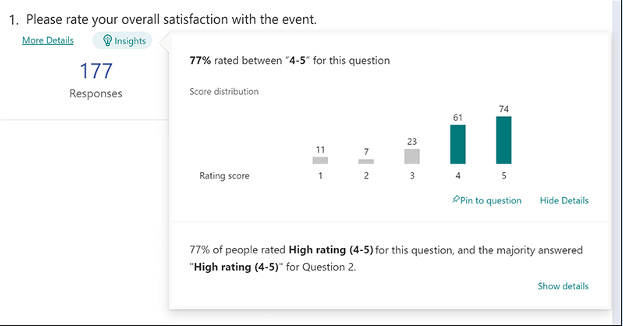
1. Online Survey Application
Doing an annual customer satisfaction survey is a great way to check in with customers. Successful businesses take the feedback that they get and use it to make their company better.
But doing these surveys through a Word document attached to an email is so last decade! Use an online survey application to make the process seamless for you and your customers.
Many online survey tools are available online. If you have Microsoft 365, you will find one included. These allow people to fill out surveys on any device and not worry about sending them back in an attachment.
On the receiving end, there is no long process of collating data. Just open your form survey tool and see the results instantly.
2. Smart Chat Bot
Most businesses have a limit on how many hours per day that they can pay staff to answer questions. Customer service hours are typically the same as business hours and staff can get busy. This means that answers may take longer to send back to an inquiry.
Putting a smart chatbot on your business website can improve customer satisfaction. It allows people to get an answer right away. They can also get that answer any time of day or night.
68% of consumers like chatbots because they give them fast answers to questions. While they can’t answer every single question, they can handle quite a few. For example, in healthcare and banking, chatbots can take 75-90% of questions.
3. Business Mobile App
People tend to live on their mobile phones these days. They carry them with them everywhere. Mobile apps are often the preferred method of connecting with data and businesses. More Google searches are now done via mobile devices than by desktops.
Think about creating a business mobile app. You want one that allows customers to connect with you to order products and services. You can use it for customer support, initiating virtual calls, etc.
4. Facebook Messenger Support
Facebook Messenger is the 2nd most popular iOS app of all time. This Facebook-connected application makes it easy to communicate with friends, family and companies.
Many businesses now use Messenger to connect with leads and provide customer support. When you use an app that is so popular in this way, you make it easier for customers to reach you. The ability to get a quick answer through Messenger can boost a customer’s opinion of your company.
5. VoIP Phone System with Good Mobile App
When customers must juggle different numbers for your staff, it gets confusing. Should they call your sales rep at their desk line or mobile number? Using a VoIP phone system simplifies the entire process.
Employees can have a single number that they use when at their desks, at their home office or anywhere else. Make sure the VoIP service has a good mobile app. You want one that is easy for employees to use. This ensures that they can easily handle customer calls using their smartphone. It also keeps them from reverting to using their number.
6. Text Notification Apps
SMS is becoming the new email for many companies. Retailers like Shoe Carnival and World Market have customers opt-in to text messaging. Customers like this for shipping notifications and to get sale and coupon alerts.
There are several services online that you can use for this purpose. Offering text updates can significantly improve your customers’ experience. Use them for appointment reminders, sale notices or shipping alerts.
7. All-in-One CRM & Sales Platform
One thing that frustrates customers is a disconnect between sales and support. They may have had a conversation with a salesperson to customize an order only to find out that customer service knows nothing about it.
To streamline the information flow, look for an all-in-one CRM/Sales platform. These are cloud services that offer a CRM module and a sales module and both connect. There is a single customer record so that all notes from the sales and customer support side are in the same place. Both teams can view all customer interactions.
This improves the customer experience and results in fewer dropped balls. Efficiency and productivity improve as well because everyone is on the same page.
Get Help with Customer-Facing Technology Support
It is easy to get lost in a sea of different cloud applications. Let us help you navigate to a better customer experience. Contact us today for a free consultation.

Aging servers are a huge risk to company profitability and productivity. If you don’t proactively upgrade your servers regularly, you may find that you face unplanned downtime because your server breaks down out of the blue. It costs you time and money to fix a broken server and that downtime eats away at your profit margin. In fact, it can cost about $5,600 per minute according to estimates! Read more

VoIP was still considered a “different” type of business phone system five or six years ago. It wasn’t the norm. However, the pandemic changed that way of thinking. Now internet-based phone systems aren’t simply the norm. They are mandatory for business continuity.
During the pandemic, VoIP and video conferencing skyrocketed by over 210%. This is largely due to the move to remote work and hybrid offices. Sixty-seven percent of surveyed companies say switching to VoIP helps improve call handling.
No longer is the business phone system tied to a physical location. This enables fluid management of a business with staff spread out over many locations.
Additionally, VoIP significantly reduces costs for businesses. The technology is much cheaper to use than a traditional landline-based system. Calling plans are also often less expensive and a company can add new numbers for very little cost.
VoIP has several helpful features for small businesses. However, owners are busy and may not have time to have all of them enabled.
What are the best features to drive efficiency, productivity and positive caller experience?
Here are some of the best features of cloud-based business phone systems to leverage.
Automated Attendant
In many small companies, the person answering the phone also has a lot of other duties. You can free up that person’s time and give the caller a better experience with an automated attendant.
An auto-attendant acts as a company directory. It will forward calls to the correct department or staff member for you. Record a pleasant greeting and ask the caller a few things like “Press or say 1 for sales, 2 for technical support,” etc.
The caller gets the person they need without needing to explain why they are calling twice (once to the person that answers the phone and once to the person that they are transferred to).
Find Me/Follow Me
What is the most popular user feature for VoIP? According to 77% of surveyed employees, it is the Find Me/Follow Me feature. This includes the ability to use a virtual phone number that is accessible from all devices. Staff can also transfer calls from one device to another with ease.
Whether you are on a PC, in a conference room or on your smartphone, you can get your calls. This feature reduces friction and allows people to give out a single phone number. Callers can then use that number to reach the person via mobile, home office or onsite office.
Hold Music
Playing pleasant music while your callers are on hold might seem like a small thing. However, it can have a big impact on customer satisfaction and lead generation activities.
We found some eye-opening statistics from a study on hold music versus silence. In the study, researchers kept people on hold for 1 minute. Results showed:
- On hold in silence: Over 50% of the callers hung up.
- On hold with music: Only 13% of the callers hung up.
Additionally, the 45% of the silent group that did not hang up thought that they were on hold for 3-5 minutes. They were on hold for just one minute. On the other hand, 56% of people listening to music thought they were on hold for less than one minute.
You can see the power of activating that one simple feature of your VoIP system. You may notice happier customers and fewer leads hanging up before they reach anyone.
Voicemail Transcription to Email
When you’re coming out of a meeting, going through a string of voicemails can be frustrating. You need to listen to each one to figure out the people to call back first.
Voicemail to email in VoIP services provides recorded voicemails emailed to you. This also comes with a transcription of the message. You can quickly glance through the emails and scan the text to rank callbacks. There is no need to listen to every message first.
Ring Groups
Ring groups are an especially helpful feature if you have a small team. It allows a group of numbers to ring simultaneously until one person in the group picks up.
This means that another staff member may be able to assist a caller rather than them needing to leave a message. Ring groups are great to set up for sales teams, accounting teams and customer support teams.
Call Reporting
Another bonus of VoIP phone systems over analog is that you get real-time call reporting. What are your busiest times when you need more staff? Do you have a problem with calls not getting answered fast enough?
Your call reporting can give you insight into those things and more. Make sure you check out these reports and then automate the ones you like so you will see them regularly.
Local Support
This is not a system feature but it is important to have. If you sign up for VoIP from a company halfway around the world, you don’t have any local support when you need it.
Having someone that can come to your office is important. They can set up VoIP desk phones and help you optimize ring groups, mobile apps and more. Your business phone system is one of the most important pieces of technology that you have. Make sure you have the local support you need to keep it operating reliably.
Looking for Local Solutions?
Get expert VoIP services and local support. We will integrate your cloud-based phone system with your entire technology environment. Contact us today for a free consultation.

One of the most difficult types of attacks to detect are insider threats. An “insider” would be anyone that has legitimate access to your company network and data. This would be via a login or other authorized connection.
Because insiders have authorized system access, they bypass certain security defenses such as those designed to keep intruders out. Since a logged-in user isn’t seen as an intruder, those security protections are not triggered.
There are three troubling statistics from a recent report by Ponemon Institute. They illustrate the importance of addressing this threat. Insider attacks are getting worse, taking longer to detect and becoming more extensive.
The report found that over the last two years:
- Insider attacks have increased by 44%.
- It takes organizations 85 days to contain an insider threat compared to 77 days in 2020.
- The average cost of addressing insider threats has risen by 34%.
It is important for companies to understand what makes up an insider threat. That is the first step toward mitigation.
4 Types of Insider Threats
One reason that insider threats can be hard to detect is that there is not just one kind. Employees, vendors and hackers can all perpetrate insider security breaches. To further complicate detection, some may be malicious and others are accidental.
Here are the four main types of insider threats faced by company networks.
Malicious/Disgruntled Employee
A sales employee that is leaving the company may decide to take all of their contacts with them. This is a malicious theft of company data.
Another example of this type of insider attack is a disgruntled employee. They may be upset with their manager who just fired them and decide to do the business harm. They could plant ransomware or make a deal with a hacker to give over their login credentials for cash.
Careless/Negligent Employee
Some insider threats are due to lazy or untrained employees. They don’t mean to cause a data breach but may accidentally share classified data on a non-secure platform. They may use a friend’s computer to access their business apps while being completely unaware of the security consequences.
3rd Party with Access to Your Systems
Outsiders with access to your network are also a very real concern. Contractors, freelancers and vendors can all constitute an insider breach risk.
You need to ensure that these third parties are fully reviewed. Do this before you give them system access. You should also allow your IT partner to review them for any data security concerns.
Hacker That Compromises a Password
Compromised login credentials are one of the most dangerous types of insider threats. This has now become the #1 driver of data breaches around the world.
When a cybercriminal can access an employee’s login, that criminal becomes an “insider.” Your computer system reads them as the legitimate user.
Ways to Mitigate Insider Threats
Insider threats can be difficult to detect after the fact. However, if you put mitigation measures in place, you can stop them in their tracks. Being proactive keeps you from suffering a costly incident (one that you may not know about for months).
Here are some of the best tactics for reducing insider threat risk.
Thorough Background Checks
When hiring new employees, make sure you do a thorough background check. Malicious insiders will typically have red flags in their work history. You want to do the same with any vendors or contractors that will have access to your systems.
Endpoint Device Solutions
Mobile devices now make up about 60% of the endpoints in a company. However, many businesses are not using a solution to manage device access to resources.
Put an endpoint management solution in place to monitor device access. You can also use this to safelist devices and block unauthorized devices by default.
Multi-Factor Authentication & Password Security
One of the best ways to fight credential theft is through multi-factor authentication. Hackers have a hard time getting past the 2nd factor. They rarely have access to a person’s mobile device or FIDO security key.
Couple this with password security. This includes things like:
- Requiring strong passwords in your cloud apps
- Using a business password manager
- Requiring unique passwords for all logins
Employee Data Security Training
Training can help you mitigate the risk of a breach through carelessness. Train employees on proper data handling and security policies governing sensitive information.
Network Monitoring
Once someone has user access to your system, how can you catch them doing something wrong? You do this through intelligent network monitoring.
Use AI-enabled threat monitoring. This allows you to detect strange behaviors as soon as they happen. For example, someone may download a large number of files or someone may log in from outside the country.
Need Help Putting a Stop to Insider Attacks?
A layered security solution can help you mitigate all four types of insider threats. We can help you with a robust (yet affordable) solution. Contact us today for a free consultation.