

Images of Black Friday no longer merely conjure up visions of bargain-hunting shoppers rushing storefronts to secure the best deals. It is now viewed by many organizations as a strategic opportunity to minimize the cost of upgrading their technology infrastructure. Traditionally, Black Friday tech deals surrounded gaming platforms and entertainment technology but that has changed. Today businesses recognize that there are numerous deals on the latest technology that offer real-world value to improve collaboration and productivity.
Whether adopting gaming hardware for creative workflows or adopting cutting-edge peripherals for hybrid teams, businesses need to recognize the opportunities for smart integration of these products.
Paying Attention to Gaming Tech
As technology in the digital landscape continues to grow at incredible rates, the gaming community has seen impressive growth as well. Hardware and accessories continue to push the limits of performance and responsiveness. By creating immersive environments through 3D rendering and advanced audio, these devices can translate to productivity-focused business applications. Some business sectors can utilize gaming tech in the following ways:
- Creative work involving graphic design, 3D modeling and video editing
- Real-time collaboration
- High-speed computing and multitasking
- Remote or hybrid work environments
Gaming devices typically come loaded with impressive features that can translate well to organizations willing to look at their capabilities.
High-Performance Laptops and Desktops
These devices are designed to handle high CPU loads and offer fast rendering capabilities in immersive environments. They are feature-rich and can easily integrate into any computing environment.
Gaming PCs and laptops often include:
- Multi-core CPUs (Intel Core i7/i9, AMD Ryzen 7/9)
- Discrete GPUs (NVIDIA RTX, AMD Radeon)
- High-refresh-rate displays
- Fast SSD storage and large memory capacities
While these devices are marketed for gamers, their specs are ideal for business users operating resource-heavy programs such as CAD software, Adobe Creative Suite, Power BI and Tableau.
When looking for Black Friday deals, look at the gaming laptops from Dell Alienware, MSI and ASUS ROG. They provide robust features and come with Windows Pro, TPM 2.0 and remote management tools.
Peripherals
Gaming mice and keyboards provide precision and ergonomics that help limit user fatigue during all-day use. Consider looking for Logitech, Razer and Corsair brands that offer discounted Black Friday deals on a regular basis.
Ultrawide and 4k Monitors
Gamers aren’t the only ones who love immersive monitors. Professionals love them too. With an ultrawide and high-resolution monitor, businesses can see improvements in employee multitasking abilities and video and audio editing along with data analytics and coding.
With ultrawide and curved displays, developers and financial analysts can better visualize large amounts of information without the need to switch windows. For Black Friday deals, consider LG, Samsung and Dell for superior USB-C support and video output.
Noise-Cancelling Headsets and Microphones
While these were originally marketed for immersive gaming experiences, noise-cancelling headphones and studio-quality microphones have impacted the way organizations do business. They are essential for working environments employing video conferencing and remote locations. They can improve focus on taxing projects.
Streaming Gear and Webcams
Streaming hardware was once a gaming-only concept but has now left an indelible mark on the business world. This includes Elgato Stream Decks and high-resolution webcams. These tools enable businesses to enhance their video presence and streamline their workflow within the organization.
Best Practices When Buying Consumer Tech for Business Use
The deals available are substantial. A quick look at online tech outlets shows just how steep the discounts can be on Black Friday. While these sales offer great savings, businesses need to approach purchases mindfully. Buying equipment solely because it is discounted defeats the purpose if it cannot integrate into your existing technology environment. If you have questions about your purchases, reach out for expert guidance to make sure your purchases support long-term business goals.
- Business-Grade Warranty: Unfortunately, consumer products don’t offer the same commercial warranties or support. It is always a good idea to check this for any purchases organizations are considering.
- Compatibility Assurance: The new purchases need to be compatible with existing software, hardware and networks or it is a wasted effort.
- Lifecycle Management: The discounted items need to be tracked and included in the IT management plan to determine when and how the devices will be replaced in the coming years.
- Secure Everything: Much like the warranty, not all consumer products come with the same safeguards necessary for enterprise-level security.
No Longer Just for Personal Upgrades
Gone are the days of consumer-only Black Friday deals. Organizations can reap the same discounts as consumers by strategically purchasing high-performance gadgets to improve their technology landscape. These devices can improve productivity and drive innovation and efficiency.
The key is knowing what to buy and when.
Considering purchasing tech gadgets on Black Friday? If you have questions or need guidance on a specific product, contact us for expert advice. With the right resources and support, IT professionals and business leaders can make smarter purchasing decisions and align technology with long-term strategies. Whether you are an MSP or a small business owner, we can help you turn Black Friday deals into year-round results. Contact us today to get started.
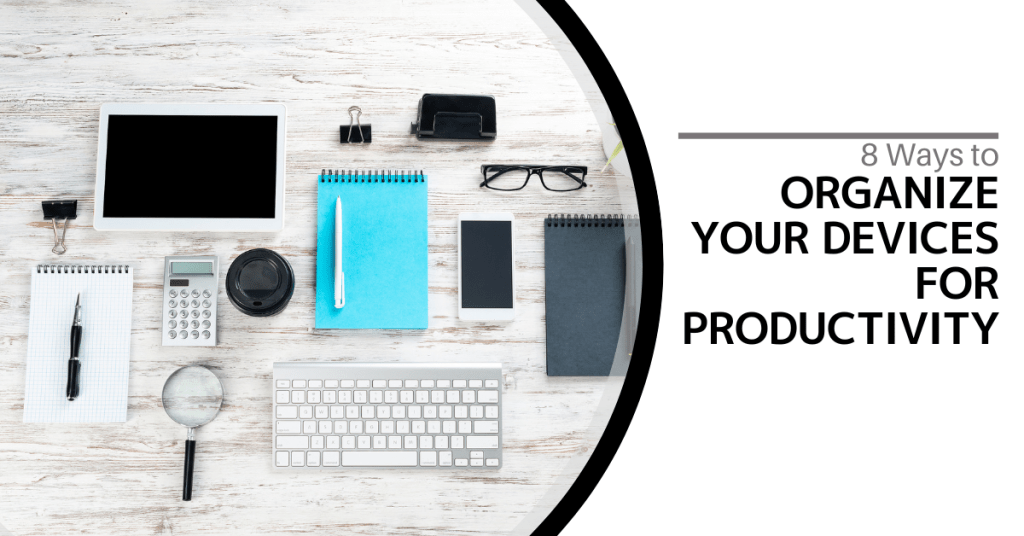
Our devices are a big part of our daily lives for work, fun and staying in touch. However, sometimes they may get in the way of our productivity.
In this article, you will learn how to organize your device. You will learn ways to boost your productivity and get more done.
Why is device organization important?
Messy devices slow us down and make it tough to find what we need. An organized device makes for a faster and much more productive experience. It also reduces stress and preserves time.
How does clutter impact productivity?
Clutter on devices adversely influences productivity. It forces you to waste precious time searching through files. It could make computers run slower which builds frustration and makes for less work being done.
What are the benefits of organized devices?
There are several benefits when using organized devices. They help us find things quickly, work efficiently, feel less stressed and have more free time.
Now let’s look into 8 ways how to organize your device for better productivity.
1. How can you declutter your home screen?
Remove Unused Apps
Look at your home screen. Remove the applications you never use. This makes it easier to find the ones you need.
Group Similar Apps
Gather similar apps into folders. This keeps your home screen neat and clean. You can find applications much quicker this way.
Use a Minimalist Wallpaper
Use a simple wallpaper. This helps you focus on your apps and tasks.
2. How do you organize your files and folders?
Set up a Logical Folders
Set up file types in folders. Label them appropriately. This would make access easier and faster.
Naming Your Files Descriptively
Clearly label the name of the file. Attach dates or names of projects for easy location of files.
House Clean Now and Then
Trash the old and irrelevant files. Get some space cleared out to reduce clutter.
3. How could you organize your email?
Create Folders and Labels
Create folders for emails of different kinds. Label them and categorize them accordingly. This helps to keep your inbox organized.
Unsubscribe to Unwanted Emails
Remove your name from email lists you never read. This cleans up your inbox.
Use the Two-Minute Rule
If an email can be handled within two minutes, handle it immediately. This helps you avoid the piling up of small tasks.
4. How Can You Optimize Your Browser?
Organize Bookmarks
Sort your bookmarks into folders. Delete ones you don’t use. This makes finding websites easier.
Use Browser Extensions Wisely
Only keep extensions you use often. Too many can slow down your browser.
Clear Your Cache Regularly
This helps your browser run faster. It also frees up space on your device.
5. What are good ways to manage passwords?
Use a Password Manager
This tool securely vaults all your passwords. You only have to remember one master password.
Generate Strong and Unique Passwords
Use a different password for every account. Make them long and complicated. This will keep your accounts secure.
Enable Two-Factor Authentication
This adds an extra layer of protection to your accounts. It makes them harder to break into.
6. How can you streamline your notifications?
Turn Off Unnecessary Notifications
Only retain notifications from important apps. This decreases distractions.
Set Specific Times to Check Notifications
Don’t view notifications throughout the day. Decide on certain times of the day to view notifications. In this way, you will be able to concentrate on your work.
Use ‘Do Not Disturb’ Mode
Switch this on when you really need to focus on something. This blocks all your notifications for a certain period.
7. What is the best type of data backup?
Utilize Cloud Storage
Store important files in the cloud. This keeps them safe and easy to access.
Set up Automatic Backups
Make your device backup files on a regular basis. This ensures you don’t lose important data.
Keep Multiple Copies of Important Files
Store critical files in more than one location. This protects against data loss.
8. How can you maintain your device’s health?
Update Software Regularly
Keep your applications and operating system updated. This will enhance the performance and security.
Run Virus Scans Regularly
Run virus scans using antivirus software to check for threats. This will keep your device safe from any kind of threat.
Clean Your Device Physically
Dust and dirt can slow down your device. Cleaning it regularly will help keep it in good shape.
It takes some time and effort to organize your devices but it is really worth the investment. You will be more productive and less stressed. Try at least one from this list and (once you get comfortable) try some more.
Remember that everybody has different needs so do what will work best for you. If you need help organizing your devices, feel free to reach out to us. Contact us now for personalized advice on boosting productivity.
In today’s fast-moving world, everyone wants to work wiser and not harder. The involvement of AI tools will definitely help you do just that. They can make your work easier and faster. Let’s explore some AI tools that can boost productivity in your office.
What are AI Tools?
AI tools are software programs that use artificial intelligence. They help users in completing their tasks in an efficient and effective manner. Over time, these tools are able to learn from data. These tools are like intelligent assistants that assist you in completing your work.
In What Ways Can AI Tools Help with Time Management?
Time management is crucial for productivity. AI tools can help you manage your day better. They can schedule meetings, remind you of events and even suggest the best times to take breaks.
Smart Calendars
Smart calendars use AI to manage your schedule. They can determine the best times for meetings based on everyone’s availability. They can also send reminders so you don’t forget important tasks.
Task Managers
Task managers keep you on track about what to do. AI-enabled task managers can even put your tasks in order by deadline or urgency. That way you focus on what really matters.
Can AI Improve Communication?
Communication is key in any office. AI tools can make communication faster and clearer. They can help with emails, meetings and even language translation.
Email Assistants
Email assistants use AI to sort your inbox. They can filter important emails and even draft replies for you. This saves time and reduces stress.
Virtual Meeting Helpers
Virtual meeting helpers use AI to transcribe meetings in real time. They can also highlight key points and action items. This makes it easy to review what was discussed later.
How Do AI Tools Enhance Data Analysis?
Data analysis is a core element of informed decision-making. AI-powered tools can analyze large volumes of data in the shortest time. They provide insights that will help you make better choices.
Data Visualization Tools
Data visualization tools create simple charts and graphs that are easy to understand. AI helps them identify trends and patterns in the data.
Predictive Analysis
Predictive analytics make use of AI to forecast the future with the help of data related to the past. It helps the businesses plan in a better way and move ahead of the competition.
Does AI Help in Creative Tasks?
It is not just about numbers and schedules. AI can be helpful in creative tasks such as writing, designing and coming up with new ideas.
Writing Assistants
Writing assistants can help with grammar checks and content ideas.
Design Tools
Design tools powered with AI will create stunning visuals in a jiffy. They offer templates and design suggestions based on current trends.
Are There AI Tools for Customer Service?
Customer service is vital for any business. AI tools can improve how you interact with customers. They give quick responses and solutions to questions.
Chatbots
Chatbots are AI programs that chat with customers online. They answer questions instantly and are available 24/7.
Sentiment Analysis Tools
Sentiment analysis tools use AI to understand customer feelings from their messages or reviews. This helps businesses respond appropriately and improve customer satisfaction.
What are the Advantages of AI Tools?
Using AI tools in your office has several advantages. They save you from tedious work and give you much more time to devote to something more important.
Most of these tools are very easy to use and many integrate well with other software. This makes them convenient for adding into your setup.
The type of AI tool you choose would depend on your needs. Identify the areas where you need help like time management or communication.
Next you should research different tools available in those areas. Look for user reviews and try free trials if available.
Ensure that the tool is easy to use and fits within your budget. Ensure it integrates well with other tools you use in your office as well.
Boost Office Productivity
AI-driven productivity tools are changing the way we do things daily. The result? Easier, faster and more efficient execution.
Ready to give productivity in your office a boost? It may be time to integrate some of these smart tools into your workflow today! Contact us for more information on how we can help you determine what tools best suit your needs.

Microsoft 365 is a powerful suite of productivity tools used by millions of businesses and individuals worldwide. However, to get the most out of these applications, it is crucial to optimize your settings for maximum performance. This guide will walk you through various techniques and configurations to enhance your Microsoft 365 experience and ensure smooth operation and increased productivity.Read more
In today’s fast-paced digital world, proficiency in technology is no longer just a desirable skill. It is a necessity. However, many employees lack the fundamental digital literacy skills needed to thrive in the modern workplace. Read more

One constant struggle in offices is the balance between user productivity and security. If you give users too much freedom in your network, risk increases. Add too many security gates and productivity can dwindle.
It is a fine balance between the two but you can achieve it. Organizations need to recognize the importance of both and not sacrifice one for another.
A recent report from Microsoft notes a dangerous lack of authentication security. Just 22% of Azure Active Directory users had multi-factor authentication (MFA) enabled. This means that over three-quarters were at a much higher risk of an account breach.
Why do organizations fail to adopt important security protocols like MFA? We know that it is as much as 99.9% effective at stopping fraudulent sign-ins. However, many companies aren’t adopting it.
User inconvenience is the biggest reason. MFA is not expensive. In fact, it is free to enable in nearly all cloud applications. However, if users say that it is hurting productivity and is a pain to use, companies may not bother with it.
Sacrificing security can hurt productivity worse. Downtime due to a data breach is expensive and can put smaller companies out of business. The main cause of data breaches is credential compromise. If you’re not protecting your authentication process, the risk of becoming a breach victim is high.
35% of data breaches initiate from breached login credentials.
There are ways to have both secure and productive users. It simply takes adopting some solutions that can help. These are tools that improve authentication security and do it in a way that keeps user convenience in mind.
Solutions to Improve Security Without Sacrificing Convenience
Use Contextual Authentication Rules
Not every user needs to go through the same authentication process. If someone is working in your building, they have a certain trust factor. If someone is attempting to log in from outside the country, they do not have that same trust.
Contextual authentication is used with MFA to target users that need to reach a higher bar. You may choose to limit or block system access to someone attempting to log in from a certain region or you may need to add an additional challenge question for users logging in after work hours.
Companies don't need to inconvenience people working from normal locations during typical hours but they can still verify those logging in under non-typical circumstances. Some of the contextual factors you can use include:
- Time of day
- Location
- The device used
- Time of the last login
- Type of resources accessed
Install a Single Sign-on (SSO) Solution
A report on U.S. employees found that they use a lot of apps. Workers switch between an average of 13 apps 30 times per day. That is a lot of inconvenience if they need to use an MFA action for each of those logins.
Single sign-on applications solve this problem. They merge the authentication process for several apps into just one login. Employees log in once and can go through MFA a single time.
Using multi-factor authentication isn’t nearly as inconvenient. Users gain access to everything at the same time. SSO solutions help organizations improve their security without all the pushback from users.
Recognize Devices
Another way to better secure network access is to recognize devices. This is typically done using an endpoint device manager. This automates some of the security behind user authentication. It doesn’t inconvenience the person.
First, register employee devices in the endpoint device manager. Once completed, you can then set up security rules such as blocking unknown devices automatically.
You can also put device scanning for malware and automated updates in place. Both these things increase security without sacrificing productivity.
Use Role-Based Authentication
Your shipping clerk may not have access to sensitive customer information but your accounting team does. One can have a lower barrier to authentication.
Using role-based authentication saves time when setting up new employee accounts. Authentication and access happen based on the person’s role. Admins can program permissions and contextual authentication factors once. Then the process automates as soon as an employee has their role set.
Consider Adding Biometrics
One of the most convenient forms of authentication is biometrics. This would be a fingerprint, retina or facial scan. The user doesn’t need to type in anything. It also takes just a few seconds.
Biometric hardware can be costly depending on the size of your organization. However, you can introduce it over time. Consider using biometrics with your most sensitive roles first and then expanding.
Additionally, many apps are now incorporating things like facial scanning. Users can authenticate using a typical smartphone which makes it much more affordable.
Need Help Improving Authentication Security?
Don’t give up important security because you are afraid of user pushback. Give us a call and schedule a security consultation.
Did you know that 65% of employees say they have experienced their video calls cut out, freeze or drop completely because of a weak internet connection? At the end of the day, time is money. Poor network performance can really hinder your business’ output and negatively impact the bottom line due to the loss in employee productivity.Read more
You know how it goes. We are working on our PC's at one moment and enjoying how things are going. The next moment there is a notification that pings. You need to allow the most recent updates. Without thinking, we hit the "remind me later" button. We say we are busy and there is so much to do today. We say we can always do it later. Read more
To capitalize on a future of work that is more flexible, Google is releasing improvements to its suite of productivity tools. Managing a business has never been simple. Companies have faced various difficulties in the last couple of years ranging from adjusting to a remote world to reduced innovation and teamwork. Read more
Productivity can be challenging to track regardless of where employees are working. How do you know they’re using their tools as effectively as possible? How can you enable them to adopt best practices?
These are questions that managers often ask themselves. If they’re looking at the wrong things, it can get in the way of empowering their team. For example, you can’t grade productivity simply by “clock in/clock out” times.
In today’s hybrid and mobile offices, the value and work product an employee brings is a better gauge. However, you also must look at what may be getting in the way of great employees doing great work.
Technology tools can slow down dedicated workers if they’re not familiar with them. Employees may be doing things the way that they always have done them and not realize that there is a better (and faster) way.
But productivity can be a tricky area to address. You don’t want to invade a remote employee’s privacy by tracking their every keystroke. That wouldn't boost morale either.
What is the answer?
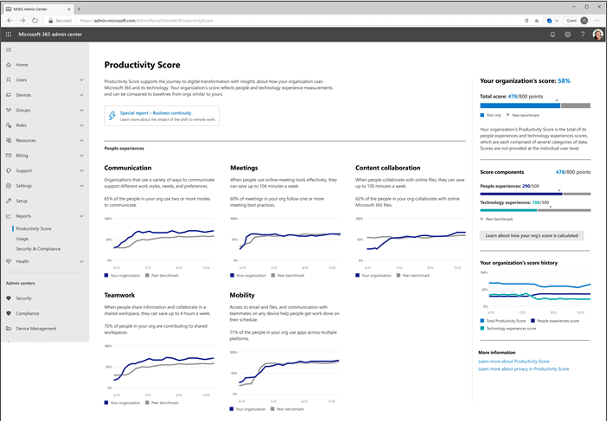
If your company uses Microsoft 365, you have a tool that you can use to find nuggets of productivity gold. This tool is Microsoft Productivity Score.
What Does Microsoft Productivity Score Do?
Microsoft Productivity Score looks at some core areas of your employees’ workflow. It also looks at them in aggregate. Because it’s looking at your team as a whole, you avoid issues with employees feeling personally spied on.
The tool gives you helpful insights that you can share with your staff. These insights help to boost their performance. It also includes hardware-related information. You can use this to see if your company tools are holding people back.
MS Productivity Score looks at the following areas.
People Experiences
This category looks at how people work. Are they using best practices for collaboration or are they doing things the hard way? Do meetings go on forever? Are employees still emailing attachments instead of using shared cloud storage links?
One example of an insight from this category is as follows. Each employee can save an average of 100 minutes per week by collaborating with online files. Productivity Score can show you where your team stands in this metric and many others.
Saving 100 minutes per week is equal to approximately 86.6 hours per year. That is over 2 full weeks of work!
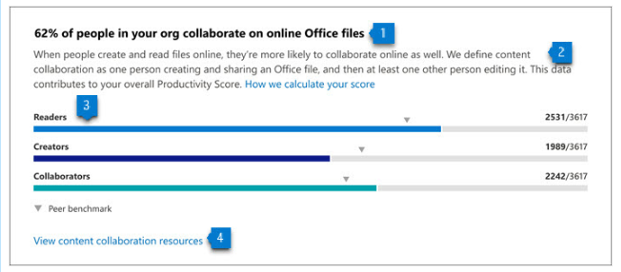
All Productivity Score images are from Microsoft.
The subcategories within people experiences are:
- Communication
- Content Collaboration
- Mobility
- Meetings
- Teamwork
Technology Experiences
Technology experiences look at the health and performance of your devices. Do you have hardware and software on endpoints that are causing issues? Is it slowing your team down? Are there network connectivity problems? Are apps updated as they should be?
This category will look at the technology that your team works with and let you know of any risk areas. When technology is not functioning well or isn’t secure, it can slow your business down.
You will find these three subcategories in the technology experiences area:
- Endpoint analytics (You need Intune for these)
- Network connectivity
- Microsoft 365 apps health
Special Reports
Besides the people and technology experiences, Microsoft Productivity Score has a special reports area. It provides details on business continuity.
This report can show you how employee collaboration and other activities are changing. It looks at these as your company goes through transitions (such as when you transition to remote working or back to in-office work). This report tells you how these changes impact your team’s productivity.
How Productivity Score Helps Your Company
Automatic Metrics Tracking
Microsoft Productivity Score tracks your team’s use of Microsoft 365 applications automatically. It then will provide you with helpful information on how staff use their digital tools.
These metrics give you a good picture of whether employees are using best practices. They may simply need guidance to learn a more efficient way of doing something.
Insights to Understand the Data
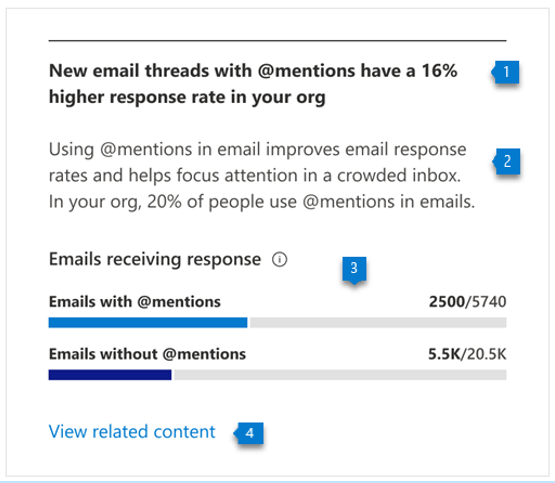
The tool provides you with helpful insights to understand the data. You won’t only get the metrics. You will get the context. This allows you to educate yourself. Then you can educate your employees on things that improve workflow and save time.
For example, getting a response quickly to a question saves time. You may not realize that using @mentions can help achieve that. Productivity Score will tell you how many people use @mentions in team communications and how much this increases the response rate.
Recommended Actions to Take
The third piece of guidance that you gain is what to do about the information. Productivity Score will give you actionable recommendations to improve a metric. This helps you to improve productivity.
The combination of the metric, insight and recommendation make this a comprehensive tool.
Would You Like to Get Started with Microsoft Productivity Score?
We can help you get your organization started with this great tool and provide solutions to increase company productivity. Give us a call at (860) 577-8060 or use our convenient contact form to get in touch.