

Microsoft 365 is a powerful suite of productivity tools used by millions of businesses and individuals worldwide. However, to get the most out of these applications, it is crucial to optimize your settings for maximum performance. This guide will walk you through various techniques and configurations to enhance your Microsoft 365 experience and ensure smooth operation and increased productivity.Read more

Microsoft Copilot has been heading up the business AI charge. It is used in Word, Excel, Edge, Windows and more. This Generative AI-powered app is also showing up in various function-related activities. The latest development is to improve finance processes.
Microsoft Copilot for Finance is a game-changer. It injects the power of next-generation AI into the heart of your everyday workflow. Imagine having an AI companion that understands the intricacies of finance as well as collaborates seamlessly with you.
It can help a seasoned financial analyst or a curious learner. It automates repetitive tasks and provides real-time insights. Copilot is poised to revolutionize how we navigate the fiscal realm.
Read on to see why this innovative tool should be on your financial radar.
What Is Microsoft Copilot for Finance?
Let's do an overview of this new application. Copilot for Finance is a new Copilot experience in Microsoft 365. It features AI-assisted help for financial professionals. It does this from within productivity apps they use every day.
Microsoft Copilot for Finance connects to business financial systems such as Dynamics 365 and SAP. It provides finance-based insights and guided actions in:
- Outlook
- Excel
- Microsoft Teams
- Other Microsoft 365 applications
Benefits of Using Copilot for Finance
Breaking Free from the Manual Grind
Finance professionals are drowning in repetitive tasks. These include data entry, review cycles and report generation. Copilot for Finance throws a lifeline to finance professionals. It automates these mundane activities and frees up valuable time for strategic thinking. Imagine a world where you can focus on high-impact tasks like financial planning, risk analysis and driving business growth.
AI-Powered Insights at Your Fingertips
Copilot for Finance isn't just about automation. It is about intelligence. This AI assistant learns your organization's financial data and behavior. It surfaces insights you might have missed.
Imagine uncovering hidden trends and predicting cash flow issues as well as identifying areas for cost optimization. All of this is powered by AI that works seamlessly within your existing Microsoft 365 environment.
Tailored for Your Team
Copilot for Finance isn't a one-size-fits-all solution. It caters to the specific needs of different financial roles. Imagine streamlining audits with a simple prompt or simplifying collections with automated communication and payment plans. It can also speed up financial reporting with effortless variance detection. Copilot for Finance empowers every member of your finance team. It does this with role-specific workflows and features.
Seamless Integration for a Frictionless Experience
Copilot for Finance integrates effortlessly with your existing Microsoft 365 tools such as Excel, Outlook and Teams. This means no more jumping between applications. You won't be struggling to import data. Imagine accessing financial insights directly within your familiar workflow. This eliminates silos and streams communication across your team.
Built with Trust in Mind
Security and compliance are paramount in the world of finance. Copilot for Finance inherits the robust security features you trust from Microsoft 365. Imagine leveraging a solution that adheres to the strictest data privacy regulations. This gives you peace of mind and ensures your financial data remains secure.
A Glimpse into the Future of Finance
Copilot for Finance represents a significant leap forward in financial technology. It is more than just automation. It is about harnessing the power of AI to augment human expertise as well as transform the way finance operates.
Imagine a future where tedious tasks are a thing of the past. They are replaced by a world of data-driven insights and strategic decision-making and all at the click of a button or text prompt.
Getting Started with Copilot for Finance
Microsoft Copilot for Finance is currently available for early adopters. Do you want to experience its transformative potential? Here is how to get started:
- Visit the Copilot for Finance website: This website provides a wealth of information. This includes product details, functionalities and more.
- Review Requirements: Ensure you meet the licensing requirements. These include specific Microsoft 365 subscriptions as well as browser specifics and other guidelines.
- Connect with Your IT Provider: We can offer support to set up Copilot for Finance. We will ensure it is integrated and secured as well as train your team on its helpful features.
The Future is Now: Embrace the Power of AI
The world of finance is evolving rapidly. Microsoft Copilot for Finance empowers you to embrace this change as well as navigate the future with confidence. Copilot for Finance offers AI-powered insights, streamlined workflows and seamless integration. It could soon become an indispensable tool for every finance professional.
Get Expert Microsoft 365 & Copilot Guidance
AI tools in Copilot are dominating business transformations. You can join or risk missing out on what AI has to offer. We can help you unlock the full potential of Copilot in Microsoft 365 as well as propel your business forward with AI power.
Contact us today to see how we can help your business.

The world of finance is about to experience a seismic shift with the introduction of Microsoft Copilot for Finance. This groundbreaking AI-powered tool promises to revolutionize the way financial professionals work, streamline processes, enhance productivity and unlock new levels of efficiency. Read more

Calendars, task lists and project planning are important business tools. Many people use Microsoft’s apps to power these processes including Microsoft Planner, Microsoft To Do and Project for the web.
These tools help keep processes on track and enable task accountability. However, they are separate apps. Switching between apps can be cumbersome. It adds more complexity to a workflow.
On average, employees switch between 22 different apps 350 times per day.
Microsoft is putting a dent in app overload. The company is rolling out a brand-new version of Microsoft Planner in early 2024. It is packed with exciting features designed to simplify your project management journey.
What apps does the new Planner include?
The new Microsoft Planner combines:
- The current Planner’s collaboration features
- The simplicity of Microsoft To Do for task management
- The capabilities of Microsoft Project for the web
- The automation of Microsoft Copilot (the company’s AI companion)
The new Planner promises to be a powerful tool for staying organized as well as boosting collaboration and achieving your goals with more ease.
Unifying Your Workflow: Tasks, Plans & Projects in One Place
Say goodbye to juggling several apps and hello to a streamlined experience. The new Planner goes beyond basic to-do lists. It seamlessly integrates tasks, plans and projects under one roof.
This means you can manage everything from large to small including simple daily tasks to complex multi-phased projects. You can do it all within a single intuitive interface.
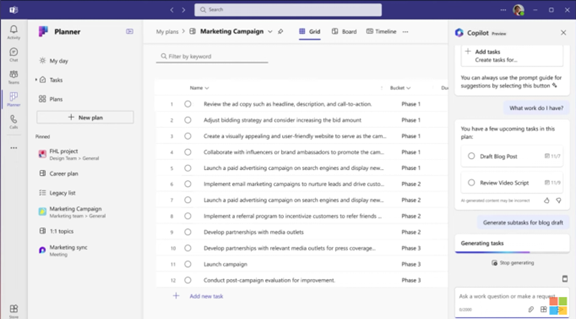
You can use the new Microsoft Planner from within Microsoft Teams or via a web browser. Here are some of the exciting things you will be able to do with it.
Enhanced Collaboration: Working Together Made Easy
Collaboration is key in today's fast-paced world. Working remotely has become the new normal. This means that the tools need to keep people coordinated wherever they are.
The new Planner empowers teams to work together seamlessly. Real-time updates ensure everyone stays on the same page. Features like shared task ownership and comments foster clear communication and efficient collaboration.
AI-Powered Insights: Your Smart Copilot for Success
The new Planner incorporates the power of AI with Microsoft Copilot built in. This intelligent assistant helps you stay on top of your work. It can suggest relevant plans, tasks and goals based on your needs and context. It can even analyze your progress and suggest adjustments to keep you on track.
Scaling with Your Needs: From Simple Tasks to Enterprise Projects
One size doesn't fit all. The new Planner understands that. It offers flexibility to cater to both individual needs and complex enterprise projects. Microsoft Planner can adapt to your specific requirements. It is flexible for use to fill big or small needs. Use it for managing a personal grocery list or to plan and deploy a large-scale company transformation.
Pre-Built Templates: Get Started Fast & Save Time
You don’t need to start from “square 1” unless you want to. Microsoft Planner provides several ready-made templates. You can use these to get started on a new project or goal quickly.
You will see templates for things like:
- Project Management
- Software Development
- Sprint Planning
- Marketing Campaign
- Commercial Construction
- Employee Onboarding
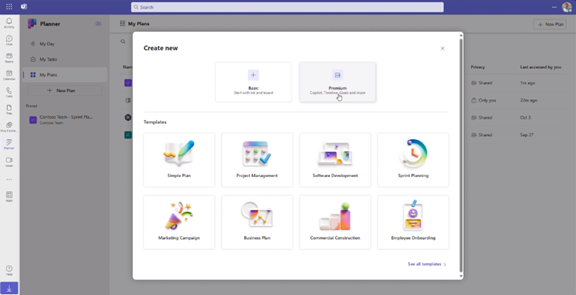
Here is a sneak peek at some key features of the new Microsoft Planner 2024:
- Improved Navigation: A redesigned interface makes finding what you need faster and easier.
- Enhanced Task Views: It has different views (like grid and board views). These let you customize how you see and organize your tasks.
- Microsoft App Integration: Planner integrates with many Microsoft tools including Power BI, Teams, Microsoft Viva Goals, Power Automate and more.
- Customizable Fields: Add custom fields to tasks. Use them to capture specific information relevant to your project needs.
- Goal Setting: Define clear goals and track progress visually within your plans.
- Critical Path: Identify the essential tasks needed to complete your project on time.
- Improved Search: Find the information you need quickly and easily. The app has powerful search functionality.
Access and Availability
Mark your calendars! The new Planner will be available in preview in early 2024. It will become generally available soon after. Some features will roll out later in the year. You can visit Microsoft’s site to sign up for updates and see a feature roadmap.
The Future of Tasks, Planning & Project Management
The new Microsoft Planner 2024 is an example of a trend that we have seen in the digital world. Less is more. This means fewer apps to juggle and more streamlined interfaces.
Planner’s powerful features make it an invaluable tool that both individuals and teams alike can leverage to streamline workflows. It also has an intuitive interface and AI-powered assistant to drive productivity.
Get Expert Business Software Support & Management
Managing both legacy and new cloud tools can be complex. Features often go underutilized and security can be a big problem if it is not done right. Our team of business software experts is here to help you.
Contact us today to schedule a chat.

Microsoft Planner, the collaborative task management tool, is set to undergo a significant update that promises enhanced features and functionalities for users. As organizations increasingly rely on digital tools to streamline workflows and improve productivity, the evolution of Microsoft Planner holds significant implications for teams worldwide. Read more

Microsoft Edge continues to redefine user experiences. This is due to Microsoft’s commitment to innovation. The latest updates bring a host of features. These are designed to enhance productivity, security and browsing satisfaction.
Chrome may have been number one for years but Edge has been steadily gaining popularity. It is now the third most popular browser worldwide. Overtaking Firefox a while back, it is now just behind Chrome (1) and Safari (2).
From personalized workspaces to a built-in VPN, Microsoft Edge is not just a browser. It is a comprehensive toolkit for users navigating the digital landscape. Let's delve into the newest Microsoft Edge features. They promise to elevate your online journey.
A New Era of Productivity: Microsoft Edge Workspaces
Introduction to Workspaces
Workspaces in Microsoft Edge represent a paradigm shift. It is a shift in how users organize and manage their online tasks. Imagine having a dedicated space for each project that seamlessly integrates relevant tabs, documents and websites.
Microsoft Edge Workspaces makes this a reality. It allows users to create custom workspaces. Each workspace represents different aspects of their digital lives. Whether you are working on a project, planning a trip or pursuing a hobby, Workspaces offer a tailored and organized browsing environment.
Key Features of Microsoft Edge Workspaces
- Personalization: Users can customize Workspaces with a unique name and color. This makes it easier to distinguish between different projects or activities.
- Easy Access: With a single click, users can switch between Workspaces. This instantly transitions them between different sets of tabs and online resources. Users associate each Workspace with specific projects or interests.
- Persistence: Workspaces keep their configurations. This is the case even when users close and reopen the browser. This ensures that users can seamlessly resume their work. There is no need to reconstruct their customized environments each time.
- Efficient Task Management: Workspaces make task-focused browsing easier and minimize distractions. This helps users maintain focus on the specific project or activity at hand.
Enhanced Security with Edge Secure Network VPN
Built-in VPN
Microsoft Edge takes a giant leap in prioritizing user privacy and security. The Edge Secure Network uses a new built-in VPN. VPNs (Virtual Private Networks) encrypt internet connections. This helps ensure a secure and private browsing experience. Microsoft Edge now provides users with 5GB of free VPN data per month. This further protects their online presence.
Key Benefits of the VPN in Microsoft Edge
- Enhanced Privacy: VPNs mask users' IP addresses. This makes it challenging for malicious actors to track their online activities. This is particularly crucial when accessing public Wi-Fi networks as well as sensitive information.
- Secure Browsing: The VPN has an encrypted connection. This ensures that data transmitted between the user's device and internet is secure. It reduces the risk of interception by hackers.
- Geographic Consistency: Edge’s VPN will mask your specific location. Websites will see a location similar to yours. When you look up movie times or nearby services, you see what you expect. You cannot choose a specific region to route traffic from.
- Complimentary 5GB Data: Microsoft Edge users receive 5GB of free VPN data each month. To conserve the data limit, content streaming sites aren’t routed through the VPN. These are sites like Netflix, Hulu, Disney+, etc.
Other New Features Added to Microsoft Edge Browser
Microsoft is continuously updating Edge. Here are a few more new features you can enjoy.
- Autofill for Forms: Edge makes filling out forms online easier. It will suggest completions when you start typing into fields. This includes name, email, address, etc.
- Web Capture: Using Web Capture in Edge makes it easy to take a screenshot. You can select an area or a full page. Then paste it into any of your files.
- Copilot: Use the Copilot icon at the top of Edge to access AI features. This includes creating AI-generated images as well as creating quick email drafts and more.
- Read Aloud: Need to step away from the screen for a moment? Let Edge read content for you out loud and enable you to multi-task like there is no tomorrow!
Get Help Exploring Your Microsoft Services
Microsoft Edge establishes itself as a comprehensive solution. It is great for those seeking a more productivity-focused browser as well as a secure and private online environment. Microsoft Edge's latest features enhance the way we work, explore and connect.
Is your company in need of help exploring what Microsoft has to offer? From Edge enhancements to Microsoft 365 tools, we have experts to guide you.
Don’t miss out on all that these solutions have to offer. Our Microsoft experts can help set up, manage and secure your digital workflows.
Give us a call today to schedule a chat.
Microsoft 365 has a powerful suite of cloud-based productivity tools. They can help you work smarter and faster. Microsoft has consistently been at the forefront of innovations and now they are with AI innovations. M365 was one of the very first all-in-one cloud tools introduced as Office 365 in 2013. Now, Microsoft and its business tools are at the leading edge of generative AI.
The Microsoft 365 platform has been adding some amazing AI innovations. They sit inside tools like Word, Excel, PowerPoint and Teams. If you know how to use them, these smart features can enhance your experience as well as significantly boost your productivity.
We will explore some of the ways you can leverage Microsoft 365's new AI innovations so that you can get more out of your work.
Microsoft Copilot: A Game-Changer in Collaboration
Microsoft Copilot is the crown jewel of Microsoft's AI innovations. It is designed to be your virtual collaborator. It can help you generate code, write documents and craft emails more efficiently. This AI-powered tool is built on the foundations of OpenAI's ChatGPT technology. This enables it to understand context and anticipate your needs as well as generate content in a remarkably human-like manner.
Here are some of the tools in the Microsoft universe that incorporate Copilot:
- Word
- Excel
- PowerPoint
- Outlook
- Teams
- Edge
- Windows
- Bing
- Dynamics 365 Sales
How can you take advantage of the benefits offered by Microsoft Copilot? Here are a few ways to jump on the added efficiency and time-savings they bring.
1. Speed Up Document Creation
In the realm of document creation, Copilot shines as a versatile writing companion. It helps when drafting a report, crafting a presentation or composing an email. Copilot provides intelligent suggestions to help you articulate your thoughts more effectively. It speeds up the writing process. It also ensures that your content is clear, concise and tailored to your audience.
2. Enhance Your Teams Meeting Experience
One of the key strengths of Copilot is its ability to enhance collaboration across teams. It can create coherent and context-aware responses such as a summary of meeting notes and an action item list.
Another helpful feature is the ability to catch up on what you have missed. Have you arrived late to a Teams meeting? You can just ask it to summarize the important points of the conversation so far.
3. Create PowerPoints with Ease
More people can become “PowerPoint Masters” with Copilot. The AI-infused features in PPT can create a slide deck for you based on text prompts.
It can tap into Microsoft’s stock images to fill your slides. Copilot will also suggest text to use based on your presentation topic. Do you have a PowerPoint that you need help with? The tool can reorganize your slides for a better presentation flow.
4. Enjoy Smart Business Insights in Excel
Another new AI innovation in Microsoft 365 is Excel Ideas. This feature can help you analyze and visualize your data with ease. Excel Ideas can automatically detect patterns and trends in your data. It will suggest charts, tables and summaries that best suit your needs.
You can also use Excel Ideas to ask natural language questions about your data such as, "What is the average sales by region?" or "Which product has the highest profit margin?" You will get instant answers in the form of charts or formulas.
5. Save Time in Outlook with AI Help
We all get those long emails from time to time. They are the ones that you push to the bottom of your inbox for when you have more time. The new Copilot feature in Outlook can help. Just ask it to summarize the key points of an email for you to save yourself reading time.
You can also use Copilot in Outlook to help write emails. It will save help by providing a first draft as well as suggest responses to emails in your inbox.
A Future of Intelligent Productivity
As we embrace the era of intelligent productivity, Microsoft 365 becomes more powerful. Its new AI innovations pave the way for a more efficient work environment.
By incorporating these capabilities into your daily workflow, you are staying competitive as well as setting the pace for the future of work.
Tap into the Future with Our M365 Services
Microsoft 365's commitment to continuous improvement ensures that you have cutting-edge tools. They are the ones needed to stay ahead, innovate and thrive in a rapidly evolving digital landscape. Embrace the power of AI. Unlock a new dimension of productivity with Microsoft 365.
Our team of M365 experts can help you ensure you are getting the full benefit of these features as well as new ones Microsoft is developing and rolling out in the coming months. We will help your team save time and improve your bottom line.
Give us a call today to schedule a chat.
In a world where technology constantly evolves, Microsoft stands at the forefront. It continues to pioneer innovations that transform how we interact with our digital universe and that includes Windows 11.
The fall Windows 11 update is a testament to Microsoft's commitment to excellence. It is more than just an upgrade. It is a leap into the future of computing. Microsoft touts it as “The most personal Windows 11 experience.”
Let’s explore some of the great features that make this update so significant.
Microsoft Copilot: Your Intelligent Partner in Creativity
A standout feature of the fall Windows 11 update is Microsoft Copilot. This AI-driven marvel is like your personal PC assistant.
Need help summarizing a web page? Want to change to dark mode but forgot how? Looking for a quick custom image for a social media post? Microsoft Copilot can do all that and more.

Copilot is seamlessly integrated into Windows 11. It offers real-time suggestions and turns ideas into reality with remarkable ease. Ask it what you need and the AI engine gets to work.
Updated Apps (Paint, Snipping Tool, Clipchamp & More)
Have you ever wished that Windows’ Snipping Tool could do more? This update grants that wish. The Snipping Tool is just one of many to get an AI upgrade.
Look for new capabilities in Paint, Clipchamp and Photos. Get a unique image from inputting a text prompt and style. The Cocreator tool in Paint makes it easy to jumpstart your creativity. It will generate the image and then you can edit it in the same app.
Microsoft Clipchamp is one of the easiest video creator tools out there. You can now just drag in your assets and clips. Then click to have the AI engine work its magic to create a video for you.
The new Clipchamp Auto Compose feature can:
- Recommend scenes
- Make edits
- Create a narrative based on your inputs
Easy Data Migration with Windows Backup
When you buy a new computer, moving data can be a pain. It can take hours to move your “pc life” between devices and there is always the risk that you will miss something.
The new Windows Backup feature makes moving between computers easier. You can choose backup options and folders. When ready to move, it is a simple process. You can restore the new PC from another backed-up PC.
Microsoft Edge: A Faster and More Secure Browsing Experience
Microsoft Edge received significant enhancements. These focus on speed, responsiveness and security. The Edge Secure Network feature offers more gigabytes. Microsoft increased user storage from 1GB to 5GB. This function encrypts your internet connection to secure data.
Edge Secure Network has many features of a VPN. This is great for extra online security. It is also helpful for companies trying to prevent breaches from clicks on phishing links
Save Energy & Battery Power
A feature called Adaptive Dimming is another enhancement of this update. Your screen slowly dims if you’re no longer paying attention. This has the dual benefit of saving energy and helping you refocus.
PC sensors power this feature as well as two others so it is going to be more common with newer computers.
The other two features that use sensors are:
- Wake on Approach
- Lock on Leave
A More Personal Experience
Beyond the technical innovations, this update brings more including a more personal touch to the user experience. Tailored to individual preferences, Windows 11 becomes an extension of the user's identity.
This includes things like:
- Personalized themes
- Custom widgets
- Intelligent assistants
Every interaction feels curated and intuitive. It makes for a truly personalized operating system.
Other Cool Enhancements
There is a lot of excitement packed into Windows 11. Here are a few more new features you can explore.
- Copilot in Microsoft Shopping: Find what you need fast when shopping online. Bing will provide tailored recommendations based on your requests.
- Content Credentials: Add an invisible digital watermark to your AI-generated images in Bing. Cryptographic methods help you tag your work.
- Bing Chat Enterprise Updates: Boost work creativity and enjoy multimodal visual search. Find information using only images.
- E 3 Model from Open AI: Use the Image Creator in Bing and you will likely be impressed. It has had an upgrade and uses the DALL.E 3 model to render images from text prompts.
Harness the Power of Microsoft Products
Microsoft is definitely a leader in work productivity tools and it has been for a long time. If you are still working like it was 2020, let us help you upgrade. Employees can be more efficient than ever with the right apps.
We have your back with Microsoft 365, Windows 11 and other solutions. Our experts will guide you so you can gain an edge on the competition.
Give us a call today to schedule a chat.
The use of AI-driven processes is exploding. Every time you turn around software is getting more intelligent. Harnessing the power of AI and machine learning is crucial for staying competitive.
Microsoft is a pioneer in the tech industry and this new AI era. It continues to lead the way with innovative solutions designed to empower businesses. One such innovation is Microsoft Sales Copilot.
This is a tool poised to reshape the future of business. We will delve into what Microsoft Sales Copilot is as well as how it is revolutionizing the world of sales and customer insights.
The Birth of Microsoft Sales Copilot
Microsoft Sales Copilot is the latest addition to the company's robust portfolio. It was officially introduced in July 2023. It represents a significant leap forward in leveraging AI and machine learning. It is designed specifically to enhance sales processes and customer engagement.
This groundbreaking tool is built on the foundation of Dynamics 365 Customer Insights. This is Microsoft's platform for unifying customer data and delivering actionable insights. The tool combines the capabilities of Customer Insights with AI-driven features. Sales Copilot offers sales teams a comprehensive and intelligent solution both for customer engagement and relationship management.
What Can Microsoft Sales Copilot Do?
Personalized Customer Insights
Personalized customer insights is one of the core features of Microsoft Sales Copilot. It achieves this by leveraging AI and machine learning to analyze a wide range of data sources. This includes:
- Customer behavior
- Buying history
- Customer interactions
By aggregating and processing this data, Sales Copilot saves salespeople time. It can provide sales professionals with a 360-degree view of their customers as well as help them understand preferences, needs and potential pain points.
AI-Driven Recommendations
Sales Copilot doesn't just stop at providing insights. It goes a step further by offering AI-driven recommendations. These recommendations guide sales teams in their interactions with customers.
For example, the tool can suggest things like:
- The most appropriate communication channels
- Timing for follow-ups
- Tailored, client-specific content recommendations
This level of personalization enables sales teams to engage with customers more effectively.
Enhanced Collaboration
Collaboration is a cornerstone of successful sales processes. Sales Copilot recognizes this by facilitating collaboration among team members. It provides a centralized platform where sales professionals can do things like:
- Share customer insights
- Discuss strategies
- Collaborate on deals
This improves internal communication. It also ensures sales team alignment in the approach to engaging with customers.
Predictive Analytics
Predictive analytics is another powerful aspect of Microsoft Sales Copilot. The tool analyzes historical data and customer behavior patterns. This allows it to predict future customer actions and trends.
This empowers sales teams to make informed decisions as well as proactively address customer needs rather than simply reacting to them.
Seamless Integration
Sales Copilot seamlessly integrates with other Microsoft tools and services. This creates a unified ecosystem. This integration allows for a smooth flow of data between applications. It eliminates the need for manual data entry and reduces the risk of errors. It also ensures the consolidation of all customer interactions and data. Having customer information in one place makes for easy access and analysis.
Cloud Migration Program
Besides Sales Copilot, Microsoft also introduced a new cloud migration program. This is in conjunction with Dynamics 365 Customer Insights. This program aims to simplify the process of migrating customer data to the cloud. The integration of Sales Copilot with this program further enhances its capabilities. It does this by providing access to a wealth of cloud-based data.
How Does Sales Copilot Benefit Your Business?
Microsoft Sales Copilot holds immense promise for businesses across various industries. It enables sales teams to work more intelligently and efficiently. The tool has the potential to drive revenue growth and enhance customer satisfaction. Here are some ways in which Sales Copilot can benefit your business.
Improved Customer Engagement
Personalized insights and AI-driven recommendations have many benefits. They enable sales professionals to engage with customers more meaningfully. This can lead to higher conversion rates and increased customer loyalty.
Streamlined Sales Processes
The tool’s predictive analytics and collaboration features can streamline sales processes. It can make them more efficient and effective. This can reduce the time and effort required to close deals.
Data-Driven Decision-Making
Sales Copilot provides access to a wealth of customer data and insights. This empowers businesses to make data-driven decisions. This can lead to better-targeted marketing campaigns, product development and customer service strategies.
Enhanced Competitive Advantage
Businesses that leverage Sales Copilot can gain a competitive advantage. It helps them stay ahead of customer trends and needs. This can be particularly valuable in fast-paced and competitive industries.
Scalability and Flexibility
Microsoft's cloud-based solutions (including Sales Copilot) offer scalability and flexibility. This allows businesses to adapt to changing market conditions and customer demands.
You Don’t Need to Face the AI Frenzy Alone
AI and machine learning are transforming business tools rapidly. This can cause business owners to worry about falling behind competitors.
You don’t have to figure this all out yourself. We can help. Give us a call today to schedule a chat.

Microsoft’s recent investment in OpenAI’s ChatGPT has ignited a wave of innovation in the tech world and particularly within the Microsoft Edge browser. This strategic partnership has given birth to a multitude of groundbreaking features that promise to enhance the user experience. Read more