

Year end is when many companies are doing reviews in order to plan ahead for the new year. One area where it is vital to do this is cybersecurity.Read more
October is National Cybersecurity Awareness Month and the main theme is, “If you connect it, protect it”. This year’s campaign focuses on device security for all endpoint devices both at work and at home.
The makeup of today’s networks look very different than those of just a decade ago. Computers and servers used to be the main endpoints that businesses had to worry about protecting. Now they have been eclipsed by mobile devices.
60% of the endpoints in an average office are mobile devices.
IoT devices are also being introduced into the office technology environment more frequently with the addition of IP security cameras along with wireless printers, voice assistants and more.
This means that cybersecurity efforts need to cover all three major types of endpoints:
- Computers
- Mobile devices
- IoT devices
Everyone plays a part in protecting devices from malware and data breaches. It takes both companies and users working together to keep devices secure and properly protected.
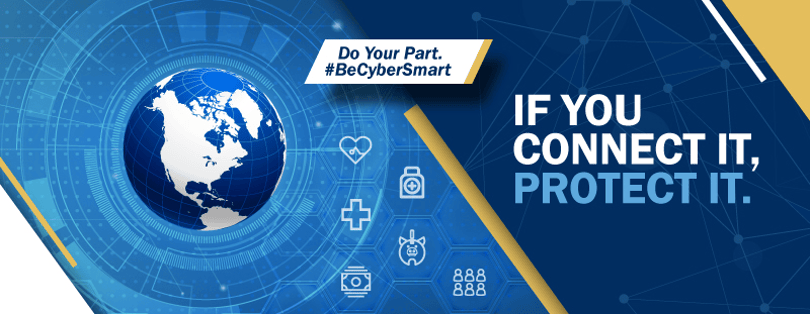
Do Your Part for Device Security
IoT Device Security
From the end of 2018 to the end of 2019, IoT adoption grew 21.5%. However, security remains a major concern with these smart gadgets. 57% of IoT devices are vulnerable to mid or high-severity attacks.
IoT security needs to be front and center as these devices become integrated into daily workflows.
Here are several best practices for IoT device security.
- Immediately Change the Admin Login: Manufacturer default logins are only designed for you to gain entry to set up an IoT device. They should be changed immediately. Otherwise, hackers can easily compromise your device.
- Change the SSID: The SSID (device name) should be changed to something that does not identify the device type, brand or location.
- Disable Unneeded Features: IoT devices can have sharing features that make them more vulnerable to hackers. Turn off any features you don’t absolutely need.
- Turn Off Camera/Mic When Not In Use: Voice assistants are helpful but they can also record things that you don’t want them to. Turn off camera and mic features when the device is not in use.
- Update Firmware Regularly: It is not always evident when a router or other IoT device has an update so you need to log into the settings regularly to check for them.
Mobile Device Security
Mobile devices have now taken on more of the workload than computers in many offices. This means they have just as much access to sensitive data but they often are not protected as much as they need to be.
Here are some of the mobile device security protections to consider:
- Use a Mobile Device Manager: Companies should use a mobile device manager to keep track of all mobile devices that have access to their data. This includes devices that are both company and employee owned.
- Only Install Legitimate Apps: Malicious apps are multiplying fast. It is important to research app makers thoroughly before installing a new app so that you do not fall victim to malware or a banking trojan.
- Keep Devices Updated: Keep mobile device operating systems and apps updated regularly.
- Don’t Auto-Connect: Do not allow mobile devices to auto-connect to Wi-Fi. You could end up connecting to an unsecure network or one that a hacker has set up as a decoy.
- Use “Find My Phone”: Make sure to use a “Find My Phone” feature on all mobile devices so you can lock or wipe them remotely if lost or stolen.
- Install Mobile Anti-Malware: Mobile devices are just as susceptible as computers to malware and viruses. Make sure you install a reliable anti-malware application.
Computer Security
You would think that desktop and laptop security was a given. However, many offices still do not have their devices properly protected.
Here are the best practices you should be following to secure computers with access to business data:
- AI-Powered Anti-Malware: Make sure you are using an AI-powered anti-malware that can detect suspicious behavior. This is needed to catch zero-day threats (which now make up a large part of malware attacks).
- Automate Updates: It is vital to keep computers updated and patched to avoid leaving them vulnerable to a breach. Managed IT services offer this and other important protections.
- Use a DNS Filter: Most phishing attacks these days use malicious URL’s instead of attachments. It is important to use a DNS filter on computers to block malicious sites and redirect users to a warning page.
- Email Filtering: Another critical protection against phishing attacks is to use an email filter to help keep dangerous emails and spam out of user inboxes.
- Managed Backup: One hard drive crash can mean a major data loss incident. It is vital to back up all computer data regularly using a managed backup and recovery strategy.
Make Device Security Easy with a Managed Services Plan
Sound Computers can help your business ensure your devices are protected and updated regularly.
Contact us today to learn more about our expert managed services! Call 860-577-8060 or reach us online.
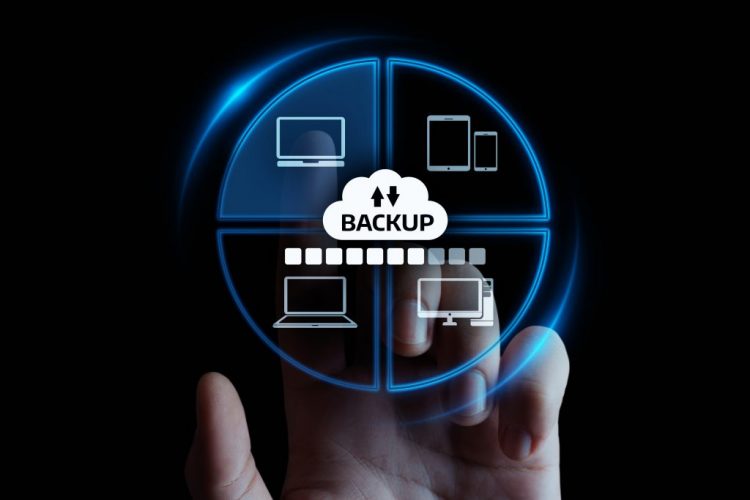
Are you using OneDrive, Google Drive or Dropbox as a backup system? If so, you may be surprised to find out that cloud storage systems are not the same as a data backup.
In fact, 1 out of 3 companies have lost data that is stored in SaaS (Software as a Service) applications. Often this data loss comes out of the blue and it is only then that a business owner realizes that data in cloud services needs to be backed up just like data on computers or servers.
Microsoft says as much in its services agreement. The company warns that users can lose access to data if services become unavailable and recommends that “you regularly backup your content and data” stored in Microsoft services.
If you think your backup and recovery strategy has you covered but it doesn’t include your cloud services, then you could be in for a data loss incident in the future.
Ways You Can Lose Data from Cloud Services
It is easy to think of cloud storage as your “back up copy” when a cloud service is syncing a file on your computer. However, there are some big differences between cloud storage and a true backup and recovery service.
If a file is saved to a backup and recovery solution, that file is not in sync with the copy on your computer so it can’t be deleted from inside the backup. The same is not true of a cloud application.
There are several ways your data can be deleted from the cloud. Let us take a look at the reasons why you need to be backing your data up separately in a backup and recovery solution as part of your business continuity and disaster recovery strategy.
Files Can be Overwritten
Your files in a shared cloud account can be accidentally overwritten by an employee. They might think they have a revision file but they are actually editing a master copy.
Once enough time has passed after the file has been overwritten the original copy is lost forever.
Files Can be Deleted
Since files in cloud storage are designed to be updated and represent a “live” version of your data, they can be deleted. However, files in a backup solution cannot be deleted.
Entire folders can be wiped out by a careless employee or by a hacker who has gained access to user credentials.
Another way that you can lose your cloud data in a platform like Microsoft 365 is when a user is deleted because they no longer work for your company. If the administrator does not transfer all of their data over to another user, the deleted user’s files will be deleted and purged from the system after 30 days.
Ransomware Can Infect Cloud Storage Files
Cloud storage is not impervious to ransomware attacks. If an infected computer is syncing with Dropbox or Google Drive, then those cloud files could also be infected.
If those infected cloud files are not backed up somewhere else, you can end up having to pay a costly ransom to get them decrypted and usable again.
Retention Policies Can Mean Lost Data
Most cloud services are not going to keep files indefinitely and have certain retention policies for deleted email, stored files and more.
For example, Gmail uses a policy that keeps messages for a minimum of 30 days once they have a “deleted” label.
If you do not understand file retention policies of cloud services, it can cause you to lose files that you need to archive for legal or historical reasons.
Breached Accounts Can Lead to Data Loss
Credential theft is on the rise because companies are keeping more of their data in cloud accounts behind a username/password login.
Over 34% of businesses around the world are impacted by insider threats each year. An “insider threat” can be a malicious employee or a hacker that has logged in as an employee using stolen credentials.
Once a cloud account is compromised, the hacker can steal your data and delete it all from your cloud account if they like.
Server Crashes & Outages
Cloud service providers take precautions to avoid downtime for their customers. However, server crashes and outages do occur even on the largest platforms. Servers can be down for hours or even days and there is always the risk with a crash that data was destroyed.
In 2019, services that saw outages included Salesforce, Amazon AWS, Apple Cloud and Microsoft Azure.
A cloud service outage can bring your office to a standstill if you don’t have access to your business data any other way. This is another reason that backing it up is essential to business continuity.
Get Backup & Recovery In Place for the Cloud from Sound Computers
We can help your business put a solid strategy in place to ensure you have a copy of all data in your cloud services so you don’t run the risk of a devastating data loss incident.
Contact us today to schedule a free consultation. Call 860-577-8060 or reach us online.
Just one ransomware incident can cost a business an average of $732,520 and that is if they don’t have to pay the ransom. If they pay it, their losses are nearly doubled!
Ransomware is a form of malware and it can be one of the most costly for a company because it can bring operations to a standstill. This will cost the company hundreds of thousands of dollars in downtime.
One recent attack that happened in Stamford was at the Pitney Bowes headquarters. Ransomware encrypted some of their data which disrupted customer access to some of the company’s services like the ability to refill postage meters.
Organizations of any size can become a ransomware victim and often small and mid-sized businesses are targeted. Hackers look to make off with a quick ransom and then move onto the next unsuspecting target.
54% of U.S. businesses reported being attacked by ransomware within the last year.
As part of your IT security strategy, you should address ransomware and how to avoid falling victim to an attack. This takes a multi-pronged approach that deploys several best practices.
Keep All Your Data Backed Up Regularly
Some organizations hit with ransomware end up coming out mostly unscathed and with much lower costs than the average. This is because they have a solid backup and recovery strategy in place in their business continuity plan.
If you have a protected and managed backup in place that can be easily restored to your devices once the ransomware is removed, you can reduce downtime and get your systems up and running much faster. It also gives you peace of mind to know that you have done everything possible to minimize the threat of a ransomware attack.
You want to ensure that you are backing up all of your data which includes data in cloud storage systems because they can also be infected with ransomware from a syncing computer. Check your backups regularly to ensure they are working properly or use managed backup services through a trusted IT provider like Sound Computers.
Use Anti-Phishing & Spam Filters
Phishing has been the #1 delivery method for ransomware and other types of malware for several years. Phishing emails are getting more sophisticated all the time which makes it more challenging for employees to detect them.
Reduce your risk by putting an anti-phishing and anti-spam filter in place for your business emails to quarantine suspicious emails and keep them out of employee inboxes.
Use an AI-Based Antivirus/Anti-Malware Solution
If you are only using a signature-based anti-malware solution, it is going to miss the majority of the dangerous scripts.
50% of all the malware detected in 2019 was considered “zero-day” which means it is so new that it has not yet been added to a threat database.
In order to detect zero-day threats, you need to have an antivirus/anti-malware solution that uses AI to detect suspicious behavior of code or processes. This will give you a much better chance at catching the newest forms of ransomware before they can infect your system.
Keep All Devices Updated
One of the cybersecurity best practices for just about any type of threat is to keep computers, routers, servers and other devices updated in a timely manner.
Updates often install critical security patches that fix vulnerabilities in a code that can allow software to be manipulated. Ransomware and other forms of malware often take advantage of these vulnerabilities.
Managed IT services can help you take the burden of updates off of your shoulders and ensure those updates are happening when they need to be.
Use DNS Filtering for Safe Browsing
A majority of malicious code spread by phishing emails comes from employees clicking links to malicious sites rather than through opening a file attachment.
Criminals use links as a way to get past an anti-malware or anti-spam application.
DNS filtering will block malicious sites and send employees that click a dangerous link to a warning page rather than the hacker’s website.
Employee Awareness Training
Well-trained employees lead to fewer cybersecurity incidents and can mitigate your risk of being infected with ransomware.
Here are some tips for employee awareness training related to ransomware that can be an effective means of protection:
- Train employees how to spot phishing emails
- Do simulated phishing drills
- Create a step-by-step guide on what to do if ransomware is detected on a device
- Teach employees about social phishing and text-based phishing
- Train regularly instead of just during an onboarding process.
Put System Protections in Place Such as Ringfencing
One of the protections you can put in place on a system to help prevent ransomware from infecting and encrypting files is called ringfencing.
This type of protocol sets parameters on how different programs can interact with each other and can help keep a rogue ransomware application from deploying encryption commands.
Another tactic you can use is application whitelisting which can prevent any unknown applications from running on a computer at all.
Get a Ransomware Protection Checkup from Sound Computers
How well does your current cybersecurity plan have you protected from ransomware? We can do a full IT security checkup and let you know if you are vulnerable.
Contact us today to schedule a free consultation. Call 860-577-8060 or reach us online.

2020 has been a memorable year for businesses in Connecticut and around the world. The pandemic has changed the way that many companies think about how they operate and what their technology solutions need to look like.
Cloud solutions for things like phone systems and video conferencing have become a necessity and businesses are incorporating new hybrid workforces with employees working both from the office and from home.
64% of workers would like to spend at least some time at the office with co-workers rather than being remote 100% of the time.
Autumn is under way and school is back in session (both physically and virtually) so many employees are headed back to the office for the first time in months.
It can be heartening to see your office come to life again with your team but it also takes a careful safety strategy to ensure that employees and any customers that may visit feel safe and protected.
What is the “Swiss Cheese” Risk Mitigation Strategy?
There is a model that has been used since the early 1990’s in the healthcare industry along with others. It is designed as a set of layers that provide a cumulative benefit for mitigating risk.
This “Swiss Cheese” model was named as a way to demonstrate how several strategies deployed together do things like reduce a patient’s risk of infection or create an environment that results in fewer airline safety incidents.
How does this relate to making your business safe for your returning employees?
Think of each COVID safety strategy as one slice of Swiss cheese. Each one will have “holes” (i.e. vulnerabilities) when used alone. However, when they are stacked together your entire strategy will have fewer vulnerabilities or areas of potential coronavirus spread.
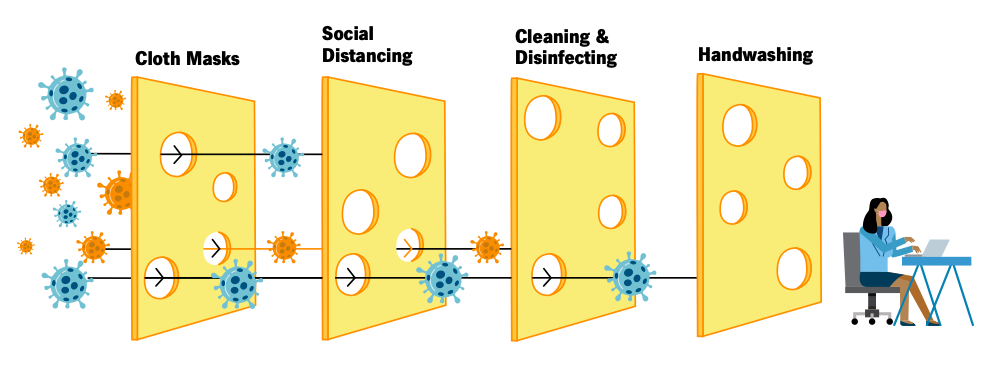
Cleveland Clinic “Return to Work Amid COVID-19” Guide.
Layers to Put in Place to Make Your Workplace “COVID Safe”
A layered strategy to make your workplace safe for employees is similar to one used for cybersecurity to prevent malware infections and data breaches.
Many of the practices below may seem like common sense and have been touted by experts for months now. However, the biggest take away is to use several of them together rather than just one or two so that you can strengthen your COVID safety and reduce the risk of spread.
Here are several layers you should use to keep your workplace free of coronavirus:
Distance Work Areas & Use Distancing Markers
One of the challenges for businesses with smaller office or retail spaces is trying to distance everyone between 6-8 feet apart.
This could be where a hybrid strategy comes in handy. This means employees will rotate which days they work at the office and which days they work from home so that fewer workstations are required.
You want to put up distancing markers around the office to remind everyone of a 6 to 8 foot minimum.
Use Plexiglass Counter and Desk Shields
Plexiglass shields have been showing up in grocery stores and other retailers as a way to help prevent the spread of coronavirus. They can also be very helpful at your business.
Use them around employee desks, the front reception desk and anywhere else people may be positioned for more than a few minutes.
These have the dual effect of both helping prevent the airborne spread of COVID-19 and making those on the other side of the plexiglass shield feel more secure.
Mandate Use of Masks
Wearing face masks has been found to be a very helpful layer in any COVID risk mitigation strategy. Mandating mask wearing at your building can help make everyone feel safer.
If you have some employees resisting, you could mandate it when employees are walking through the building or are not distanced by 6-8 feet as a compromise.
Provide Sanitizing & Handwashing Stations
You can encourage frequent handwashing which is another important safety measure for mitigating the spread of the virus. Make sanitizing and hand washing stations convenient for employees to use throughout the day.
Sanitize All Surfaces on a Schedule
The additional sanitizing can be a burden to some small businesses but it is a necessary step to ensure everyone is safe from potential contraction of the coronavirus.
You can work with a cleaning service that comes in nightly or in the early morning hours to sanitize or enlist the help of your employees to keep all surfaces disinfected on a regular schedule.
Here are some tips from the CDC on cleaning and disinfecting your facility.
Use the Outdoors (or Bring Them In) When Possible
Once that fall chill hits the air here in Connecticut conducting meetings outside is is going to be a challenge for most businesses.
However, anything you can do to conduct certain activities (like team meetings) outside or simply opening windows to bring in fresh air can also be a helpful risk mitigation layer in your Swiss cheese strategy.
Get a Pro to Help You Distance Your Workstations & IT
Trying to move your technology around yourself for distancing measures could leave you with connection issues or safety hazards. Call on Sound Computers to help move your workstations and other IT equipment safely.
Contact us today to schedule a free consultation. Call 860-577-8060 or reach us online.
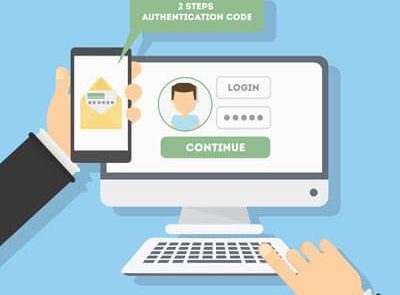
The password isn’t nearly as secure as it used to be. Hackers have begun to take advantage of extremely powerful solutions designed to brute force their way into accounts by using software to rapidly guessing thousands of passwords per second, making it extraordinarily difficult to prepare yourself for them.
What’s the best way to guarantee that passwords aren’t going to be the downfall of your company? A great start is by taking a close look at password best practices and two-factor authentication.
Read more
Data security isn’t a matter to be taken lightly, as too many businesses have found out the hard way. Unfortunately, there are far too many simple ways to correct common security issues - enough that it’s foolish not to do so. We’ll review a few ways to fix security issues, after discussing one of, if not the, most egregious security failings in modern history.
Read more
In April 2020, about 50% of surveyed businesses had 81% or more of their employees working remotely. That meant buildings were sitting empty while companies were being run completely remotely.
Now that re-openings are occurring around the US, many small and large business owners in Connecticut and the rest of the country are contemplating what it would take to keep their business remote and close their physical office to save money on overhead.
Technology solutions have made things possible that most companies would not have considered in the past. One of these is the ability to eliminate a physical office and put that money saved back into their business.
Even before the pandemic began, companies like Apple and U-Haul were running their customer support departments through at-home workers. Many organizations are considering a permanent switch to a virtual office now that the initial shut down from the pandemic has started to lift because they realize that it CAN be done.
One big reason is the cost savings. It is estimated that for each remote worker a business will save approximately $22,000 per year.
Where do those savings come from? A number of areas contribute to the savings:
- Improved productivity
- Office space savings
- Savings on utilities and other physical office costs
- Travel/commuting costs
- Improved employee retention
- Reduced absenteeism
- Ability to hire Independent Contractors for Virtual Help which potentially reduces the cost of benefits and wasted downtime by paying for only what they need
- Business continuity improvements.
If you have been thinking about the boost in bottom line from lowering your overhead by closing your physical office, read on for the things you need in place to make that happen.
How to Successfully Transition from a Physical to Virtual Office
There are some core things you need to have in place to ensure your business can run virtually just as well (or better) than it did with a physical office location.
Virtual Office Address Service
One thing you lose when you close your physical office is your business address. You want to keep a professional address and also have a level of separation between your home and work life which is why using your home address for your business is not a good idea.
There are many virtual office address services you can use that give you a little more legitimacy than just a P.O. box. A virtual address typically will be to a physical office building that provides conference room rental, office rental and more.
It gives you a physical address so that if someone were to look you up on Google street view, it would be to an office park or office building that allows you to have mail handling services for your company. This also keeps your Google My Business listing as an effective tool.
Team Collaboration Tool with Video & Chat
Your employees need to have the ability to virtually “stop by each other’s office” and this can be facilitated with a tool like Microsoft Teams. It makes it easy to chat, share files, use team channeled messaging and video/audio chat.
Encouraging the use of short video chats and team video meetings keeps everyone feeling connected and like part of the team even though they are all working in different locations.
Cloud Productivity & Storage Apps
The cloud is what is powering the ability for companies to work remotely. You want to put in a streamlined cloud productivity suite that includes cloud storage.
Utilizing less app platforms will be better for integration, automation and the user learning curve. Platforms like Microsoft 365 and G Suite give you cloud storage and several productivity tools that all integrate and make co-authoring and online collaboration easy.
Device & Network Security
Even though the computers accessing your business data are now located in employee homes instead of an office, you still need to ensure they have protection to keep your data safe.
The best way to do this is through a managed IT services plan that provides multiple security and user benefits, including:
- PC health monitoring
- Managed updates
- Managed antivirus/anti-malware
- Web protection
- Helpdesk support
- Remote support
When it comes to network security, the best way to secure data transmissions on so many different home networks is to use a business virtual private network (VPN).
A VPN will encrypt all online sessions no matter how unsecure the Wi-Fi network might be and can be used on computers and mobile devices.
VoIP Phone System
Virtual company phone lines is a must for a business without a physical office. VoIP allows your phone lines to be answered from anywhere and gives a professional sounding experience to the caller.
VoIP also costs much less than a traditional landline phone system and you can easily add or remove users whenever you need to.
Clear Virtual Work Policies
It is important to have policies in place so employees will know what is expected of them now that you operate from a virtual office.
For example, set up work hours, break times, etc. just as you would at a physical office.
Also, create policies for communications that might not have been necessary when everyone worked at the same location. For instance, instruct employees to set a “status message” in your office communications app when they are away from their desk or on the phone.
Get Help Transitioning to a Fully Virtual Office
If you have been considering making the switch to a virtual office, Sound Computers can help you put the technology pieces in place to ensure a successful transition.
Contact us today to schedule a free consultation. Call 860-577-8060 or reach us online.

The popularity of TikTok has exploded during the pandemic. The social media app that launched in 2016 has people addicted to watching short user video clips edited with effects and music.
The average user spends 52 minutes a day on the app and it is not just kids. Adults have been drawn to the app as well. Even some small businesses have discovered that they can use it for marketing to find new customers.
However, the app has not only been in the news because of its recent growth. It has been banned by the U.S. military and companies like Wells Fargo. There is also a potential ban looming for TikTok in the U.S.
The controversy stems from the fact that the company that owns TikTok, ByteDance, is based in China.
There are worries that because of all the data the app collects, it could be a serious threat to online safety for millions of Americans and the app could actually be used for spying by the Chinese government.
Currently, Microsoft is in talks to possibly purchase the app to help prevent the ban. In the meantime, people are still posting, messaging and watching videos on the app. During that time, a lot of data is being collected and it is likely a lot more than they realize.
How Much Data Are You Giving Up to TikTok?
In this day and age, people are used to having their movements tracked online using cookies and typically understand the tradeoff of using a free app that shares data with advertisers.
But what about having your keystroke patterns tracked? That is just one of the pieces of data users may not realize is being collected when they use TikTok.
A virus removal can be done to help prevent adware. However, when it comes to an app you install and then activate by agreeing to its policies, data is collected with your permission even if you are not fully aware of how much data they have collected.
We have reviewed the application’s privacy policy and here are the types of data that the app is collecting from you and your device:
Standard Registration Information
This includes the information you provide when you sign up and includes things like your username, password, email address, phone number and age.
Profile Information
The app will also collect the data you set up in your profile such as your profile image, your name and your other social media accounts. When you connect accounts like Twitter or Facebook to TikTok, that means the app will collect more data from those other social accounts.
Your Generated Content
Any content that you add to the platform is also being collected. This would include videos or photos you post and the comments you make on videos.
Your Social and Phone Contacts
When you give the app permission, it can also collect contact information that you may have in your phone book/contact application and in any connected social media accounts.
Data on your contacts that the app collects includes names, phone numbers and public profiles on social accounts.
Device Information
Here is where data sharing can get a little scarier due to the details the app collects from your mobile device automatically. This includes:
- Your IP address
- Model of your device
- Mobile carrier
- Time zone setting
- Operating system
- App and file names and types
That last one is very concerning because it means that TikTok is collecting information on the file names and types that are on your mobile device as well as all the apps you have installed.
Keystroke Patterns
TikTok’s privacy policy also states that it collects “keystroke patterns or rhythms.” This should be the most worrisome piece of data collection of all because this can be extrapolated to mean that every keystroke you type is being recorded by the app.
That would include when you input passwords and your credit card numbers. While the app maker may be more interested in analyzing how fast you move from one key to another, the fact that they have your keystroke data does not stop it from being used for more nefarious purposes.
Location Information
The app collects your location information from your SIM card and/or IP address. With your permission, it can also collect your GPS tracking data. You can stop that by turning GPS location off on your phone or specifically for the app.
Message Content
If you are using TikTok for direct messaging with someone, the app is also collecting, scanning and analyzing the information in any messages you send and receive through the app.
Who Does TikTok Share Your Data With?
That is quite a lot of invasive data that the app collects on its users! It also does not keep all that data to itself so it can share it with any number of entities including:
- Service providers and business partners
- Advertisers
- Within the corporate group
- In connection with a sale, merger or other business transfer
- For legal reasons (including “government inquiries”)
How Safe is Your Mobile Device?
Invasive apps are just one potential security issue when it comes to smartphones. Mobile malware is also on the rise. Sound Computers can help you ensure your personal or company’s mobile devices are protected.
Contact us today to schedule a free consultation. Call 860-577-8060 or reach us online.

Anyone dealing with protected health information (PHI) has to comply with HIPAA including doctor offices or nursing homes.
The Health Insurance Portability and Accountability Act (HIPAA) was designed to ensure personal health information is protected from unauthorized disclosure and ensure that patients have access to their own health information.
It has multiple technology guidelines that apply to anyone that generates, transmits or stores patient health records.
Unfortunately, these regulations can be difficult for many small and mid-sized businesses to get their heads around which leaves many Connecticut business owners at risk of a HIPAA violation. There is always the question of “Have we thought of everything?”
HIPAA violation penalties range from $100 to $50,000 per incident or per health record.
If technology and network systems are not set up with the proper protections, it can lead to a data breach or data leakage incident due to the inadvertent exposure of PHI. HIPAA fines can be levied for anything from failing to properly secure a patient records database to leaving a laptop unattended with a patient record in plain sight on the screen.
Be Aware of These HIPAA Mistakes to Avoid
There are some common HIPAA mistakes that businesses tend to make which get them into trouble.
Being aware of these pitfalls and how to avoid them can help you prevent a costly data breach and result in fines and loss of business.
Not Having Adequate Data Encryption on Mobile Devices
Mobile devices are often outside a company’s on-premises firewall or other security protocols but they are being used much more often by on-the-go medical staff to review patient information.
One of the mistakes companies make is not properly securing or encrypting data being transmitted to and from staff mobile devices which can lead to it being compromised.
Putting in place a business virtual private network (VPN) can help you avoid this problem. It encrypts all internet traffic and can be used on both computer and mobile devices.
Lost Laptop or Mobile Device Containing PHI
Another common HIPAA violation can happen when someone loses a laptop or mobile device that contains PHI.
Once a device is lost or stolen, anyone can access anything on it if you don’t have protections in place which means you could be facing fines for each patient record exposed.
An endpoint device manager, such as Microsoft Intune, can help you secure lost devices immediately. This type of tool allows you to remotely lock or wipe a device as well as detect any activity.
Not Using HIPAA-Compliant Business Associate Agreements
Companies that are subject to HIPAA are also responsible to ensure any vendors they work with and share sensitive information with also follow HIPAA guidelines.
The HIPAA rules dictate the need to create and use business associate agreements that confirm this HIPAA compliance. Business associates can include IT professionals, payment processors or anyone else that may have access to patient information.
Many IT professionals can help you with vendor management when it comes to HIPAA compliance to ensure each of them signs a HIPAA-compliant Business Associate Agreement.
Not Notifying Impacted Parties of a Breach Within 60-Days
When a data breach happens, all that is usually on a company’s mind is securing their data and immediately addressing the reason for the breach. In the aftermath of returning to normal business operations, 60-days can go by pretty quickly. Some companies may not even realize they need to make all notifications within that time.
HIPAA requires that anyone impacted by the data breach, including any clients that may have had their information exposed, need to be notified within 60 days of breach discovery (not containment).
HIPAA regulations can seem overwhelming if you are trying to navigate them on your own and things like the 60-day notification rule can easily fall between the cracks. This is another reason to work with a trusted IT partner like Sound Computers for HIPAA compliance help.
Human Error – Lack of Data Handling Procedures
A patient health record left out in a common area, an unattended computer without a screen lock and a clicked phishing email link are all examples of human-caused reasons for HIPAA violations.
If an organization doesn’t have clear data handling policies that employees are regularly trained on, human errors are much more likely to cost you in HIPAA compliance penalties.
It is important to conduct ongoing cybersecurity and HIPAA compliance training so procedures stay fresh in an employee’s mind. Some of the things you should cover are the following:
- How to identify a phishing email
- Password security
- Data handling procedures
- Physical device security
- The cost of HIPAA violations
- Examples of unintended HIPAA violations
- Mobile device security
Get the Help You Need with HIPAA Compliance
Sound Computers can help your company avoid making common HIPAA mistakes by ensuring you have the network and technology protections in place you need.
Contact us today and we can customize a protection plan that fits your unique needs. Call 860-577-8060 or reach us online.