

Have you ever seen a video of your favorite celebrity saying something outrageous? You find out later that it was completely fabricated. Perhaps you have received an urgent email seemingly from your boss but something felt off.
Welcome to the world of deepfakes. This is a rapidly evolving technology that uses artificial intelligence (AI). It does this to create synthetic media in the form of videos or audio recordings. They can appear real but are actually manipulated.
People can use deepfakes for creative purposes such as satire or entertainment. However, their potential for misuse is concerning. Deepfakes have already made it into political campaigns. In 2024, a fake robocall mimicked the voice of a candidate. Scammers wanted to fool people into believing they said something that they never said.
Bad actors can use deepfakes to spread misinformation as well as damage reputations and even manipulate financial markets. They are also used in phishing attacks. Knowing how to identify different types of deepfakes is crucial in today’s world.
What are the different types of deepfakes and how can you spot them?
Face-Swapping Deepfakes
This is the most common type. Here the face of one person is seamlessly superimposed onto another's body in a video. These can be quite convincing due to high-quality footage and sophisticated AI algorithms.
Here is how to spot them:
- Look for inconsistencies: Pay close attention to lighting, skin tones and facial expressions. Do they appear natural and consistent throughout the video? Look for subtle glitches such as hair not moving realistically or slight misalignments around the face and neck.
- Check the source: Where did you encounter the video? Was it on a reputable news site or a random social media page? Be cautious of unverified sources and unknown channels.
- Listen closely: Does the voice sound natural? Does it match the person's typical speech patterns? Incongruences in voice tone, pitch or accent can be giveaways.
Deepfake Audio
This type involves generating synthetic voice recordings. They mimic a specific person's speech patterns and intonations. Scammers can use these to create fake audio messages as well as make it seem like someone said something that they didn't.
Here is how to spot them:
- Focus on the audio quality: Deepfake audio can sound slightly robotic or unnatural. This is especially true when compared to genuine recordings of the same person. Pay attention to unusual pauses as well as inconsistent pronunciation or a strange emphasis.
- Compare the content: Does the content of the audio message align with what the person would say? Is it within the context in which it is presented? Consider if the content seems out of character or contradicts known facts.
- Seek verification: Is there any independent evidence to support the claims made? If not, approach it with healthy skepticism.
Text-Based Deepfakes
This is an emerging type of deepfake. It uses AI to generate written content such as social media posts, articles or emails. They mimic the writing style of a specific person or publication. These can be particularly dangerous. Scammers can use these to spread misinformation or impersonate someone online.
Here is how to spot them:
- Read critically: Pay attention to the writing style, vocabulary and tone. Does it match the way the person or publication typically writes? Look for unusual phrasing, grammatical errors or inconsistencies in tone.
- Check factual accuracy: Verify the information presented in the text against reliable sources. Don't rely solely on the content itself for confirmation.
- Be wary of emotional triggers: Be cautious of content that evokes strong emotions such as fear, anger or outrage. Scammers may be using these to manipulate your judgment.
Deepfake Videos with Object Manipulation
This type goes beyond faces and voices. It uses AI to manipulate objects within real video footage such as changing their appearance or behavior. Bad actors may be using this to fabricate events or alter visual evidence.
Here is how to spot them:
- Observe physics and movement: Pay attention to how objects move in the video. Does their motion appear natural and consistent with the laws of physics? Look for unnatural movement patterns as well as sudden changes in object size or inconsistencies in lighting and shadows.
- Seek original footage: If possible, try to find the original source of the video footage. This can help you compare it to the manipulated version and identify alterations.
Staying vigilant and applying critical thinking are crucial in the age of deepfakes.
Familiarize yourself with the different types. Learn to recognize potential red flags. Verify information through reliable sources. These actions will help you become more informed and secure.
Get a Device Security Checkup
Criminals are using deepfakes for phishing. Just by clicking on one, you may have downloaded a virus. A device security checkup can give you peace of mind. We will take a look for any potential threats and remove them.
Contact us today to learn more.
Relentless digital innovation has defined the last few years. The symbiotic relationship between AI trends and cybersecurity trends has become pivotal when it comes to safeguarding sensitive information and digital assets.
As cyber threats evolve in complexity, AI has emerged as a formidable ally. It empowers organizations with advanced tools and techniques and helps them to stay one step ahead of malicious actors.
In this exploration, we delve into cutting-edge AI trends that are reshaping the cybersecurity realm as well as fortifying defenses against an ever-expanding array of cyber threats.
The Rise of AI in Cybersecurity
As cyber threats grow in sophistication, traditional measures face challenges in keeping pace. This is where AI steps in. It offers a dynamic and adaptive approach to cybersecurity.
Machine learning algorithms, neural networks and other AI technologies analyze vast datasets. They do this at unprecedented speeds. They identify patterns and anomalies that might elude human detection.
58% of security professionals expect a completely new set of cyber risks in the coming years.
The integration of AI in cybersecurity doesn't replace human expertise. It enhances it. This allows security professionals to focus on strategic decision-making while AI handles the heavy lifting of data analysis and threat detection.
AI Trends Sweeping the Cybersecurity Realm
1. Predictive Threat Intelligence
AI is revolutionizing threat intelligence by enabling predictive capabilities. Machine learning algorithms analyze historical data, current threats and emerging patterns. It does this to predict potential future cyber threats. This proactive approach allows organizations to put in place preemptive measures as well as close vulnerabilities before hackers exploit them.
2. Behavioral Analytics
Traditional signature-based approaches struggle to keep up with zero-day attacks as well as advanced “smart phishing.” However, AI-driven behavioral analytics take a different approach. They focus on understanding the normal behavior of systems and users. Deviations from these patterns trigger alerts. This helps in identifying potential threats. Identification is based on anomalous activities rather than known signatures.
3. Autonomous Security Systems
The concept of autonomous security systems empowered by AI is gaining prominence. These systems can automatically detect, analyze and respond to cyber threats in real-time. This minimizes response times and reduces the impact of security incidents. The ability to automate routine security tasks enhances efficiency. It also allows human experts to focus on strategic aspects of cybersecurity.
4. Explainable AI (XAI)
AI plays an increasingly critical role in cybersecurity decision-making. This makes the need for transparency paramount. Explainable AI (XAI) addresses this concern. It provides insights into how AI algorithms reach specific conclusions. This enhances trust in AI-driven cybersecurity. It also helps security professionals understand the decisions made by AI systems.
5. Cloud Security Augmentation
With the proliferation of cloud services, securing cloud environments has become a priority. AI is being leveraged to enhance cloud security. A few ways that it does this is by:
- Monitoring activities
- Detecting anomalies
- Responding to threats in cloud-based infrastructures
The dynamic nature of cloud environments requires adaptive security measures. This makes AI a natural fit for bolstering cloud security.
6. Deception Technology
Deception technology involves creating decoy assets within an organization's network to mislead attackers. Companies are now integrating AI into deception technology to make decoys more convincing as well as more responsive to attackers' behavior. This helps in early threat detection. It also provides valuable insights into attacker tactics and techniques.
7. Zero Trust Architecture
Zero Trust Architecture (supported by AI) challenges the traditional security model where systems trust entities inside and distrust entities outside the network. AI-driven continuous authentication and monitoring ensure that trust is never assumed. It dynamically adapts access privileges. It does this based on real-time assessments of user behavior and risk factors.
Embracing the Future of Cybersecurity with AI
As the threat landscape evolves, the incorporation of AI in cybersecurity is important. It is not just a strategic choice. It is a necessity. These AI trends mark a paradigm shift. They are enabling organizations to build more resilient and adaptive cybersecurity frameworks.
It is important to stay informed and embrace the transformative power of AI. This helps businesses navigate the complexities of the digital landscape and do it with confidence to fortify defenses against emerging threats.
AI stands as a beacon of innovation. It continually pushes the boundaries of what is possible in the realm of cybersecurity. The symbiotic relationship between human expertise and AI-driven capabilities is vital. It will shape the future of data security and help ensure a safer digital landscape for businesses and individuals alike.
Schedule a Cybersecurity Upgrade Assessment
How strong are your digital defenses against sophisticated threats? The bad guys are also using AI. This means more dangerous phishing and network attacks. Need some help assessing your strength?
Sign up for a cybersecurity assessment and shed light on your capabilities. We can help you incorporate AI-based protection and fortify your network from attacks.
Give us a call today to schedule a chat.
Deepfake technology has rapidly advanced in recent years which makes it increasingly difficult to discern between real and manipulated content. These synthetic media that are often created with the help of artificial intelligence (AI) can range from humorous impersonations to malicious propaganda. Read more
Microsoft 365 has a powerful suite of cloud-based productivity tools. They can help you work smarter and faster. Microsoft has consistently been at the forefront of innovations and now they are with AI innovations. M365 was one of the very first all-in-one cloud tools introduced as Office 365 in 2013. Now, Microsoft and its business tools are at the leading edge of generative AI.
The Microsoft 365 platform has been adding some amazing AI innovations. They sit inside tools like Word, Excel, PowerPoint and Teams. If you know how to use them, these smart features can enhance your experience as well as significantly boost your productivity.
We will explore some of the ways you can leverage Microsoft 365's new AI innovations so that you can get more out of your work.
Microsoft Copilot: A Game-Changer in Collaboration
Microsoft Copilot is the crown jewel of Microsoft's AI innovations. It is designed to be your virtual collaborator. It can help you generate code, write documents and craft emails more efficiently. This AI-powered tool is built on the foundations of OpenAI's ChatGPT technology. This enables it to understand context and anticipate your needs as well as generate content in a remarkably human-like manner.
Here are some of the tools in the Microsoft universe that incorporate Copilot:
- Word
- Excel
- PowerPoint
- Outlook
- Teams
- Edge
- Windows
- Bing
- Dynamics 365 Sales
How can you take advantage of the benefits offered by Microsoft Copilot? Here are a few ways to jump on the added efficiency and time-savings they bring.
1. Speed Up Document Creation
In the realm of document creation, Copilot shines as a versatile writing companion. It helps when drafting a report, crafting a presentation or composing an email. Copilot provides intelligent suggestions to help you articulate your thoughts more effectively. It speeds up the writing process. It also ensures that your content is clear, concise and tailored to your audience.
2. Enhance Your Teams Meeting Experience
One of the key strengths of Copilot is its ability to enhance collaboration across teams. It can create coherent and context-aware responses such as a summary of meeting notes and an action item list.
Another helpful feature is the ability to catch up on what you have missed. Have you arrived late to a Teams meeting? You can just ask it to summarize the important points of the conversation so far.
3. Create PowerPoints with Ease
More people can become “PowerPoint Masters” with Copilot. The AI-infused features in PPT can create a slide deck for you based on text prompts.
It can tap into Microsoft’s stock images to fill your slides. Copilot will also suggest text to use based on your presentation topic. Do you have a PowerPoint that you need help with? The tool can reorganize your slides for a better presentation flow.
4. Enjoy Smart Business Insights in Excel
Another new AI innovation in Microsoft 365 is Excel Ideas. This feature can help you analyze and visualize your data with ease. Excel Ideas can automatically detect patterns and trends in your data. It will suggest charts, tables and summaries that best suit your needs.
You can also use Excel Ideas to ask natural language questions about your data such as, "What is the average sales by region?" or "Which product has the highest profit margin?" You will get instant answers in the form of charts or formulas.
5. Save Time in Outlook with AI Help
We all get those long emails from time to time. They are the ones that you push to the bottom of your inbox for when you have more time. The new Copilot feature in Outlook can help. Just ask it to summarize the key points of an email for you to save yourself reading time.
You can also use Copilot in Outlook to help write emails. It will save help by providing a first draft as well as suggest responses to emails in your inbox.
A Future of Intelligent Productivity
As we embrace the era of intelligent productivity, Microsoft 365 becomes more powerful. Its new AI innovations pave the way for a more efficient work environment.
By incorporating these capabilities into your daily workflow, you are staying competitive as well as setting the pace for the future of work.
Tap into the Future with Our M365 Services
Microsoft 365's commitment to continuous improvement ensures that you have cutting-edge tools. They are the ones needed to stay ahead, innovate and thrive in a rapidly evolving digital landscape. Embrace the power of AI. Unlock a new dimension of productivity with Microsoft 365.
Our team of M365 experts can help you ensure you are getting the full benefit of these features as well as new ones Microsoft is developing and rolling out in the coming months. We will help your team save time and improve your bottom line.
Give us a call today to schedule a chat.
In an era of technological advancements, companies are constantly seeking innovative solutions to navigate challenges. One pressing concern for businesses is how to manage workforce fluctuations without resorting to layoffs. Artificial Intelligence (AI) emerges as a key player in this scenario and offers diverse strategies to not only prevent layoffs but also to strengthen existing staff structures.Read more
Technology is reshaping the world of work at an unprecedented pace from artificial intelligence and web3 to the metaverse and the hybrid work model. We are witnessing a series of technological trends and revolutions. They are transforming how we communicate, collaborate, create and innovate.
Let’s explore some of the most impactful technology trends that are changing the way we work in 2024 and beyond.
1. Artificial Intelligence
AI and Generative AI are not just buzzwords. They are transforming the workplace. These technologies enable automation which allows teams to handle mundane tasks more efficiently. They free up human resources for more creative and strategic endeavors.
AI is not a new concept but it has become more powerful and accessible in recent years. This is thanks to advances in computing power, data availability and algorithm development.
Artificial intelligence is now augmenting and automating various aspects of work. This includes data analysis, customer service, image creation, product design and more.
AI also poses significant challenges and risks. This includes ethical dilemmas, social implications and workforce displacement. That is why it is essential to adopt responsible and human-centric approaches to AI as well as ensure that workers have the skills and support to adapt to the changing nature of work.
2. Remote Collaboration Tools
Advanced collaboration tools have facilitated the rise of remote work. These include video conferencing, project management software and cloud-based document sharing platforms.
This technology empowers teams to collaborate seamlessly from different corners of the globe. These tools break down geographical barriers and allow for efficient teamwork and real-time communication.
3. Hybrid Work Model
The hybrid work model is a term that describes the combination of remote and in-office work. This is not a new concept but it has become more prevalent in the wake of the Covid-19 pandemic.
The hybrid work model offers many benefits such as:
- Increased productivity
- Reduced costs
- Improved work-life balance
- Enhanced employee satisfaction
- Improved employee retention
The hybrid work model is transforming the way we work. It requires workers to have new skills, tools and strategies. For example, hybrid work requires workers to have several capabilities to work effectively. These include strong digital literacy, communication, collaboration and self-management skills.
4. Web3: The Decentralized Internet
Web3 is a term that refers to the next generation of the internet. It is an internet based on decentralized technologies such as:
- Blockchain
- Cryptocurrencies
- Smart contracts
- Peer-to-peer networks
Web3 aims to create a more open, transparent, secure and democratic internet where users have more control over their own data, identity and digital assets.
Web3 also enables new forms of collaboration and value creation. This includes:
- Decentralized autonomous organizations (DAOs)
- Non-fungible tokens (NFTs)
- Decentralized finance (DeFi)
- Social tokens
Web3 is transforming the way we work. It is creating new business models, platforms and communities. These are designed to be more inclusive, participatory and innovative.
Web3 has the potential to generate $49.10 billion in economic value by 2030.
5. Internet of Things (IoT) in the Workplace
IoT devices are creating smart and optimized workplaces. This includes smart thermostats that adjust office temperatures based on occupancy as well as wearable devices that track employees' health and productivity. This connectivity enhances efficiency and reduces energy consumption. It also provides valuable data for informed decision-making.
6. Augmented Reality (AR) and Virtual Reality (VR)
AR and VR technologies are revolutionizing training, design and customer interactions. In the workplace, AR and VR offer immersive training experiences. These allow employees to learn complex tasks in a simulated environment. These technologies are also used in product design. This enables professionals to visualize and modify prototypes in real time. This drives faster innovation cycles.
7. Cybersecurity Advancements
As digital technologies advance, cybersecurity threats also advance. Businesses are investing in advanced cybersecurity measures to protect sensitive data as well as ensure the privacy of employees and customers.
These innovations include biometric authentication and AI-driven threat detection. Cybersecurity advancements are crucial. They help companies safeguard digital assets and maintain trust in the online workspace.
The Impact on the Future of Work
These transformative technology trends are not just fleeting novelties. They are shaping the future of work. Businesses that adapt and embrace these technologies gain a competitive edge.
Remote collaboration tools foster flexibility and work-life balance which appeals to the modern workforce. AI and automation enhance efficiency, reduce errors and cut operational costs.
IoT creates intelligent workspaces that enhance employee well-being and environmental sustainability. AR and VR drive innovation that offers new ways to engage both employees and customers.
Challenges and Considerations
While these technology trends bring immense benefits, they also pose challenges. Workforce training is essential to ensure employees can leverage these tools effectively. Additionally, there are ethical considerations about data privacy and security as well as the impact of automation on employment. Striking a balance between technological advancement and human welfare is crucial (especially in this transformative era).
Let Us Guide You Successfully Through Digital Transformation
Navigating new technology trends can be complex. There are pitfalls that can waste time and money. Avoid this by working with our team of experts. We can help you customize your transformation to fit your business goals.
Give us a call today to schedule a chat.
In the ever-evolving landscape of technology, artificial intelligence (AI) has become an integral part of various industries and reshaped the way businesses operate. As AI adoption grows, it is crucial for organizations to establish clear guidelines and rules to ensure ethical and effective use of AI within their teams. In this article, we will explore the importance of setting AI rules and provide practical tips for creating a framework that fosters responsible AI practices within your organization.
The Significance of AI Rules in the Workplace
1. Maintaining Ethical Standards
Artificial intelligence is powerful but it comes with ethical considerations. Establishing AI rules helps ensure that your team operates within ethical boundaries and addresses issues such as bias, privacy concerns and the potential impact on employment. Clearly defined rules act as a compass to guide your team to make decisions that align with ethical standards.
2. Enhancing Transparency
Transparency is key when it comes to AI implementation. Clearly communicated rules help demystify the use of AI within your organization and foster trust among employees and stakeholders. This transparency not only helps in compliance with regulations but also encourages a culture of openness and collaboration.
Crafting Effective Rules
1. Involve Cross-Functional Teams
When formulating AI rules, it is essential to involve individuals from various departments including legal, IT and data science. This interdisciplinary approach ensures a comprehensive understanding of potential challenges and opportunities. Collaborative efforts lead to more holistic rules that consider diverse perspectives.
2. Prioritize Ease of Explaining and Accountability
Ensure that your rules prioritize the ease of explaining. Every AI decision should be understandable and traceable to allow your team to identify the reasoning behind specific outcomes. Additionally, assign clear accountability for AI-related decisions to avoid ambiguity and facilitate learning from both successes and failures.
3. Regularly Update Rules Based on Learnings
The field of AI is dynamic because of continuous advancements and evolving ethical considerations. Regularly revisit and update your AI rules to adapt to changing circumstances. Create a feedback loop that encourages employees to share insights and experiences and fosters a culture of continuous improvement.
Implementing AI Rules in Practice
1. Educate Your Team
One of the fundamental steps in implementing AI rules is educating your team. Ensure that everyone understands the principles behind the rules and the potential impact of AI on their work. This education not only enhances compliance but also empowers your team to contribute to the responsible use of AI.
2. Provide Accessible Resources
Facilitate easy access to resources that explain the AI rules. Develop user-friendly documentation, conduct training sessions and establish a central repository for guidelines. This accessibility ensures that team members can quickly refer to the rules when faced with AI-related decisions.
3. Integrate Rules into Workflows
Make these rules an integral part of your team’s daily workflows. Integration ensures that employees naturally consider the rules when working with AI technologies. Whether it is during the development phase or when making strategic decisions, embedding the rules into workflows helps create a seamless and ethical AI-driven environment.
Overcoming Common Challenges
1. Addressing Bias in AI
AI algorithms can inadvertently perpetuate biases present in training data. Mitigate this challenge by regularly auditing and updating training datasets. Implementing diversity and inclusion measures in data collection can also contribute to reducing biases in AI outcomes.
2. Balancing Innovation and Regulation
Finding the right balance between encouraging innovation and adhering to regulations can be challenging. Establish a framework that encourages experimentation while respecting ethical boundaries. Engage with regulatory bodies to stay informed about evolving compliance standards.
Set Clear AI Guidelines For Your Team Today
Setting AI guidelines for your team is not only a responsible practice but also a strategic move to ensure long-term success in the age of artificial intelligence. By prioritizing ethical considerations, enhancing transparency and involving cross-functional teams, you lay the foundation for a culture that embraces the benefits of AI while mitigating potential risks. Implementing and regularly updating these rules (along with addressing common challenges) will position your organization as a leader in responsible AI practices.
Remember that the journey towards ethical AI is ongoing. Embrace it with enthusiasm, learn from experiences and continuously refine your rules to stay ahead in the rapidly evolving technological landscape.
If you have any questions or need assistance in developing AI rules for your organization, feel free to contact us at Sound Computers. We are here to help you navigate the exciting and challenging world of artificial intelligence.
There is no escaping the relentless march of AI and Generative AI. Software companies are rapidly incorporating it into many business tools. This includes tools like Microsoft 365, Salesforce and others.
Many people are still concerned about where AI will go. There is no denying that it makes certain work more efficient. It can generate custom images on demand or write a company device policy draft in seconds.
Staying ahead of the curve often means embracing cutting-edge technologies even if you are a little wary about what the future holds.
Generative Artificial Intelligence (GenAI) is unique from the AI of a few years back. It can create, innovate and optimize. These functions have become a game-changer for businesses of all sizes.
Leveraging Generative AI means small businesses can unlock a world of possibilities. This includes everything from enhancing customer experiences to streamlining operations.
Have you felt bombarded with AI tool options? Unsure where to begin with leveraging it for your business? Let’s explore some smart and practical ways to incorporate Generative AI.
1. Personalized Customer Experiences
Generative AI algorithms can analyze customer data and preferences. Using these, it can create personalized experiences.
48% of customers expect specialized treatment for being loyal to a company.
Some of the ways AI can help you improve customer experience include:
- Tailored product recommendations
- Customized marketing messages
- Custom coupons
- Proactive engagement
These things help small businesses enhance customer satisfaction and foster brand loyalty.
2. Presentations & Graphics Creation
Generating a great sales presentation can be time-consuming. AI tools can automate this process. Microsoft Copilot is one of these. It can take meeting notes and prompts and create a presentation (and that includes images!).
Have you ever had trouble finding a promotional image? Tell Bing’s new AI tool what you need. You will get several options tailored to your description.
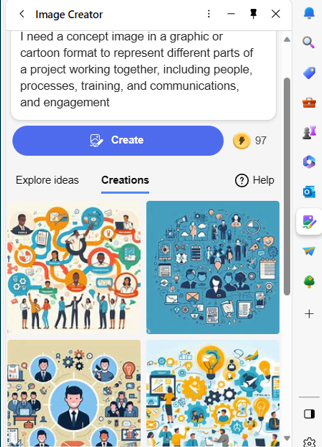
AI-driven platforms can produce relevant and engaging graphics. This frees up valuable time and saves money for business owners.
3. Chatbots for Customer Support
AI-powered chatbots on websites and social media platforms are becoming commonplace. This is because they enable small businesses to provide instant customer support which is exactly what people expect these days.
These chatbots can handle frequently asked questions. They can also assist with product inquiries and customer transactions.
They help small companies provide round-the-clock help for customers without needing to pay for extra staff hours.
4. Data Analysis and Insights
Generative AI can process vast datasets to extract meaningful insights. Small businesses can use AI algorithms to analyze important data.
Such as:
- Market trends
- Customer behavior
- Operational data
These insights can inform strategic decision-making which helps businesses refine their offerings and marketing strategies.
5. Product Design and Prototyping
AI in product design process allows businesses to explore many design variations rapidly. AI algorithms can generate prototypes and simulations. They do this based on specified parameters. This enables small businesses to visualize products before investing in physical prototypes.
6. Supply Chain Optimization
AI can optimize supply chain operations. It can predict demand, identify inefficiencies and suggest inventory levels. It takes away the human error component as well as fees up teams from tedious administrative work.
Small businesses can reduce costs and improve efficiency. AI automates a lot of the supply process. This helps ensure products are readily available when customers need them.
7. Dynamic Pricing Strategies
AI-driven pricing algorithms can help companies make better pricing decisions. Pricing your products and services can be tricky. You don’t want to go too low or too high.
AI helps businesses quickly analyze:
- Market trends
- Competitor pricing
- Customer behavior
These data insights help companies optimize pricing strategies. Small businesses can also dynamically adjust prices based on demand. This maximizes profits while remaining competitive in the market.
8. Human Resources and Recruitment
Generative AI can streamline the recruitment process. The hiring process includes a lot of work reviewing resumes. Many candidates don’t make the interview stage.
AI can help by analyzing resumes and screening candidates for you. It can even help with conducting initial interviews. Small businesses can find the best talent to drive their growth faster.
9. Predictive Maintenance
Downtime on a production line is costly. Proactive maintenance is vital. It is another area where Generative AI can help.
The technology can predict maintenance needs based on data analysis. It helps businesses avoid costly downtimes. It proactively addresses maintenance requirements as well as helps to ensure smooth operations.
Unsure How to Get Started with AI at Your Business?
Generative AI opens a world of opportunities for small businesses. It can also add to the complexity of a technology infrastructure.
We can help you use it effectively and affordably. Give us a call today to schedule a chat.

The use of AI-driven processes is exploding. Every time you turn around software is getting more intelligent. Harnessing the power of AI and machine learning is crucial for staying competitive.
Microsoft is a pioneer in the tech industry and this new AI era. It continues to lead the way with innovative solutions designed to empower businesses. One such innovation is Microsoft Sales Copilot.
This is a tool poised to reshape the future of business. We will delve into what Microsoft Sales Copilot is as well as how it is revolutionizing the world of sales and customer insights.
The Birth of Microsoft Sales Copilot
Microsoft Sales Copilot is the latest addition to the company's robust portfolio. It was officially introduced in July 2023. It represents a significant leap forward in leveraging AI and machine learning. It is designed specifically to enhance sales processes and customer engagement.
This groundbreaking tool is built on the foundation of Dynamics 365 Customer Insights. This is Microsoft's platform for unifying customer data and delivering actionable insights. The tool combines the capabilities of Customer Insights with AI-driven features. Sales Copilot offers sales teams a comprehensive and intelligent solution both for customer engagement and relationship management.
What Can Microsoft Sales Copilot Do?
Personalized Customer Insights
Personalized customer insights is one of the core features of Microsoft Sales Copilot. It achieves this by leveraging AI and machine learning to analyze a wide range of data sources. This includes:
- Customer behavior
- Buying history
- Customer interactions
By aggregating and processing this data, Sales Copilot saves salespeople time. It can provide sales professionals with a 360-degree view of their customers as well as help them understand preferences, needs and potential pain points.
AI-Driven Recommendations
Sales Copilot doesn't just stop at providing insights. It goes a step further by offering AI-driven recommendations. These recommendations guide sales teams in their interactions with customers.
For example, the tool can suggest things like:
- The most appropriate communication channels
- Timing for follow-ups
- Tailored, client-specific content recommendations
This level of personalization enables sales teams to engage with customers more effectively.
Enhanced Collaboration
Collaboration is a cornerstone of successful sales processes. Sales Copilot recognizes this by facilitating collaboration among team members. It provides a centralized platform where sales professionals can do things like:
- Share customer insights
- Discuss strategies
- Collaborate on deals
This improves internal communication. It also ensures sales team alignment in the approach to engaging with customers.
Predictive Analytics
Predictive analytics is another powerful aspect of Microsoft Sales Copilot. The tool analyzes historical data and customer behavior patterns. This allows it to predict future customer actions and trends.
This empowers sales teams to make informed decisions as well as proactively address customer needs rather than simply reacting to them.
Seamless Integration
Sales Copilot seamlessly integrates with other Microsoft tools and services. This creates a unified ecosystem. This integration allows for a smooth flow of data between applications. It eliminates the need for manual data entry and reduces the risk of errors. It also ensures the consolidation of all customer interactions and data. Having customer information in one place makes for easy access and analysis.
Cloud Migration Program
Besides Sales Copilot, Microsoft also introduced a new cloud migration program. This is in conjunction with Dynamics 365 Customer Insights. This program aims to simplify the process of migrating customer data to the cloud. The integration of Sales Copilot with this program further enhances its capabilities. It does this by providing access to a wealth of cloud-based data.
How Does Sales Copilot Benefit Your Business?
Microsoft Sales Copilot holds immense promise for businesses across various industries. It enables sales teams to work more intelligently and efficiently. The tool has the potential to drive revenue growth and enhance customer satisfaction. Here are some ways in which Sales Copilot can benefit your business.
Improved Customer Engagement
Personalized insights and AI-driven recommendations have many benefits. They enable sales professionals to engage with customers more meaningfully. This can lead to higher conversion rates and increased customer loyalty.
Streamlined Sales Processes
The tool’s predictive analytics and collaboration features can streamline sales processes. It can make them more efficient and effective. This can reduce the time and effort required to close deals.
Data-Driven Decision-Making
Sales Copilot provides access to a wealth of customer data and insights. This empowers businesses to make data-driven decisions. This can lead to better-targeted marketing campaigns, product development and customer service strategies.
Enhanced Competitive Advantage
Businesses that leverage Sales Copilot can gain a competitive advantage. It helps them stay ahead of customer trends and needs. This can be particularly valuable in fast-paced and competitive industries.
Scalability and Flexibility
Microsoft's cloud-based solutions (including Sales Copilot) offer scalability and flexibility. This allows businesses to adapt to changing market conditions and customer demands.
You Don’t Need to Face the AI Frenzy Alone
AI and machine learning are transforming business tools rapidly. This can cause business owners to worry about falling behind competitors.
You don’t have to figure this all out yourself. We can help. Give us a call today to schedule a chat.
In the age of artificial intelligence, small and medium-sized businesses (SMBs) are no longer confined to traditional methods of operation. Generative AI, a subset of artificial intelligence, has emerged as a powerful tool for SMBs to enhance their operations and stay competitive. Read more