
The recent AT&T data breach has left millions of customers vulnerable to potential phishing attacks and scams. With personal information now in the hands of malicious actors, it is crucial for affected individuals to stay vigilant and take proactive steps to protect themselves. Read more
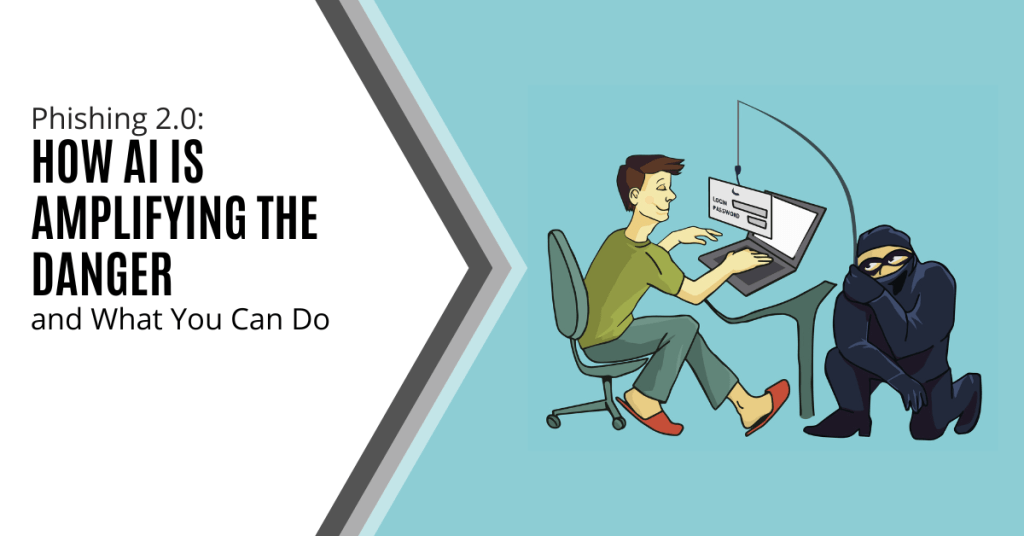
Phishing has always been a threat. With AI, it is more dangerous than ever. Phishing 2.0 is here. It is smarter, more convincing and harder to detect. Understanding this new threat is crucial.
A recent study found a 60% increase in AI-driven phishing attacks. This is a wake-up call that phishing is only getting worse. Here is how AI is amplifying phishing and what you can do to protect yourself.
The Evolution of Phishing
Phishing began simply. Attackers sent out mass emails. They hoped someone would take the bait. The emails were often crude and used poor grammar and obvious lies were common. Many people could spot them easily.
Things have changed. Attackers now use AI to improve their tactics. AI helps them craft convincing messages. It also helps them target specific individuals. This makes phishing more effective.
How AI Enhances Phishing
Creating Realistic Messages
AI can analyze huge amounts of data. It studies how people write and speak. This helps it create realistic phishing messages. These messages sound like they come from a real person. They mimic the tone and style of legitimate communications. This makes them harder to spot.
Personalized Attacks
AI can gather information from social media and other sources. It uses this information to create personalized messages. These messages mention details about your life. They might reference your job, hobbies or recent activities. This personalization increases the chances that you will believe the message is real.
Spear Phishing
Spear phishing targets specific individuals or organizations. It is more sophisticated than regular phishing. AI makes spear phishing even more dangerous. It helps attackers research their targets in depth. They can craft highly tailored messages. These messages are hard to distinguish from legitimate ones.
Automated Phishing
AI automates many aspects of phishing. It can send out thousands of phishing messages quickly. It can also adapt messages based on responses. If someone clicks a link but doesn’t enter information, AI can send a follow-up email. This persistence increases the likelihood of success.
Deepfake Technology
Deepfakes use AI to create realistic fake videos and audio. Attackers can use deepfakes in phishing attacks. For example, they might create a video of a CEO asking for sensitive information. This adds a new layer of deception. It makes phishing even more convincing.
The Impact of AI-Enhancing Phishing
Increased Success Rates
AI makes phishing more effective. More people fall for these sophisticated attacks. This leads to more data breaches. Companies lose money. Individuals face identity theft and other issues.
Harder to Detect
Traditional phishing detection methods struggle against AI-enhanced attacks. Spam filters may not catch them. Employees may not recognize them as threats. This makes it easier for attackers to succeed.
Greater Damage
AI-enhanced phishing can cause more damage. Personalized attacks can lead to significant data breaches. Attackers can gain access to sensitive information. They can also disrupt operations. The consequences can be severe.
How to Protect Yourself
Be Skeptical
Always be skeptical of unsolicited messages. Even if they appear to come from a trusted source. Verify the sender’s identity. Don’t click on links or download attachments from unknown sources.
Check for Red Flags
Look for red flags in emails. These might include generic greetings, urgent language or requests for sensitive information. Be cautious if the email seems too good to be true.
Use Multi-Factor Authentication (MFA)
MFA adds an extra layer of security. Even if an attacker gets your password, they will need another form of verification. This makes it harder for them to access your accounts.
Educate Yourself and Others
Education is key. Learn about phishing tactics. Stay informed about the latest threats. Share this knowledge with others. Training can help people recognize and avoid phishing attacks.
Verify Requests for Sensitive Information
Never provide sensitive information via email. If you receive a request, verify it through a separate communication channel. Contact the person directly using a known phone number or email address.
Use Advanced Security Tools
Invest in advanced security tools. Anti-phishing software can help detect and block phishing attempts. Email filters can screen out suspicious messages. Keep your security software up to date.
Report Phishing Attempts
Report phishing attempts to your IT team or email provider. This helps them improve their security measures. It also helps protect others from similar attacks.
Enable Email Authentication Protocols
Email authentication protocols like SPF, DKIM and DMARC help protect against email spoofing. Ensure these protocols are enabled for your domain. This adds an extra layer of security to your emails.
Regular Security Audits
Conduct regular security audits. This helps identify vulnerabilities in your systems. Addressing these vulnerabilities can prevent phishing attacks.
Need Help with Safeguards Against Phishing 2.0?
Phishing 2.0 is a serious threat. AI amplifies the danger and makes attacks more convincing and harder to detect. Have you had an email security review lately? Maybe it is time.
Contact us today to schedule a chat about phishing 2.0 safety.
Phishing attacks have been a persistent threat in the digital landscape for decades and has been preying on unsuspecting individuals and organizations alike. However, the advent of artificial intelligence (AI) has ushered in a new era of sophistication and complexity for these malicious activities. AI has become a double-edged sword and empowered both cybercriminals and cybersecurity professionals with advanced tools and techniques.Read more
Cybersecurity is a constantly evolving field. There are new threats, technologies and opportunities emerging every year. As we enter 2024, organizations need to be aware of current and future cyber threats. Businesses of all sizes and sectors should plan accordingly.
Staying ahead of the curve is paramount to safeguarding digital assets. Significant changes are coming to the cybersecurity landscape. Driving these changes are emerging technologies and evolving threats as well as shifting global dynamics.
We will explore key cybersecurity predictions for 2024 that you should consider.
1. AI Will Be a Double-edged Sword
Artificial intelligence (AI) has been a game-changer for cybersecurity. It has enabled faster and more accurate threat detection, response and prevention. However, AI also poses new risks such as adversarial AI, exploited vulnerabilities and misinformation.
For example, malicious actors use chatbots and other large language models to generate:
- Convincing phishing emails
- Fake news articles
- Deepfake videos
This malicious content can deceive or manipulate users. Organizations will need to put in place robust security protocols. This includes embracing a human-in-the-loop approach as well as regularly tracking and reviewing their AI systems. These steps will help them mitigate these risks and harness the power of AI for a more secure future.
2. Quantum Computing Will Become a Looming Threat
Quantum computing is still a few years away from reaching its full potential. However, it is already a serious threat to the security of current encryption standards.
Quantum computers can potentially break asymmetric encryption algorithms. These algorithms are widely used to protect data in transit and at rest. This means that quantum-enabled hackers could compromise sensitive data (like financial transactions).
Organizations will need to start preparing for this scenario. They can do this by assessing their potential risks first. Then they should adopt quantum-resistant technologies and deploy quantum-safe architectures.
3. Hacktivism Will Rise in Prominence
Hacktivism is the use of hacking techniques to promote a political or social cause such as exposing corruption, protesting injustice or supporting a movement.
Hacktivism has been around for decades. It is expected to increase in 2024 (especially during major global events). These may include the Paris Olympics and the U.S. Presidential Election as well as specific geopolitical conflicts.
Hacktivists may target organizations that they perceive as adversaries or opponents. This can include governments, corporations or media outlets. These attacks can disrupt their operations as well as leak their data or deface their websites.
Organizations will need to be vigilant against potential hacktivist attacks. This includes being proactive in defending their networks, systems and reputation.
4. Ransomware Will Remain a Persistent Threat
Ransomware is a type of malware that encrypts the victim's data. The attacker then demands a ransom for its decryption. Ransomware has been one of the most damaging types of cyberattacks in recent years.
In 2023, ransomware attacks increased by more than 95% over the prior year.
Ransomware attacks are likely to continue increasing in 2024 due to new variants, tactics, and targets emerging. For example, ransomware attackers may leverage AI to enhance their encryption algorithms as well as evade detection and customize their ransom demands.
Hackers may also target cloud services, IoT devices or industrial control systems. This could cause more disruption and damage. Organizations will need to put in place comprehensive ransomware prevention and response strategies. These include the following:
- Backing up their data regularly
- Patching their systems promptly
- Using reliable email and DNS filtering solutions
- Educating their users on how to avoid phishing emails
5. Cyber Insurance Will Become More Influential
Cyber insurance covers the losses and liabilities resulting from cyberattacks. It has become more popular and important in recent years. This is due to cyberattacks becoming more frequent and costly.
Cyber insurance can help organizations recover from cyber incidents faster and more effectively. It provides financial compensation, legal help or technical support.
Cyber insurance can also influence the security practices of organizations. More cyber insurers may impose certain requirements or standards on their customers such as implementing specific security controls or frameworks. Organizations will need to balance the benefits and costs of cyber insurance as well as ensure that they are in compliance with their cyber insurers' expectations.
Be Proactive About Cybersecurity Predictions
It is clear that the cybersecurity landscape will continue to evolve rapidly. Organizations and individuals must proactively prepare for emerging threats. This includes adopting advanced technologies and prioritizing workforce development as well as staying abreast of regulatory changes.
Put a comprehensive cybersecurity strategy in place that encompasses these predictions. This will help you navigate the digital frontier with resilience and vigilance.
Need help ensuring a secure and trustworthy digital environment for years to come? Contact us today to schedule a cybersecurity assessment.
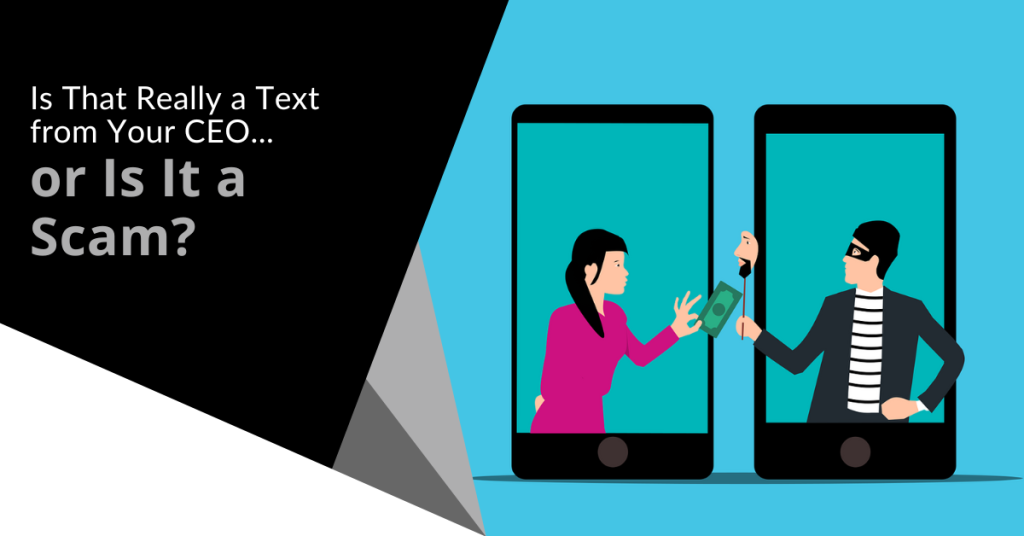
Imagine that you are going about your day when suddenly you receive a text from the CEO. The head of the company is asking for your help. They are out doing customer visits and someone else dropped the ball in providing gift cards. The CEO needs you to buy six $200 gift cards and text the information right away. This can't be a scam because it is from the boss.
The message sender promises to reimburse you before the end of the day. You won’t be able to reach them by phone for the next two hours because they will be in meetings. This is a high priority. They need those gift cards urgently.
Would this kind of request make you pause and wonder? Would you quickly pull out your credit card to do as the message asked?
A surprising number of employees fall for this gift card scam. There are also many variations such as your boss being stuck without gas or some other dire situation that only you can help with.
This scam can come by text message or via email. What happens is that the unsuspecting employee buys the gift cards. They then send the numbers back. They find out later that the real company CEO wasn’t the one that contacted them. It was a phishing scammer.
The employee is out the cash.
Without proper training, 32.4% of employees are prone to fall for a phishing scam.
Why Do Employees Fall for Phishing Scams?
Though the circumstances may be odd, many employees fall for this gift card scam. Hackers use social engineering tactics. They manipulate emotions to get the employee to follow through on the request.
Some of these social engineering tactics illicit the following:
- The employee is afraid of not doing as asked by a superior.
- The employee jumps at the chance to save the day.
- The employee doesn’t want to let their company down.
- The employee may feel they can advance in their career by helping.
The scam’s message is also crafted in a way to get the employee to act without thinking or checking. It includes a sense of urgency. The CEO needs the gift card details right away. Also, the message notes that the CEO will be out of touch for the next few hours. This decreases the chance that the employee will try to contact the real CEO to check the validity of the text.
llinois Woman Scammed Out of More Than $6,000 from a Fake CEO Email
Variations of this scam are prevalent and can lead to significant financial losses. A company isn’t responsible if an employee falls for a scam and purchases gift cards with their own money.
In one example, a woman from Palos Hills, Illinois lost over $6,000. This was after getting an email request from who she thought was her company’s CEO.
The woman received an email purporting to be from her boss and company CEO. It stated that her boss wanted to send gift cards to some selected staff that had gone above and beyond.
The email ended with “Can you help me purchase some gift cards today?” The boss had a reputation for being great to employees so the email did not seem out of character.
The woman bought the requested gift cards from Target and Best Buy. Then she got another request asking to send a photo of the cards. The wording in the message was very believable and non-threatening. It simply stated, “Can you take a picture? I’m putting this all on a spreadsheet.”
The woman ended up purchasing over $6,500 in gift cards that the scammer then stole. When she saw her boss a little while later, her boss knew nothing about the gift card request. The woman realized she was the victim of a scam.
Tips for Avoiding Costly Phishing Scams
Always Double Check Unusual Requests
Despite what a message might say about being unreachable, check in person or by phone. If you receive any unusual requests or one relating to money, verify it. Contact the person through other means to make sure it is legitimate.
Don’t React Emotionally
Scammers often try to get victims to act before they have time to think. Just a few minutes of sitting back and looking at a message objectively is often all that is needed to realize it is a scam. Don’t react emotionally. Ask if this seems real or does it seem out of the ordinary.
Get a Second Opinion
Ask a colleague your company’s IT service provider to take look at the message. Getting a second opinion keeps you from reacting right away. It can save you from making a costly judgment error.
Need Help with Employee Phishing Awareness Training?
Phishing keeps getting more sophisticated all the time. Make sure your employee awareness training is up to date. Give us a call today to schedule a training session to shore up your team’s defenses.
As the digital world evolves, the threats it faces also evolve. Despite its seemingly innocuous name, phishing is considered to be one of the most dangerous cybersecurity threats facing businesses today. The sophistication of phishing attacks (which entail various fraudulent attempts to obtain user information, credit card numbers and passwords) is continuously on the rise.Read more
It seems you can’t read an article on cybersecurity without the word phishing coming up. That is because phishing is still the number one delivery vehicle for cyberattacks.
A cybercriminal may want to steal employee login credentials or wish to launch a ransomware attack for a payout. They may possibly plant spyware to steal sensitive info. Sending a phishing email can do them all.
80% of surveyed security professionals say that phishing campaigns have significantly increased post-pandemic.
Phishing continues to work and is also increasing in volume due to the move to remote teams. Many employees are now working from home. They don't have the same network protections they had when working at the office.
Why has phishing continued to work so well after all these years? Aren’t people finally learning what phishing looks like?
It's true that people are generally more aware of phishing emails and how to spot them than they were a decade ago. But it's also true that these emails are becoming harder to spot as scammers evolve their tactics.
One of the newest tactics is particularly hard to detect. It is the reply-chain phishing attack.
What is a Reply-Chain Phishing Attack?
Just about everyone is familiar with reply chains in email. An email is copied to one or more people. One person replies and that reply sits at the bottom of the new message. Then another person chimes in on the conversation by replying to the same email.
Soon you have a chain of email replies on a particular topic. It lists each reply one under the other so everyone can follow the conversation.
You don’t expect a phishing email tucked inside that ongoing email conversation. Most people are expecting phishing to come in as a new message rather than as a message included in an ongoing reply chain.
The reply-chain phishing attack is particularly insidious because it does exactly that. It inserts a convincing phishing email in the ongoing thread of an email reply chain.
How Does a Hacker Gain Access to the Reply Chain?
How does a hacker gain access to the reply chain conversation? By hacking the email account of one of those people copied on the email chain.
The hacker can email from an email address that the other recipients recognize and trust. They also gain the benefit of reading down through the chain of replies. This enables them to craft a response that looks like it fits.
For example, they may see that everyone has been weighing in on a new product idea for a product called Superbug. So, they send a reply that says, “I’ve drafted up some thoughts on the new Superbug product. Here is a link to see them.”
The link will go to a malicious phishing site. The site might infect a visitor’s system with malware or present a form to steal more login credentials.
The reply won’t seem like a phishing email at all. It will be convincing because:
- It comes from an email address of a colleague. This address has already been participating in the email conversation.
- It may sound natural and reference items in the discussion.
- It may use personalization. The email can call others by the names the hacker has seen in the reply chain.
Business Email Compromise is Increasing
Business email compromise (BEC) is so common that it now has its own acronym. Weak and unsecured passwords lead to email breaches. So do data breaches that reveal databases full of user logins. Both are contributors to how common BEC is becoming.
In 2021, 77% of organizations saw business email compromise attacks. This is up from 65% the year before.
Credential theft has become the main cause of data breaches globally. There is a pretty good chance of a compromise of one of your company’s email accounts at some point.
The reply-chain phishing attack is one of the ways that hackers turn that BEC into money. They either use it to plant ransomware or other malware or to steal sensitive data to sell on the Dark Web.
Tips for Addressing Reply-Chain Phishing
Here are some ways that you can lessen the risk of reply-chain phishing in your organization:
- Use a Business Password Manager:
This reduces the risk that employees will reuse passwords across many apps. It also keeps them from using weak passwords since they won’t need to remember them anymore.
- Put Multi-Factor Controls on Email Accounts:
Present a system challenge (question or required code). Using this for email logins from a strange IP address can stop account compromise.
- Teach Employees to be Aware:
Awareness is a big part of catching anything that might be slightly “off” in an email reply. Many attackers do make mistakes.
How Strong Are Your Email Account Protections?
Do you have enough protection in place on your business email accounts to prevent a breach? Let us know if you would like some help! We have email security solutions that can keep you better protected.
You can contact us at (860) 577-8060 or use our convenient contact form.
There is a reason why phishing is usually at the top of the list for security awareness training. For the last decade or two, it has been the main delivery method for all types of attacks. Ransomware, credential theft, database breaches and more launch via a phishing email.
Why has phishing remained such a large threat for so long? Because it continues to work. Scammers evolve their methods as technology progresses. For example, they use AI-based tactics to make targeted phishing more efficient.
If phishing didn’t continue working, scammers would move on to another type of attack. That hasn’t been the case. People continue to get tricked. They open malicious file attachments, click on dangerous links and reveal passwords.
In May of 2021, phishing attacks increased by 281%. Then in June, they spiked another 284% higher.
Studies show that as soon as 6 months after training, phishing detection skills wane. Employees begin forgetting what they have learned and cybersecurity suffers as a result.
Want to give employees a “hook” they can use for memory retention? Introduce the SLAM method of phishing identification.
What is the SLAM Method for Phishing Identification?
One of the mnemonic devices known to help people remember information is the use of an acronym. SLAM is an acronym for four key areas of an email message to check before trusting it.
These are:
S = Sender
L = Links
A = Attachments
M = Message text
By giving people the term “SLAM” to use, it’s quicker for them to check suspicious email. This device helps them avoid missing something important. All they need to do is use the cues in the acronym.
Check the Sender
It is important to check the sender of an email thoroughly. Often scammers will either spoof an email address or use a look-alike. People often mistake a spoofed address for the real thing.
In this phishing email below, the email address domain is “@emcom.bankofamerica.com.” The scammer is impersonating Bank of America. This is one way that scammers try to trick you. They put the real company’s URL inside their fake one.
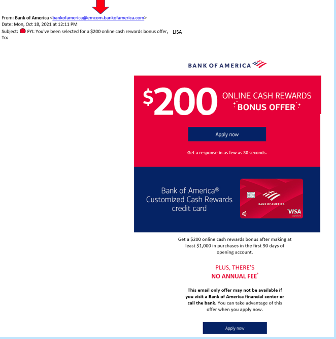
You can see that the email is very convincing. It has likely fooled many people into divulging their personal details. People applying for a credit card provide a Social Security Number, income and more.
Doing a quick search on the email address quickly reveals it to be a scam and a trap used in both email and SMS phishing attacks.
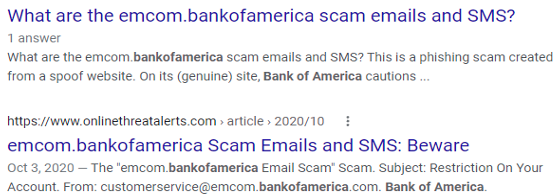
It only takes a few seconds to type an email address into Google. This allows you to see if any scam warnings come up indicating a phishing email.
Hover Over Links Without Clicking
Hyperlinks are popular to use in emails. They can often get past antivirus/anti-malware filters. Those filters are looking for file attachments that contain malware. However, a link to a malicious site doesn’t contain any dangerous code. It links to a site that does.
Links can be in the form of hyperlinked words, images and buttons in an email. When on a computer, it’s important to hover over links without clicking on them to reveal the true URL. This often can immediately call out a fake email scam.
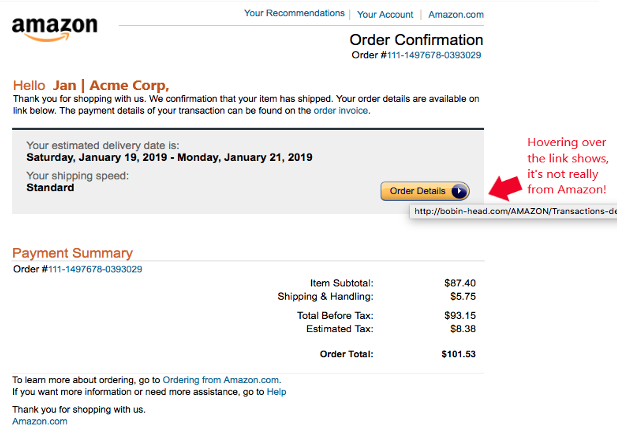
When looking at email on a mobile device, it can be trickier to see the URL without clicking on it. There is no mouse like there is with a PC. In this case, it’s best not to click the URL at all. Go to the purported site to check the validity of the message.
Never Open Unexpected or Strange File Attachments
File attachments are still widely used in phishing emails. Messages may have them attached and promise a large sales order. The recipient might see a familiar word document and open it without thinking.
It is getting harder to know what file formats to avoid opening. Cybercriminals have become savvier about infecting all types of documents with malware. There have even been PDFs with malware embedded.
Never open strange or unexpected file attachments. Use an antivirus/anti-malware application to scan all attachments before opening.
Read the Message Carefully
We have become savvier at scanning through text as technology has progressed. It helps us quickly process a lot of incoming information each day. But if you rush through a phishing email, you can miss some telltale signs that it is a fake.
Look at the phishing example posted above in the “Links” section. There is a small error in grammar in the second sentence. Did you spot it?
It says, “We confirmation that your item has shipped,” instead of “We confirm that your item has shipped.” These types of errors can be hard to spot but are a big red flag that the email is not legitimate.
Get Help Combatting Phishing Attacks
Both awareness training and security software can improve your defenses against phishing attacks. Contact us today at (860) 577-8060 or use our contact form and we will be happy to discuss your email security needs.
You have completed your annual phishing training. This includes teaching employees how to spot phishing emails. You’re feeling good about it. That is until about 5-6 months later. Your company suffers a costly ransomware infection due to a click on a phishing link.
You wonder why you seem to need to train on the same information every year. You still suffer from security incidents. The problem is that you’re not training your employees often enough.
People can’t change behaviors if training isn’t reinforced. They can also easily forget what they have learned after several months go by.
How often is often enough to improve your team’s cybersecurity awareness? It turns out that training every four months is the “sweet spot.” This is when you see more consistent results in your IT security.
Why Is Cybersecurity Awareness Training Every 4-Months Recommended?
Where does this four-month recommendation come from? There was a study presented at the USENIX SOUPS security conference recently. It looked at users’ ability to detect phishing emails versus training frequency. It looked at training on phishing awareness and IT security.
Employees took phishing identification tests at several different time increments:
- 4-months
- 6-months
- 8-months
- 10-months
- 12-months
The study found that scores were still good four months after their training. Employees were still able to accurately identify and avoid clicking on phishing emails. However, after 6-months, their scores started to get worse. Scores continued to decline as the months passed after their initial training.
To keep employees well prepared, they need training and refreshers on security awareness. This will help them to act as a positive agent in your cybersecurity strategy.
Tips on What & How to Train Employees to Develop a Cybersecure Culture
The gold standard for security awareness training is to develop a cybersecure culture. This is one where everyone is cognizant of the need to protect sensitive data as well as avoid phishing scams and keep passwords secured.
This is not the case in most organizations. According to the 2021 Sophos Threat Report, one of the biggest threats to network security is a lack of good security practices.
The report states the following:
“A lack of attention to one or more aspects of basic security hygiene has been found to be at the root cause of many of the most damaging attacks we've investigated.”
Well-trained employees significantly reduce a company’s risk. They reduce the chance of falling victim to any number of different online attacks. To be well-trained doesn’t mean you need to conduct a long day of cybersecurity training. It is better to mix up the delivery methods.
Here are some examples of engaging ways to train employees on cybersecurity. You can include these in your training plan:
- Self-service videos that get emailed once per month
- Team-based roundtable discussions
- Security “Tip of the Week” in company newsletters or messaging channels
- Training session given by an IT professional
- Simulated phishing tests
- Cybersecurity posters
- Celebrate Cybersecurity Awareness Month in October
When conducting training, phishing is a big topic to cover. However, it’s not the only one. Here are some important topics that you want to include in your mix of awareness training.
Phishing by Email, Text & Social Media
Email phishing is still the most prevalent form. SMS phishing (“smishing”) and phishing over social media are both growing. Employees must know what these look like so that they can avoid falling for these sinister scams.
Credential & Password Security
Many businesses have moved most of their data and processes to cloud-based platforms. This has led to a steep increase in credential theft because it’s the easiest way to breach SaaS cloud tools.
Credential theft is now the #1 cause of data breaches globally. This makes it a topic that is critical to address with your team. Discuss the need to keep passwords secure and the use of strong passwords. Also, help them learn tools like a business password manager.
Mobile Device Security
Mobile devices are now used for a large part of the workload in a typical office. They’re handy for reading and replying to an email from anywhere. Most companies will not even consider using software these days if it doesn’t have a great mobile app.
Review security needs for employee devices that access business data and apps such as securing the phone with a passcode and keeping it properly updated.
Data Security
Data privacy regulations are something else that has been rising over the years. Most companies have more than one data privacy regulation requiring compliance.
Train employees on proper data handling and security procedures. This reduces the risk that you will fall victim to a data leak or breach that can end up in a costly compliance penalty.
Need Help Keeping Your Team Trained on Cybersecurity?
Take training off your plate and train your team with cybersecurity professionals. We can help you with an engaging cybersecurity awareness training program that helps your team change their behaviors to improve cyber hygiene. You can reach us at (860) 577-8060 or use our convenient contact form.
Companies had to deal with more than just COVID complications last year as they faced brutal cyber-attacks. In fact, a new type of phishing attack was discovered after the furniture giant IKEA noticed several malicious reply-chain emails making rounds in the company. While IKEA was able to protect itself against the attack, many companies are still unaware of the lurking danger.
What Is Reply-Chain Phishing?
Reply-chain phishing is a method hackers use to put themselves into legitimate conversations by taking advantage of compromised accounts.
Unlike spear-phishing where they use fake emails similar to authentic ones, reply-chain phishing involves gaining control of a legitimate email account and using that to carry out their nefarious attack.
They obtain these legitimate emails through different methods. Once they have control of an employee’s email account, they scan through email threads looking for those with the highest chance of landing a victim. After identifying an email thread, they send an email with a malicious link attached as a reply to the thread.
Once a recipient clicks on the URL, they will unintentionally download malware that will spread through the network. Another tactic is to insert malicious links in out-of-office replies. Both tactics are a way to spread malware.
The actual owner of the email account doesn't see the reply in the email chain which means that a reply-chain attack can go unnoticed for some time.
Reply-chain phishing attacks are hard for employees to notice and react/report. This is because the emails look like they’re from a colleague when it is in fact from a colleague's account.
How Do Reply-Chain Attacks Work?
It starts with hackers taking over an email account through techniques like password-spraying, credentials stuffing or credentials dumping. They may even be using an already compromised account. After gaining access to one or more accounts, they monitor email threads for a chance to send malware or compromised links to participants in the email chain.
Reply-chain phishing is very effective since the email parties already trust each other. The hackers do not insert themselves as new participants in the ongoing conversation and they are not trying to spoof another employee's email account. Instead, they operate from behind a genuine account.
Since the attacker has access to the full thread, they can customize their nefarious message to fit the topic of an ongoing conversation. This, on top of the fact that the recipient likely trusts the sender, massively increases the chance of the victim opening the malicious attachment or clicking a dangerous link.
To simplify it all, let's say "Taylor's" account was compromised and the attacker sees that Taylor and Bethanie (and a few other team members) have been discussing a new project campaign. The attacker can take advantage of this conversation to send Bethanie a malicious link to a document/article that appears related to the conversation.
How To Protect Your Business Against Reply-Chain Hacking
There are a couple of ways to protect your company against email chain attacks. They include:
- Make sure that all employees follow best security practices with their email accounts. This includes using multi-factor authentication and setting a secure password.
- Inspect inbox and email settings regularly. Check for rules meant to filter replies to a different inbox and particularly those that weren't set by the user. If you notice any, immediately contact your IT team.
- If possible, disable all Microsoft Office Macros. Microsoft Office Macros allow users to personalize manual and automatic email replies. Unfortunately, they are a common vehicle for email attacks.
- Schedule comprehensive training sessions to increase employee awareness and knowledge about cybercrime as well as their responsibility to protect the company.
If an employee notices a reply-chain attack in progress, they should take the following steps:
- Immediately delete the email from every folder (including inbox, spam and trash).
- Reach out to other members of the email chain through a new email thread or another communication means to inform them of the attack and ask them to delete the thread from their email.
- Don't open any other message from the compromised account until the attack has been dealt with.
- Inform your security or managed IT team so they can investigate and make sure the hackers didn't compromise your systems and data.
Conclusion
With a month and a half left in Q2 2022, it's important to start beefing up your cybersecurity. This includes informing your employees about the latest methods of attack, carrying out cybersecurity awareness training, arming your IT team and creating an effective strategy to protect your data from such attacks. If it could work on a large corporation like IKEA, imagine how effective it will be on a small-scale business.
If you need additional support, Sound Computers has your business covered. Reach us on our contact form or call us at (860) 577-8060.