

Calendars, task lists and project planning are important business tools. Many people use Microsoft’s apps to power these processes including Microsoft Planner, Microsoft To Do and Project for the web.
These tools help keep processes on track and enable task accountability. However, they are separate apps. Switching between apps can be cumbersome. It adds more complexity to a workflow.
On average, employees switch between 22 different apps 350 times per day.
Microsoft is putting a dent in app overload. The company is rolling out a brand-new version of Microsoft Planner in early 2024. It is packed with exciting features designed to simplify your project management journey.
What apps does the new Planner include?
The new Microsoft Planner combines:
- The current Planner’s collaboration features
- The simplicity of Microsoft To Do for task management
- The capabilities of Microsoft Project for the web
- The automation of Microsoft Copilot (the company’s AI companion)
The new Planner promises to be a powerful tool for staying organized as well as boosting collaboration and achieving your goals with more ease.
Unifying Your Workflow: Tasks, Plans & Projects in One Place
Say goodbye to juggling several apps and hello to a streamlined experience. The new Planner goes beyond basic to-do lists. It seamlessly integrates tasks, plans and projects under one roof.
This means you can manage everything from large to small including simple daily tasks to complex multi-phased projects. You can do it all within a single intuitive interface.
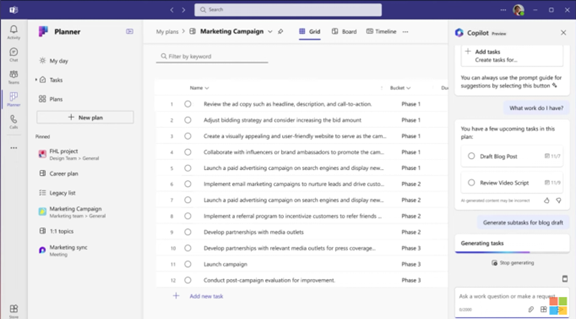
You can use the new Microsoft Planner from within Microsoft Teams or via a web browser. Here are some of the exciting things you will be able to do with it.
Enhanced Collaboration: Working Together Made Easy
Collaboration is key in today's fast-paced world. Working remotely has become the new normal. This means that the tools need to keep people coordinated wherever they are.
The new Planner empowers teams to work together seamlessly. Real-time updates ensure everyone stays on the same page. Features like shared task ownership and comments foster clear communication and efficient collaboration.
AI-Powered Insights: Your Smart Copilot for Success
The new Planner incorporates the power of AI with Microsoft Copilot built in. This intelligent assistant helps you stay on top of your work. It can suggest relevant plans, tasks and goals based on your needs and context. It can even analyze your progress and suggest adjustments to keep you on track.
Scaling with Your Needs: From Simple Tasks to Enterprise Projects
One size doesn't fit all. The new Planner understands that. It offers flexibility to cater to both individual needs and complex enterprise projects. Microsoft Planner can adapt to your specific requirements. It is flexible for use to fill big or small needs. Use it for managing a personal grocery list or to plan and deploy a large-scale company transformation.
Pre-Built Templates: Get Started Fast & Save Time
You don’t need to start from “square 1” unless you want to. Microsoft Planner provides several ready-made templates. You can use these to get started on a new project or goal quickly.
You will see templates for things like:
- Project Management
- Software Development
- Sprint Planning
- Marketing Campaign
- Commercial Construction
- Employee Onboarding
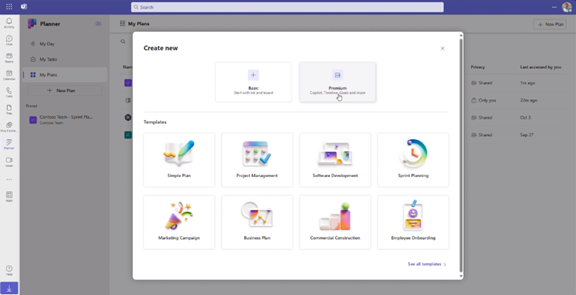
Here is a sneak peek at some key features of the new Microsoft Planner 2024:
- Improved Navigation: A redesigned interface makes finding what you need faster and easier.
- Enhanced Task Views: It has different views (like grid and board views). These let you customize how you see and organize your tasks.
- Microsoft App Integration: Planner integrates with many Microsoft tools including Power BI, Teams, Microsoft Viva Goals, Power Automate and more.
- Customizable Fields: Add custom fields to tasks. Use them to capture specific information relevant to your project needs.
- Goal Setting: Define clear goals and track progress visually within your plans.
- Critical Path: Identify the essential tasks needed to complete your project on time.
- Improved Search: Find the information you need quickly and easily. The app has powerful search functionality.
Access and Availability
Mark your calendars! The new Planner will be available in preview in early 2024. It will become generally available soon after. Some features will roll out later in the year. You can visit Microsoft’s site to sign up for updates and see a feature roadmap.
The Future of Tasks, Planning & Project Management
The new Microsoft Planner 2024 is an example of a trend that we have seen in the digital world. Less is more. This means fewer apps to juggle and more streamlined interfaces.
Planner’s powerful features make it an invaluable tool that both individuals and teams alike can leverage to streamline workflows. It also has an intuitive interface and AI-powered assistant to drive productivity.
Get Expert Business Software Support & Management
Managing both legacy and new cloud tools can be complex. Features often go underutilized and security can be a big problem if it is not done right. Our team of business software experts is here to help you.
Contact us today to schedule a chat.

Microsoft Planner, the collaborative task management tool, is set to undergo a significant update that promises enhanced features and functionalities for users. As organizations increasingly rely on digital tools to streamline workflows and improve productivity, the evolution of Microsoft Planner holds significant implications for teams worldwide. Read more

Microsoft Edge continues to redefine user experiences. This is due to Microsoft’s commitment to innovation. The latest updates bring a host of features. These are designed to enhance productivity, security and browsing satisfaction.
Chrome may have been number one for years but Edge has been steadily gaining popularity. It is now the third most popular browser worldwide. Overtaking Firefox a while back, it is now just behind Chrome (1) and Safari (2).
From personalized workspaces to a built-in VPN, Microsoft Edge is not just a browser. It is a comprehensive toolkit for users navigating the digital landscape. Let's delve into the newest Microsoft Edge features. They promise to elevate your online journey.
A New Era of Productivity: Microsoft Edge Workspaces
Introduction to Workspaces
Workspaces in Microsoft Edge represent a paradigm shift. It is a shift in how users organize and manage their online tasks. Imagine having a dedicated space for each project that seamlessly integrates relevant tabs, documents and websites.
Microsoft Edge Workspaces makes this a reality. It allows users to create custom workspaces. Each workspace represents different aspects of their digital lives. Whether you are working on a project, planning a trip or pursuing a hobby, Workspaces offer a tailored and organized browsing environment.
Key Features of Microsoft Edge Workspaces
- Personalization: Users can customize Workspaces with a unique name and color. This makes it easier to distinguish between different projects or activities.
- Easy Access: With a single click, users can switch between Workspaces. This instantly transitions them between different sets of tabs and online resources. Users associate each Workspace with specific projects or interests.
- Persistence: Workspaces keep their configurations. This is the case even when users close and reopen the browser. This ensures that users can seamlessly resume their work. There is no need to reconstruct their customized environments each time.
- Efficient Task Management: Workspaces make task-focused browsing easier and minimize distractions. This helps users maintain focus on the specific project or activity at hand.
Enhanced Security with Edge Secure Network VPN
Built-in VPN
Microsoft Edge takes a giant leap in prioritizing user privacy and security. The Edge Secure Network uses a new built-in VPN. VPNs (Virtual Private Networks) encrypt internet connections. This helps ensure a secure and private browsing experience. Microsoft Edge now provides users with 5GB of free VPN data per month. This further protects their online presence.
Key Benefits of the VPN in Microsoft Edge
- Enhanced Privacy: VPNs mask users' IP addresses. This makes it challenging for malicious actors to track their online activities. This is particularly crucial when accessing public Wi-Fi networks as well as sensitive information.
- Secure Browsing: The VPN has an encrypted connection. This ensures that data transmitted between the user's device and internet is secure. It reduces the risk of interception by hackers.
- Geographic Consistency: Edge’s VPN will mask your specific location. Websites will see a location similar to yours. When you look up movie times or nearby services, you see what you expect. You cannot choose a specific region to route traffic from.
- Complimentary 5GB Data: Microsoft Edge users receive 5GB of free VPN data each month. To conserve the data limit, content streaming sites aren’t routed through the VPN. These are sites like Netflix, Hulu, Disney+, etc.
Other New Features Added to Microsoft Edge Browser
Microsoft is continuously updating Edge. Here are a few more new features you can enjoy.
- Autofill for Forms: Edge makes filling out forms online easier. It will suggest completions when you start typing into fields. This includes name, email, address, etc.
- Web Capture: Using Web Capture in Edge makes it easy to take a screenshot. You can select an area or a full page. Then paste it into any of your files.
- Copilot: Use the Copilot icon at the top of Edge to access AI features. This includes creating AI-generated images as well as creating quick email drafts and more.
- Read Aloud: Need to step away from the screen for a moment? Let Edge read content for you out loud and enable you to multi-task like there is no tomorrow!
Get Help Exploring Your Microsoft Services
Microsoft Edge establishes itself as a comprehensive solution. It is great for those seeking a more productivity-focused browser as well as a secure and private online environment. Microsoft Edge's latest features enhance the way we work, explore and connect.
Is your company in need of help exploring what Microsoft has to offer? From Edge enhancements to Microsoft 365 tools, we have experts to guide you.
Don’t miss out on all that these solutions have to offer. Our Microsoft experts can help set up, manage and secure your digital workflows.
Give us a call today to schedule a chat.
Microsoft 365 has a powerful suite of cloud-based productivity tools. They can help you work smarter and faster. Microsoft has consistently been at the forefront of innovations and now they are with AI innovations. M365 was one of the very first all-in-one cloud tools introduced as Office 365 in 2013. Now, Microsoft and its business tools are at the leading edge of generative AI.
The Microsoft 365 platform has been adding some amazing AI innovations. They sit inside tools like Word, Excel, PowerPoint and Teams. If you know how to use them, these smart features can enhance your experience as well as significantly boost your productivity.
We will explore some of the ways you can leverage Microsoft 365's new AI innovations so that you can get more out of your work.
Microsoft Copilot: A Game-Changer in Collaboration
Microsoft Copilot is the crown jewel of Microsoft's AI innovations. It is designed to be your virtual collaborator. It can help you generate code, write documents and craft emails more efficiently. This AI-powered tool is built on the foundations of OpenAI's ChatGPT technology. This enables it to understand context and anticipate your needs as well as generate content in a remarkably human-like manner.
Here are some of the tools in the Microsoft universe that incorporate Copilot:
- Word
- Excel
- PowerPoint
- Outlook
- Teams
- Edge
- Windows
- Bing
- Dynamics 365 Sales
How can you take advantage of the benefits offered by Microsoft Copilot? Here are a few ways to jump on the added efficiency and time-savings they bring.
1. Speed Up Document Creation
In the realm of document creation, Copilot shines as a versatile writing companion. It helps when drafting a report, crafting a presentation or composing an email. Copilot provides intelligent suggestions to help you articulate your thoughts more effectively. It speeds up the writing process. It also ensures that your content is clear, concise and tailored to your audience.
2. Enhance Your Teams Meeting Experience
One of the key strengths of Copilot is its ability to enhance collaboration across teams. It can create coherent and context-aware responses such as a summary of meeting notes and an action item list.
Another helpful feature is the ability to catch up on what you have missed. Have you arrived late to a Teams meeting? You can just ask it to summarize the important points of the conversation so far.
3. Create PowerPoints with Ease
More people can become “PowerPoint Masters” with Copilot. The AI-infused features in PPT can create a slide deck for you based on text prompts.
It can tap into Microsoft’s stock images to fill your slides. Copilot will also suggest text to use based on your presentation topic. Do you have a PowerPoint that you need help with? The tool can reorganize your slides for a better presentation flow.
4. Enjoy Smart Business Insights in Excel
Another new AI innovation in Microsoft 365 is Excel Ideas. This feature can help you analyze and visualize your data with ease. Excel Ideas can automatically detect patterns and trends in your data. It will suggest charts, tables and summaries that best suit your needs.
You can also use Excel Ideas to ask natural language questions about your data such as, "What is the average sales by region?" or "Which product has the highest profit margin?" You will get instant answers in the form of charts or formulas.
5. Save Time in Outlook with AI Help
We all get those long emails from time to time. They are the ones that you push to the bottom of your inbox for when you have more time. The new Copilot feature in Outlook can help. Just ask it to summarize the key points of an email for you to save yourself reading time.
You can also use Copilot in Outlook to help write emails. It will save help by providing a first draft as well as suggest responses to emails in your inbox.
A Future of Intelligent Productivity
As we embrace the era of intelligent productivity, Microsoft 365 becomes more powerful. Its new AI innovations pave the way for a more efficient work environment.
By incorporating these capabilities into your daily workflow, you are staying competitive as well as setting the pace for the future of work.
Tap into the Future with Our M365 Services
Microsoft 365's commitment to continuous improvement ensures that you have cutting-edge tools. They are the ones needed to stay ahead, innovate and thrive in a rapidly evolving digital landscape. Embrace the power of AI. Unlock a new dimension of productivity with Microsoft 365.
Our team of M365 experts can help you ensure you are getting the full benefit of these features as well as new ones Microsoft is developing and rolling out in the coming months. We will help your team save time and improve your bottom line.
Give us a call today to schedule a chat.
In a world where technology constantly evolves, Microsoft stands at the forefront. It continues to pioneer innovations that transform how we interact with our digital universe and that includes Windows 11.
The fall Windows 11 update is a testament to Microsoft's commitment to excellence. It is more than just an upgrade. It is a leap into the future of computing. Microsoft touts it as “The most personal Windows 11 experience.”
Let’s explore some of the great features that make this update so significant.
Microsoft Copilot: Your Intelligent Partner in Creativity
A standout feature of the fall Windows 11 update is Microsoft Copilot. This AI-driven marvel is like your personal PC assistant.
Need help summarizing a web page? Want to change to dark mode but forgot how? Looking for a quick custom image for a social media post? Microsoft Copilot can do all that and more.

Copilot is seamlessly integrated into Windows 11. It offers real-time suggestions and turns ideas into reality with remarkable ease. Ask it what you need and the AI engine gets to work.
Updated Apps (Paint, Snipping Tool, Clipchamp & More)
Have you ever wished that Windows’ Snipping Tool could do more? This update grants that wish. The Snipping Tool is just one of many to get an AI upgrade.
Look for new capabilities in Paint, Clipchamp and Photos. Get a unique image from inputting a text prompt and style. The Cocreator tool in Paint makes it easy to jumpstart your creativity. It will generate the image and then you can edit it in the same app.
Microsoft Clipchamp is one of the easiest video creator tools out there. You can now just drag in your assets and clips. Then click to have the AI engine work its magic to create a video for you.
The new Clipchamp Auto Compose feature can:
- Recommend scenes
- Make edits
- Create a narrative based on your inputs
Easy Data Migration with Windows Backup
When you buy a new computer, moving data can be a pain. It can take hours to move your “pc life” between devices and there is always the risk that you will miss something.
The new Windows Backup feature makes moving between computers easier. You can choose backup options and folders. When ready to move, it is a simple process. You can restore the new PC from another backed-up PC.
Microsoft Edge: A Faster and More Secure Browsing Experience
Microsoft Edge received significant enhancements. These focus on speed, responsiveness and security. The Edge Secure Network feature offers more gigabytes. Microsoft increased user storage from 1GB to 5GB. This function encrypts your internet connection to secure data.
Edge Secure Network has many features of a VPN. This is great for extra online security. It is also helpful for companies trying to prevent breaches from clicks on phishing links
Save Energy & Battery Power
A feature called Adaptive Dimming is another enhancement of this update. Your screen slowly dims if you’re no longer paying attention. This has the dual benefit of saving energy and helping you refocus.
PC sensors power this feature as well as two others so it is going to be more common with newer computers.
The other two features that use sensors are:
- Wake on Approach
- Lock on Leave
A More Personal Experience
Beyond the technical innovations, this update brings more including a more personal touch to the user experience. Tailored to individual preferences, Windows 11 becomes an extension of the user's identity.
This includes things like:
- Personalized themes
- Custom widgets
- Intelligent assistants
Every interaction feels curated and intuitive. It makes for a truly personalized operating system.
Other Cool Enhancements
There is a lot of excitement packed into Windows 11. Here are a few more new features you can explore.
- Copilot in Microsoft Shopping: Find what you need fast when shopping online. Bing will provide tailored recommendations based on your requests.
- Content Credentials: Add an invisible digital watermark to your AI-generated images in Bing. Cryptographic methods help you tag your work.
- Bing Chat Enterprise Updates: Boost work creativity and enjoy multimodal visual search. Find information using only images.
- E 3 Model from Open AI: Use the Image Creator in Bing and you will likely be impressed. It has had an upgrade and uses the DALL.E 3 model to render images from text prompts.
Harness the Power of Microsoft Products
Microsoft is definitely a leader in work productivity tools and it has been for a long time. If you are still working like it was 2020, let us help you upgrade. Employees can be more efficient than ever with the right apps.
We have your back with Microsoft 365, Windows 11 and other solutions. Our experts will guide you so you can gain an edge on the competition.
Give us a call today to schedule a chat.
The use of AI-driven processes is exploding. Every time you turn around software is getting more intelligent. Harnessing the power of AI and machine learning is crucial for staying competitive.
Microsoft is a pioneer in the tech industry and this new AI era. It continues to lead the way with innovative solutions designed to empower businesses. One such innovation is Microsoft Sales Copilot.
This is a tool poised to reshape the future of business. We will delve into what Microsoft Sales Copilot is as well as how it is revolutionizing the world of sales and customer insights.
The Birth of Microsoft Sales Copilot
Microsoft Sales Copilot is the latest addition to the company's robust portfolio. It was officially introduced in July 2023. It represents a significant leap forward in leveraging AI and machine learning. It is designed specifically to enhance sales processes and customer engagement.
This groundbreaking tool is built on the foundation of Dynamics 365 Customer Insights. This is Microsoft's platform for unifying customer data and delivering actionable insights. The tool combines the capabilities of Customer Insights with AI-driven features. Sales Copilot offers sales teams a comprehensive and intelligent solution both for customer engagement and relationship management.
What Can Microsoft Sales Copilot Do?
Personalized Customer Insights
Personalized customer insights is one of the core features of Microsoft Sales Copilot. It achieves this by leveraging AI and machine learning to analyze a wide range of data sources. This includes:
- Customer behavior
- Buying history
- Customer interactions
By aggregating and processing this data, Sales Copilot saves salespeople time. It can provide sales professionals with a 360-degree view of their customers as well as help them understand preferences, needs and potential pain points.
AI-Driven Recommendations
Sales Copilot doesn't just stop at providing insights. It goes a step further by offering AI-driven recommendations. These recommendations guide sales teams in their interactions with customers.
For example, the tool can suggest things like:
- The most appropriate communication channels
- Timing for follow-ups
- Tailored, client-specific content recommendations
This level of personalization enables sales teams to engage with customers more effectively.
Enhanced Collaboration
Collaboration is a cornerstone of successful sales processes. Sales Copilot recognizes this by facilitating collaboration among team members. It provides a centralized platform where sales professionals can do things like:
- Share customer insights
- Discuss strategies
- Collaborate on deals
This improves internal communication. It also ensures sales team alignment in the approach to engaging with customers.
Predictive Analytics
Predictive analytics is another powerful aspect of Microsoft Sales Copilot. The tool analyzes historical data and customer behavior patterns. This allows it to predict future customer actions and trends.
This empowers sales teams to make informed decisions as well as proactively address customer needs rather than simply reacting to them.
Seamless Integration
Sales Copilot seamlessly integrates with other Microsoft tools and services. This creates a unified ecosystem. This integration allows for a smooth flow of data between applications. It eliminates the need for manual data entry and reduces the risk of errors. It also ensures the consolidation of all customer interactions and data. Having customer information in one place makes for easy access and analysis.
Cloud Migration Program
Besides Sales Copilot, Microsoft also introduced a new cloud migration program. This is in conjunction with Dynamics 365 Customer Insights. This program aims to simplify the process of migrating customer data to the cloud. The integration of Sales Copilot with this program further enhances its capabilities. It does this by providing access to a wealth of cloud-based data.
How Does Sales Copilot Benefit Your Business?
Microsoft Sales Copilot holds immense promise for businesses across various industries. It enables sales teams to work more intelligently and efficiently. The tool has the potential to drive revenue growth and enhance customer satisfaction. Here are some ways in which Sales Copilot can benefit your business.
Improved Customer Engagement
Personalized insights and AI-driven recommendations have many benefits. They enable sales professionals to engage with customers more meaningfully. This can lead to higher conversion rates and increased customer loyalty.
Streamlined Sales Processes
The tool’s predictive analytics and collaboration features can streamline sales processes. It can make them more efficient and effective. This can reduce the time and effort required to close deals.
Data-Driven Decision-Making
Sales Copilot provides access to a wealth of customer data and insights. This empowers businesses to make data-driven decisions. This can lead to better-targeted marketing campaigns, product development and customer service strategies.
Enhanced Competitive Advantage
Businesses that leverage Sales Copilot can gain a competitive advantage. It helps them stay ahead of customer trends and needs. This can be particularly valuable in fast-paced and competitive industries.
Scalability and Flexibility
Microsoft's cloud-based solutions (including Sales Copilot) offer scalability and flexibility. This allows businesses to adapt to changing market conditions and customer demands.
You Don’t Need to Face the AI Frenzy Alone
AI and machine learning are transforming business tools rapidly. This can cause business owners to worry about falling behind competitors.
You don’t have to figure this all out yourself. We can help. Give us a call today to schedule a chat.

Microsoft’s recent investment in OpenAI’s ChatGPT has ignited a wave of innovation in the tech world and particularly within the Microsoft Edge browser. This strategic partnership has given birth to a multitude of groundbreaking features that promise to enhance the user experience. Read more

Endpoint management has changed a lot over the last two decades. There was a time when companies housed all endpoints in the same place. This made managing them simpler. However, it held offices back from being mobile and flexible.
Today’s office can include endpoints around the globe. Remote teams can work from anywhere and people often prefer doing things from their mobile devices (such as checking email or managing tasks).
The average enterprise endpoint makeup is 60% mobile devices and it is estimated that they handle about 80% of the workload. What does this mean for security? It means that an endpoint device management solution has become a necessity.
One that might be on your radar is the new Microsoft Intune Suite. It bundles several areas of endpoint management into a single platform.
Wondering whether it is worth taking the plunge and upgrading? Stick around as we break down the what, why and how of this cloud-based management solution.
What is Microsoft Intune Suite?
What is Microsoft Intune? It is a software tool that helps you manage your company's devices and apps all in one place. Whether your employees use PCs, Macs, smartphones or tablets, Intune has your back.
So, what is the deal with the upgrade? Microsoft has been hard at work improving Intune. The latest version brings some exciting new features to the table.
The core capabilities of Microsoft Intune include:
- Cross-platform endpoint management
- Built-in endpoint security
- Mobile application management
- Endpoint analytics
- Microsoft Configuration Manager
Here is a comparison of the subscription options you now have with Intune:
- Microsoft Intune Plan 1: Microsoft Intune core capabilities are included with various subscriptions (Microsoft 365 E3, E5, F1, and F3; Enterprise Mobility + Security E3 and E5 and Business Premium plans).
- Microsoft Intune Plan 2: An add-on to Microsoft Intune Plan 1. It offers advanced endpoint management capabilities.
- Microsoft Intune Suite: An add-on to Microsoft Intune Plan 1. Includes:
- Plan 2 features
- Microsoft Intune Remote Help
- Microsoft Intune Endpoint Privilege Management
- Microsoft Tunnel for Mobile Application Management
- Management of specialty devices
- Select Microsoft Intune advanced endpoint analytics features.
Advantages of Subscribing
Should you subscribe or upgrade to the suite? Before you rush in, let us consider some key factors to help you decide if it is the right move for your business. First the advantages of subscribing.
Streamlined Device Management
We all know how chaotic device management can get. With the new Intune Suite, you get a centralized dashboard. It gives you full control over your devices.
You can set up policies and enforce security measures. You can even wipe data remotely if needed. Plus, it is compatible with both Windows and macOS. You won’t need to worry about compatibility issues.
Provide Secure Helpdesk Support
Keep your employees productive by giving them help when they need it. Intune Suite includes Microsoft Intune Remote Help. This feature allows you to deliver simple and secure help to your team anywhere and at any time.
The platform reinforces a Zero Trust security model. It also enables fast responses to issues. You can address employee device roadblocks no matter where your team is working.
Enhanced Security and Compliance
Data breaches and cyberattacks are real threats to businesses of all sizes. With Intune's advanced security features, you can breathe a little easier. It offers robust encryption and secure access controls including the ability to quarantine risky devices.
Do you deal with sensitive information or have compliance requirements? Intune has got you covered with its auditing and reporting capabilities.
App Management Made Easy
Applications are the lifeblood of modern businesses and Intune understands that. With its app management features, you can do a lot including easily deploying, updating and retiring applications across all devices.
Intune keeps everyone organized and on the same page whether your team is using Microsoft 365 apps or third-party software.
BYOD-Friendly
Bring Your Own Device (BYOD) policies have become a popular trend in the corporate world. If your company is open to BYOD, Intune can be a game-changer. It enables you to separate personal and corporate data on employee devices. This helps ensure that sensitive company information remains secure.
The Intune Suite includes Microsoft Tunnel for Mobile App Management. This lightweight VPN solution connects corporate resources from personal iOS and Android devices. Device enrollment is not required. Employees can have quick and secure access to company resources when needed.
Scalability and Cost-Effectiveness
As your business grows, so do your tech needs. Thankfully, Intune scales effortlessly and accommodates new devices and users without breaking a sweat. It also operates on a subscription-based model so it allows you to pay for only what you need. No more hefty upfront costs. Just a predictable monthly fee.
What Do You Need to Consider?
Those are some pretty compelling reasons to consider Microsoft Intune Suite. Let us take a moment to address some potential downsides that you need to consider as well.
Learning Curve
One common concern is the learning curve. If your team uses a different management solution, they might need some time to get the hang of Intune. Luckily, we can help you with training and support to ensure a smooth shift.
Do You Have Legacy Systems?
Does your business rely on legacy systems or run a large number of on-premises servers? Integrating Intune into your existing setup may take some extra effort. It is essential to assess your current infrastructure and compatibility requirements before diving in.
Improve Security & Operations by Properly Managing Endpoints
Upgrading to the new Microsoft Intune Suite could be a game-changer for your business. It is crucial to carefully evaluate your specific needs. We can help you make an informed decision that aligns with your unique business goals.
Give us a call today to schedule a chat.
In today's digital workplace, printing remains an essential function. This is true for just about all businesses. Keeping up with your print infrastructure can be a time-consuming task. One printer down can mean work comes to a standstill.
Another issue is keeping up with all those printer drivers. If firmware updates are not done, vulnerabilities exist. One unprotected printer can cause an entire network malware infection.
Microsoft has come up with an answer to streamline print management. This solution is called Microsoft Universal Print. It offers a modern answer to age-old print problems.
Looking to improve how you handle document printing? Do you wish you could avoid printer problems? We will explore the benefits and features of Microsoft Universal Print. We will also help you discover how it can enhance your printing environment.
What Can Microsoft Universal Print Do for You?
Microsoft Universal Print leverages the power of Microsoft 365 and Azure. It eliminates the need for complex on-premises print infrastructure. Here are some of the ways that it can improve your document handling.
Simplifying Print Management
Universal Print eliminates the need for on-premises print servers. Print management becomes more simplified and all in one place. Organizations can centrally manage their printing needs from the cloud.
This ease of use removes the need for complex print server configurations as well as driver installations and print queue management. This results in significant time and cost savings.
Seamless Integration with Microsoft 365
A key advantage of Universal Print is its seamless integration with Microsoft 365. It works in tandem with Azure Active Directory. This ensures a secure and authenticated printing experience for users.
This integration allows users to print from any device (whether it is a Windows PC, Mac or mobile device). There is no need for complex setup or driver installations. It simplifies the printing process. It also enhances productivity for employees working across different platforms.
Flexibility and Scalability
With Microsoft Universal Print, organizations gain flexibility and scalability in their print activities. It supports both modern and legacy printers. This allows businesses to leverage their existing printer fleet.
Universal Print enables easy connectivity. This is true whether it is a local printer or a network printer as well as if it is managed through the cloud. Additionally, it offers centralized control and monitoring of printers. This makes it effortless to scale up or down based on business needs.
Streamlined Printer Deployment
Deploying printers across an organization can be a time-consuming task. Microsoft Universal Print simplifies this process. It does this by providing a centralized portal for printer management.
Administrators can easily add and configure printers. They can assign them to specific users or groups as well as manage printer settings from a single interface. This eliminates the need for manual configuration on individual devices which can be very time-consuming and fraught with issues. It also ensures a consistent printing experience across the organization.
Enhanced Security and Compliance
A big benefit of using Universal Print is its security capabilities. Print security is a critical concern for businesses (especially in today's threat landscape). Microsoft Universal Print enhances security by leveraging Azure Active Directory. It is used for authentication and access control.
It also supports secure print release. This means that sensitive documents are only printed under certain circumstances. This is often when the authorized user is physically present at the printer.
Universal Print also integrates with Microsoft Endpoint Manager. This gives organizations even more capabilities. They can enforce security policies and manage print-related settings from a centralized location.
Insights and Analytics
Understanding print usage and optimizing print infrastructure is essential for efficient cost management. Microsoft Universal Print provides insights and analytics that help organizations gain visibility. They are able to see print usage patterns as well as track printing costs and identify opportunities for optimization.
With detailed reporting and analytics, businesses can make informed decisions. Reporting enables better print resource allocation as well as the implementation of strategies to reduce printing costs.
Is Microsoft Universal Print for You?
Microsoft Universal Print offers a modern and efficient approach to print management. It streamlines the printing experience for organizations. It also eliminates the need for complex on-premises print infrastructure. There are also important benefits from the boost in security.
But is it for you?
We can help you understand the full capabilities of Microsoft Universal Print. This includes the costs versus the benefits. Whether the solution is for you will depend on your printing needs. Extra factors to consider will be how often you print and your number of endpoints.
Get Cost-Efficient Technology Answers
It is not easy to make software decisions on your own. That is why we are here to help! We can sit down with you to discuss your current infrastructure. We will help you evaluate solutions like Microsoft Universal Print. Then we will tell you straight up what makes the most sense for you.
Give us a call today to chat about your technology needs.

Advanced AI is a new buzzword in cloud computing. The launch of tools like ChatGPT and Bard have made big waves. Developers are now racing to introduce the next level of features to apps. They contain features that do part of your work for you like writing emails or making follow-up checklists based on contact data.
These AI-based applications do much more than automate processes. People are using them to write business correspondence, create websites and write scripts. AI is also quickly transforming the everyday office workflow.
Microsoft is one of the biggest players in the office application field. It is at the forefront of introducing transformative technology. The company is about to transform Microsoft 365 in a huge way with its new Copilot tool.
Microsoft 365 Copilot is a new tool designed to help users get the most out of their Microsoft 365 apps. This revolutionary tool is an intelligent and personalized assistant. It is designed to help users navigate and use M365 more efficiently.
In this article, we will take a closer look at Microsoft 365 Copilot and tell you the key ways that it is going to improve M365 apps and your business workflows.
What is Microsoft 365 Copilot?
Microsoft 365 Copilot is an AI-powered assistant. It helps users with their day-to-day tasks in M365 apps. It is like having a personal assistant right in your Office apps. Users can ask questions, get help with tasks and receive personalized recommendations. Copilot responds leveraging the context of their usage patterns.
Microsoft 365 Copilot works across all M365 apps. This includes:
- Word
- Excel
- PowerPoint
- Outlook
- Teams
Whether you are doing any number of tasks, Microsoft 365 Copilot is there to assist you. This includes working on a document, meeting scheduling or collaborating with a team.
How Does Microsoft 365 Copilot Work?
Microsoft 365 Copilot uses AI and machine learning to understand users' needs. It provides personalized help. It uses data from users' interactions with M365 apps. It learns a user's usage patterns and offers recommendations based on their preferences.
For example, say you frequently use certain features in Excel. Microsoft 365 Copilot will learn this. It will offer suggestions when it detects that you're working on a similar task.
Say that you are working on a presentation in PowerPoint and struggling with design. Microsoft 365 Copilot can offer design suggestions based on your company's brand guidelines.
Microsoft 365 Copilot can also help users with common tasks like scheduling meetings and managing emails. Users can simply ask Copilot for help. They can ask it to schedule a meeting or find an email from a specific person and Copilot will take care of the rest.
Why is Microsoft Copilot Important?
Copilot is important because it can help users be more productive and efficient. By providing personalized support, the tool can save users time and reduce frustration.
Imagine you are working on a report in Word and you are struggling to format a table. Instead of spending time searching for a solution online or trying to figure it out on your own, you can simply ask Microsoft 365 Copilot for help. Copilot can offer suggestions. It can even walk you through the process which will save you time and reduce frustration.
Microsoft 365 Copilot is also important because it can help users get more out of their M365 apps. Many users may not be aware of all the features and capabilities of their M365 apps. Copilot can help users discover new ways to work more efficiently and effectively.
The capabilities of Copilot go even further. Say that you need to give your team an update on a marketing strategy. You won’t need to dig out emails, chat threads or meeting notes. Instead, you can ask Copilot to “tell my team how we updated the marketing strategy.” The app will then search all those places for you and craft an update for your team.
Need a first draft of a meeting agenda or presentation? Just ask Copilot. It can access existing M365 documents and content and craft an initial draft for you.
Benefits of Using Microsoft 365 Copilot
Personalized Help
Microsoft 365 Copilot provides personalized help based on users' usage patterns and preferences. This means that users get the help they need when they need it without needing to search for solutions on their own.
Time Saving
Microsoft 365 Copilot can help users save time on common tasks such as scheduling meetings and formatting documents. It can take on many information gathering tasks (like summarizing meeting notes). This saves users considerable time for manual tasks such as searching for information.
Knowledge workers spend an average of 2.5 hours per day searching for information.
Reduced Frustration
Microsoft 365 Copilot can help reduce frustration. It provides solutions when users are stuck on a task. The tool can also help users struggling with an Excel chart or table. Instead of figuring out how to generate it, they can simply give a command to Copilot to do it for them.
Improved Productivity
Microsoft Copilot handles tasks that go beyond what business apps have historically done. For example, you can use it in PowerPoint to create a presentation for you. Use a command such as, “Create a six-slide presentation based on (this) document.” You can also tell it to find appropriate Microsoft stock photos and insert them.
The sky is the limit right now for how much this tool is going to impact office productivity.
When Will Microsoft 365 Copilot Be Available?
At the writing of this article, Microsoft hasn’t announced a release date yet. It is currently testing Copilot with a limited number of users. You will most likely see it coming out sometime soon.
Improve Your Microsoft 365 Value & Security
Need help with security or setup in Microsoft 365? Give us a call today to talk to one of our cloud app experts.