

Article Summary: AI note takers join your meetings, transcribe everything said and save the recording and summary to the vendor's servers. Who can see that recording depends on the tool. Some keep your data inside your own Microsoft or Google environment and never use it for training while others store it on their own servers and may use it to improve their AI. Some also auto-join meetings from your calendar without anyone pressing record. Before you let one into a client or staff meeting, it is worth knowing where the recording goes and getting everyone's consent.
AI note takers have become normal in a short time.
You start a Teams, Zoom or Google Meet call and a bot joins to record the conversation. Minutes later everyone gets a tidy summary with action items.
It saves real time which is why staff often adopt these tools on their own before anyone has asked where the recording ends up.
The problem is that every word of the meeting (including the parts you would never put in writing) gets captured, stored somewhere and read by whoever has access. Few business owners have stopped to ask who that includes or what happens to the recording afterward.
What an AI Note Taker Actually Does
An AI note taker is a tool that joins a meeting, records the audio and sometimes the video, turns the speech into a written transcript and produces a summary. Common ones include Microsoft 365 Copilot in Teams, Otter, Fireflies and Fathom.
Most connect to your calendar so they can join automatically and some will sit in on any meeting on your schedule unless you turn that setting off.
The recording and transcript do not disappear when the call ends.
They are saved (usually in the cloud) where they can be searched, shared and exported later.
Where they are saved and who can reach them depends on which tool you use.
Who can see the recording?
Start with the obvious group which is anyone the meeting organizer shares the summary with.
Many note takers email the transcript to every attendee by default and some send it to people who were invited but never joined. When the meeting covered a sensitive topic, that distribution list matters.
Then there is the tool's own access.
With a cloud note-taker, the recording sits on the vendor's servers which means the vendor's systems (and in some cases its staff) can reach it under the terms you agreed to.
If the tool auto-joined from someone's calendar, the recording may live on an account you do not control that belongs to whichever employee connected the bot.
A law firm publication on the legal risks of AI note takers warned that letting a note taker vendor access or use your transcripts for its own purposes can even risk waiving attorney-client privilege for businesses that handle legal matters.
Does the tool use your meetings to train its AI?
This is where tools differ the most and it is worth checking before you choose one.
Microsoft states that Copilot in Teams does not use your prompts, responses or meeting content to train its AI models and that the data stays inside your organization's Microsoft 365 environment.
Microsoft's privacy documentation says this directly and notes the content is processed within the Microsoft 365 service boundary rather than on the public version of the AI.
Third-party note takers vary widely.
Some store your recordings on their own servers and (depending on the terms you accept) may use that data to improve their models.
Others say they do not train on customer data at all. The only way to know is to read the specific tool's privacy terms because two tools that look almost identical can treat your data very differently.
The Consent Question
Recording a meeting is not always yours to decide alone and the rules change depending on where you and the other people are.
In around a dozen U.S. states and in most Australian states, everyone in a conversation needs to agree to being recorded.
Federal U.S. law, most other states and the UK allow recording when one participant consents.
On top of that, the UK and Europe treat recording people as handling their personal data so under GDPR you generally have to tell participants you are recording, explain why and have a proper reason for doing it.
That is why the safest way to go about this is to tell people the meeting is being recorded, explain why and give them a chance to object before the bot starts.
For client meetings, HR conversations and anything covered by confidentiality, that matters even more and in some cases you should check with a lawyer before recording at all.
How to Use AI Note Takers Safely
You don't need to ban these tools to use them responsibly.
Do this instead:
- Pick an approved tool and say so. Decide which note taker your business uses and ask staff not to connect others to company meetings. This keeps your recordings in one place you control.
- Turn off auto-join. Set the tool to join only when someone chooses to record rather than automatically for every meeting on a calendar.
- Announce recording and get consent. Make it normal to say a meeting is being recorded at the start and to skip recording when someone objects.
- Prefer tools that keep data in your environment. A note taker that stores recordings inside your own Microsoft or Google tenant and does not train on your data is easier to control than one that holds everything on its own servers.
- Control who gets the summary. Check the default sharing setting so transcripts are not emailed to everyone including people who missed the meeting.
- Keep bots out of sensitive meetings. For legal, HR, financial and confidential client conversations, the default should be no recording unless there is a clear reason and everyone agrees.
If you use Microsoft 365, an administrator can control whether Copilot and transcription are allowed in Teams meetings. That gives you one place to set the rule instead of relying on each person to get it right.
Frequently Asked Questions
Is it legal to record a meeting with an AI note taker?
It depends on where everyone in the meeting is. Around a dozen U.S. states and most Australian states require everyone to consent. The UK, federal U.S. law and most U.S. states allow it with one person's consent. In the UK and Europe, you also need to inform people and have a valid reason under data-protection law. The safe approach everywhere is to announce the recording and let people object before it starts.
Does Microsoft Copilot use my meeting data to train its AI?
No. Microsoft states that Copilot in Teams does not use your meeting content, prompts or responses to train its foundation AI models and that the data stays within your organization's Microsoft 365 environment.
Can an AI note taker join a meeting without me knowing?
Yes. Many tools connect to a user's calendar and can auto-join meetings (sometimes ones the user isn't even attending). You can turn auto-join off so the bot only records when someone chooses to start it.
Where are AI note taker recordings stored?
In the cloud. With Microsoft Copilot, the data stays inside your Microsoft 365 tenant. With many third-party tools, recordings sit on the vendor's own servers. Where they live and who can reach them depends on the tool so check its terms.
Should we let staff use Otter or Fireflies for work?
You can but with rules in place. Choose one approved tool, turn off auto-join, announce recording and get consent, check how the tool handles your data and keep it out of legal, HR and confidential client meetings.
Article summary: A small business incident response checklist gives your team clear steps to follow when something goes wrong. By deciding who to call, what to do first and who is responsible ahead of time, your business can respond faster and avoid making critical decisions in the middle of a crisis. Read more
Article summary: A USB drop attack relies on someone finding an unfamiliar drive and plugging it into a work computer. Research shows that happens more often than businesses might expect. Combining employee awareness with device controls that restrict unknown USB storage can prevent a moment of curiosity from becoming a larger security incident.Read more
Article summary: SIM-swapping attacks can turn control of an executive’s phone number into a path to sensitive business accounts. Stronger carrier protections and moving away from SMS verification on financial and other critical accounts can reduce that risk without making everyday access more difficult.Read more

Article summary: Shared Wi-Fi passwords become harder to control every time they are given to another employee or contractor. WPA3-Enterprise replaces that one-password-for-everyone approach with individual authentication which makes it easier to manage access and remove users without disrupting the rest of the office.Read more
Article Summary: Email spoofing is when a scammer sends a message that appears to come from your domain to trick your clients or staff into paying a fake invoice or changing banking details. Three DNS records (SPF, DKIM and DMARC) prove that a message really came from you and tell receiving mail servers to reject the ones that didn't. The catch is that DMARC only protects you once it is set to "quarantine" or "reject" and a lot of businesses leave it on "none" which monitors but does not block.
Right now (with no special tools) someone could send an email that looks like it came from your company.
The From line would show your domain, your logo could be pasted into the message and it could ask one of your clients to pay an invoice or update banking details. This is called email spoofing and it is one of the most common ways fraud against your clients and suppliers begins.
There are three settings you can add to your domain that make this much harder to pull off.
They are called SPF, DKIM and DMARC.
Most businesses have one or two of them set up and the third missing.
That is usually all it takes to let a spoofed email through. This post explains what each one does, the setting most businesses get wrong and how to check your own domain.
Why Scammers Can Send Email in Your Company's Name
Email was built in a more trusting time.
The system that delivers mail does not check that the sender is who they claim to be. The From address on an email is about as trustworthy as the return address handwritten on an envelope. Anyone can write anything there and the mail still gets delivered.
Spoofing takes advantage of that.
A scammer puts your domain in the From field, sends the message and (unless your domain is set up to prevent it) the receiving mail server has no reason to question it. The message lands in your client's inbox looking like it came from you. The UK's National Cyber Security Centre publishes anti-spoofing guidance for exactly this reason.
The Three Records That Stop Email Spoofing
Three DNS records work together to prove an email really came from your domain. You add them once at your domain registrar or DNS host and receiving mail servers check them on every message you send.
SPF (Sender Policy Framework)
SPF is a list of the mail servers allowed to send email for your domain published as a DNS record. When a receiving server gets a message claiming to be from you, it checks whether the sending server is on that list. If a server that isn't on the list tries to send as your domain, SPF flags it.
DKIM (DomainKeys Identified Mail)
DKIM adds a tamper-proof signature to every message you send. Your mail server signs outgoing email with a private key and the matching public key sits in your DNS. The receiving server checks the signature to confirm two things: the message really came from your domain and nobody altered it along the way.
DMARC (Domain-based Message Authentication, Reporting and Conformance)
DMARC ties the other two together and tells receiving servers what to do when a message fails the check. It also confirms that the domain in the visible From address matches the domain SPF and DKIM verified which is the part that stops someone forging your exact address.
It also sends you reports showing who is sending email using your domain including the senders who shouldn't be.
The DMARC Setting Most Businesses Get Wrong
DMARC has three policy settings and choosing the wrong one is a common mistake.
- p=none tells receiving servers to do nothing when a message fails. It only monitors and sends you reports. Your domain can still be spoofed.
- p=quarantine tells them to send failing messages to the junk folder.
- p=reject tells them to block failing messages before they ever arrive.
A lot of businesses set up DMARC at p=none, watch the reports come in and never move past it. At p=none, you get reports but your domain still isn't protected.
Real protection only starts at quarantine or reject.
Microsoft's own guidance is to work toward p=reject once you have confirmed your legitimate mail passes.
What SPF, DKIM and DMARC Don't Stop
These records stop someone from forging your exact domain.
There are two things they don't catch and both are worth knowing about.
- Lookalike domains. A scammer can register a domain that resembles yours (like yourcompany-invoices.com) or yourcompany.co instead of .com and send from that. Your records protect your real domain but not a different one the attacker owns.
- Display-name spoofing. The name shown in the From line can read "Your Company Accounts" while the real address behind it is a random Gmail account. DMARC checks the domain but not the display name.
For those, you still need the habits that catch any phishing attempt: check the full email address rather than just the display name and verify any request to change payment details by calling a known number rather than one from the email.
Why This Matters Even if You Don't Send Bulk Email
The first reason is protection.
These records stop scammers from impersonating your domain to your clients, your suppliers and your own staff.
The second is deliverability.
The major mailbox providers now require these records from anyone sending in volume.
Since February 2024, Google and Yahoo have required bulk senders (which means those sending more than 5,000 messages a day) to use SPF, DKIM and DMARC.
Microsoft began applying similar requirements to Outlook.com and Hotmail in 2025 and routing non-compliant high-volume mail to junk and then rejecting it.
Even below those thresholds, a domain with proper authentication is more likely to reach the inbox than the spam folder.
How to Check and Fix Your Domain
You can get a rough sense of where you stand without any technical work.
Several free DMARC and SPF checkers let you type in your domain and see which records exist. That tells you whether the records are present but not whether they are configured correctly.
Fixing them properly is a job for whoever manages your IT or your domain.
The records live in your DNS and a mistake can send your own legitimate email to spam so the rollout is done in stages:
- Publish SPF and DKIM so all of your real mail sources are covered.
- Add DMARC at p=none and read the reports to confirm your legitimate mail passes.
- Move DMARC to p=quarantine and then to p=reject once the reports look clean.
Microsoft recommends this same gradual path starting at none and working toward reject so you protect the domain without blocking your own mail on the way.
Frequently Asked Questions
What is email spoofing?
Email spoofing is when someone sends a message with your domain in the From address to make it look like it came from your company. It is used to trick your clients, suppliers or staff into paying fake invoices, changing banking details or handing over information.
What are SPF, DKIM and DMARC in simple terms?
SPF is a list of servers allowed to send email for your domain. DKIM is a signature that proves a message came from you and was not altered. DMARC ties the two together, tells receiving servers to reject messages that fail and reports who is sending email as your domain.
Does DMARC stop all email impersonation?
No. DMARC stops someone forging your exact domain. It does not stop lookalike domains (like yourcompany-invoices.com) or display-name spoofing where the sender's name says your company but the address behind it is different. Those still need staff awareness and payment-verification habits.
Will setting up DMARC block my own emails?
Not if you roll it out gradually. Starting at p=none lets you watch the reports and confirm your legitimate mail passes before you move to quarantine and then reject. Skipping straight to reject without checking first is what causes problems.
Do I need these records if I don't send many emails?
Yes. They protect your domain from being spoofed regardless of how much email you send and they help your messages reach the inbox. Google, Yahoo and Microsoft now expect proper authentication and mail without it is more likely to be filtered.
Article Summary: If your business is hit by a cyberattack, the first hour matters. Disconnect the affected devices from the network instead of powering them off, call your IT provider by phone and leave the evidence in place. If money was wired to a scammer, call your bank right away. This post is the step-by-step plan plus where to report an attack in the US, UK and Australia.
If a cyberattack hits your business, what you do in the first hour really matters.
It is also the easiest time to make a costly mistake like turning off the wrong machine, deleting evidence or replying from an email account the attacker is already reading.
The steps below tell you what to do and the order to do them in so you are not guessing in the moment.
Doing these steps doesn’t require technical knowledge.
Before Anything Else, Don't Make it Worse
Before you touch anything, avoid these:
- Don't turn the affected computer off if you can avoid it. Disconnecting it from the network is better because powering it down can wipe evidence that helps work out what happened.
- Don't delete anything. Leave the ransom note, the suspicious email and any alerts exactly where they are. They are what your IT team and investigators will need.
- Don't pay a ransom on the spot.
- Don't use the hacked email or accounts to talk about the attack. If an attacker is in your inbox, they can read those messages. Switch to phone calls or a different account.
The Step by Step
Work through these in order starting from the moment you notice something is wrong.
- Disconnect the affected devices from the network. Unplug the network cable and turn off Wi-Fi on anything that looks affected. This stops the problem spreading to other computers and to your backups. CISA's guidance is to isolate devices rather than power them off where you ca, and to shut a device down only if you can't get it off the network any other way.
- Call your IT provider straight away by phone. Don't email in case the attacker is watching your inbox. If you have cyber insurance, call them next because many policies require you to involve their incident team early.
- Leave the evidence alone. Don't wipe, reinstall or tidy up the affected machines yet. Screenshots of the ransom note or suspicious emails are useful but keep the originals too.
- If money was sent, call your bank immediately. Ask them to recall the transfer and freeze it if they can. With wire and bank fraud, acting in the first few hours makes the biggest difference.
- Reset passwords from a clean device and turn on multi-factor authentication. Start with email and any admin accounts and use a device you know isn't affected.
- Report it. That can help you recover and it is sometimes legally required. Where to report depends on your country.
Where to Report It
Where you report depends on where you are:
- United States: file with the FBI's Internet Crime Complaint Center (IC3) and report to CISA.
- United Kingdom: report through the NCSC and to Action Fraud.
- Australia: report through ReportCyber or call the 24/7 hotline on 1300 CYBER1.
If money was wired to a scammer, report it fast.
The FBI says reporting wire fraud to IC3 within 72 hours gives its Recovery Asset Team the best chance of clawing it back and that team recovers funds in about 70% of the cases reported in time.
If personal data about your customers or staff was exposed, you may be legally required to notify a regulator and the people affected (sometimes within 72 hours).
The rules depend on where you operate like GDPR in the UK and Europe, state breach-notification laws in the US and the Notifiable Data Breaches scheme in Australia.
Ask your lawyer or IT provider early so you don't miss a deadline.
Should You Pay the Ransom?
If it is ransomware, the big question is whether to pay.
The FBI does not recommend it. Paying doesn't guarantee you get your files back. It marks you as a business that pays and the money funds more attacks.
It is ultimately your decision but it is one to make with law enforcement, your IT or incident-response team and your insurer rather than alone in the first panicked hour.
Sometimes a free decryption tool already exists for the exact ransomware that hit you which is one more reason to get the experts involved before you pay anyone.
The Best Time to Prepare is Before it Happens
All of this is far easier if you have decided some of it in advance. You don't need a thick binder. You just need a simple plan that covers:
- Who to call first (your IT provider and your insurer) and their numbers kept somewhere you can reach without your main systems.
- Where your backups are and proof they have been tested by restoring from them.
- Which accounts and devices matter most so you know what to protect first.
A single page covering those is enough for most small businesses and it will save you a lot of scrambling if the day ever comes.
Frequently Asked Questions
What is the first thing to do in a cyberattack?
Disconnect the affected devices from the network by unplugging the network cable and turning off Wi-Fi and then call your IT provider by phone. Getting the device off the network stops the problem spreading while you get help.
Should I turn off the computer if I get ransomware?
If you can, disconnect it from the network instead of powering it off. Shutting it down can wipe evidence stored in memory that helps work out what happened. Only power a device off if you can't get it off the network any other way.
Should I pay the ransom?
The FBI does not recommend it. Paying doesn't guarantee you get your data back and it funds more attacks. Make that decision with law enforcement, your IT or incident-response team and your insurer and check whether a free decryption tool already exists first.
We wired money to a scammer. What do we do?
Call your bank immediately and ask them to recall the transfer. If you are in the US, report it to the FBI's IC3 within 72 hours because reported quickly means their Recovery Asset Team recovers the money in about 70% of cases. In other countries, contact your bank and your national reporting service straight away.
Who do I report a cyberattack to?
In the US, the FBI's IC3 and CISA. In the UK, the NCSC and Action Fraud. In Australia, ReportCyber. Also tell your cyber insurer and check whether you have a legal duty to notify a regulator if personal data was exposed.
Article Summary: A QR code scam (sometimes called quishing) hides a malicious web link inside a QR code. Since the link is buried in an image instead of written as text, it slips past the email filters that normally catch bad links and scanning the code usually moves the victim onto a personal phone that sits outside the company's security. Microsoft reported a 146% rise in QR code phishing during the first quarter of 2026.
QR codes are part of normal business now.
You scan them to see a menu, pay for parking, connect to Wi-Fi or open a shared document.
Attackers know that and they have started hiding malicious links inside QR codes to get past the security tools that would normally catch a bad link in an email.
The technique is called quishing and it works because a QR code is just an image.
Your email filter reads text so a link encoded into a QR code can pass straight through. When you scan it, you usually do so on your phone which sits outside most of the protection your work computer has.
This post covers what a QR code scam is, why it gets past your security, what the common ones look like and the habits that protect your business.
What is a QR code scam?
A QR code scam is a phishing attack that uses a QR code in place of a written link.
Instead of a clickable URL your email security can inspect, the attacker encodes the web address into a square image.
You scan it with your phone camera, your phone opens the link and you land on a page built to steal your login or your payment details.
The page on the other end is the same kind of fake you would see in any phishing attack which is a login screen made to look like Microsoft 365 or a payment form that copies your bank. The QR code is only the delivery method that gets you there.
Why QR Code Scams Get Past Your Security
Two things make these scams effective.
The malicious link is hidden inside an image.
Most email security tools scan the text of a message for known bad links. A QR code is a picture so the link inside it is not text the filter can read.
The UK's National Cyber Security Centre points out that not all phishing-detection tools scan images which is the reason criminals started using QR codes to disguise their links in the first place.
Scanning a code moves you onto your phone.
Your work computer probably has web filtering, endpoint protection and DNS controls that block known bad sites.
Your personal phone usually has none of that. So the moment you scan, you step outside the protection your business pays for and often without realizing it happened.
How common are QR code scams?
The volume is climbing fast. In its report on email threats for the first quarter of 2026, Microsoft said it detected around 8.3 billion email-based phishing threats in those three months.
QR code phishing rose 146% across the quarter from 7.6 million attacks in January to 18.7 million in March.
By the end of the quarter it had reached its highest monthly volume in at least a year.
Microsoft also found that most of these attacks arrived as PDF attachments and grew from 65% of QR code attacks in January to 70% in March.
The QR code sits inside a PDF, the PDF is attached to an email and the whole thing looks like an ordinary document until someone scans it.
What QR Code Scams Look Like
These are the QR code scams that come up most often.
- A "security" email. You get a message that looks like it is from Microsoft or your IT team telling you to scan a code to re-enroll your multi-factor authentication or keep your account active. The code leads to a fake login page.
- A shared document. An email says a colleague or client has shared a file and you need to scan the code to view it. The page asks you to sign in first.
- A fake invoice. A PDF invoice includes a QR code "to pay faster." The code routes your payment to the attacker.
- A delivery notice. A text or email about a missed package asks you to scan a code to reschedule. The US Federal Trade Commission has warned about this exact scam.
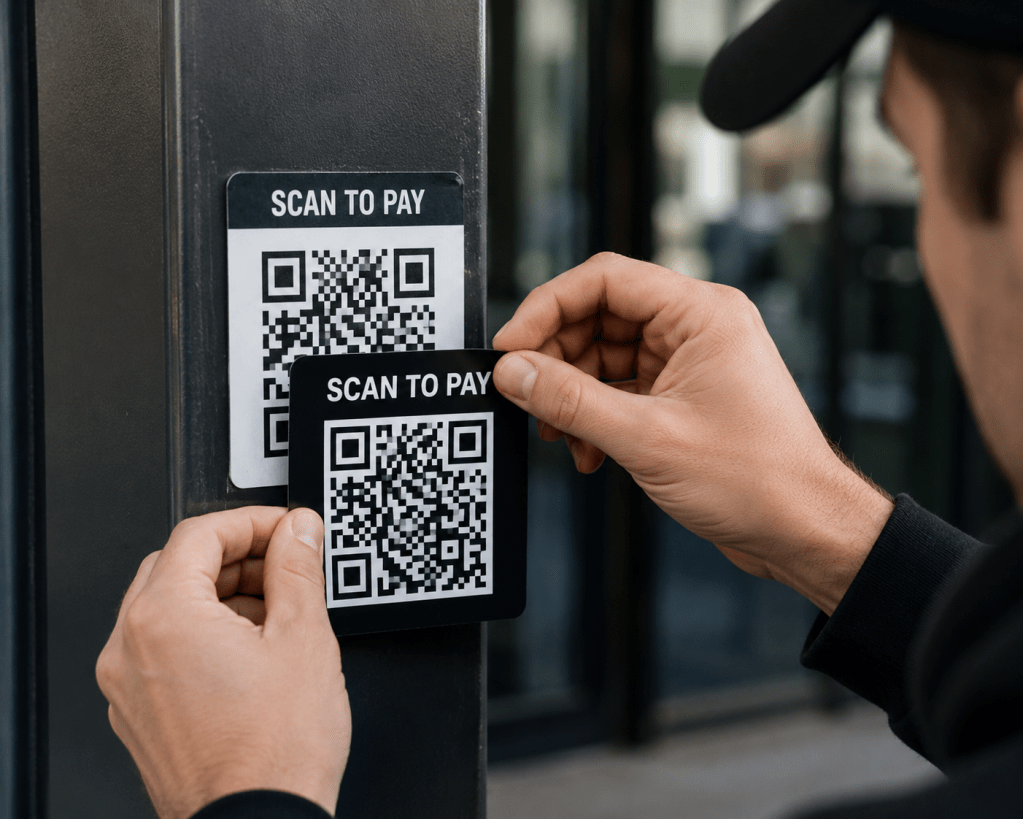
- A sticker in the real world. Attackers print QR code stickers and place them over legitimate ones on parking meters, posters and payment terminals. You think you are paying for parking and instead you are handing your card details to a stranger.
How to Protect Your Business from QR Code Scams
Protecting yourself against Quishing comes down to a few habits:
- Be suspicious of QR codes in emails. A code that arrives by email that asks you to log in or pay deserves the same caution as a strange link. The NCSC's advice is to be wary of scanning QR codes inside emails even though codes in places like restaurants are usually fine.
- Check the web address before you act. When you scan a code, your phone shows the link before it opens. Read it. If the address is not the official site you expected, close it.
- Go direct instead of scanning. If an email says your Microsoft account needs attention, open your browser and type the address yourself or use a bookmark. Don't rely on the code to take you to the right place.
- Watch for urgency. Messages that threaten account closure or a fine "within 24 hours" are trying to rush you past your own judgment. That pressure is a warning sign.
- Use phishing-resistant MFA. If a scam does capture a password, phishing-resistant multi-factor authentication (a passkey, a hardware key or number-matching in an authenticator app) makes that password much harder to use.
- Check physical codes for tampering. Before scanning a code on a parking meter or payment terminal, look for a sticker placed over the original.
- Tell your team. Most people have never been warned about QR code scams. Send your staff a short message with a real example so they know what to watch for.
What to Do if Someone Already Scanned One
If you or someone on your team scanned a QR code and entered details on the page that opened:
- Change the password for that account right away along with any other account that used the same password.
- Confirm multi-factor authentication is turned on for the account.
- Tell whoever manages your IT so they can check for unusual sign-ins.
- If card or banking details were entered, call the bank and watch the account closely.
Acting quickly limits what an attacker can do with the details they captured.
Frequently Asked Questions
Are QR codes safe to use?
Most QR codes are safe. A code on a restaurant table or an official payment terminal is usually fine. The risk comes from codes sent in unexpected emails or texts and from stickers placed over real codes in public. Treat those with caution.
What is quishing?
Quishing is phishing that uses a QR code instead of a written link. The word combines "QR" and "phishing". The goal is the same as any phishing attack: to get you onto a fake page that captures your login or payment information.
Can antivirus or email filters stop QR code scams?
Not always. Many email security tools scan the text of a message for bad links and a QR code hides its link inside an image so it can slip through. Some products now scan images for codes but you should not assume the scam will be caught before it reaches you.
Why is a QR code in an email more dangerous than a normal link?
A written link can be inspected by your email security and opened on a managed work computer. A QR code hides the link from those tools and pushes you to scan with your phone which usually has far less protection than your work device.
What should I do if I scanned a scam QR code but didn't enter anything?
If you closed the page without typing anything, the risk is low. Close it, don't go back and let your IT contact know so they can keep an eye out. If you did enter a password or payment details, follow the recovery steps above.

Article Summary: Most ransomware operations target small businesses at volume and run through dozens of prospects per month. A 22-person company can be researched in 40 minutes using public records, attacked using session-token theft after a single phishing click and ransomed within a week. What follows is a step-by-step walkthrough of how that attack unfolds written from the attacker's perspective plus the five specific controls that would have stopped it. Each control is included in security tools small businesses already pay for.
Small businesses are the most common ransomware target by volume of incidents even though many small business owners assume hackers focus on larger organizations. A 22-person company has enough revenue to be worth attacking, no dedicated security team to defend it and a publicly traceable footprint that takes about an hour to research.
What follows is a step-by-step walkthrough of how a small business gets attacked written from the attacker's side. The company in this account is composite but the methods are accurate to current threat intelligence reporting. After the walkthrough, you will see five specific points where the attack would have been stopped by controls that come bundled with security tools most small businesses already pay for.
Monday: How I Picked You
I work regular hours and run a small volume operation. My spreadsheet has about 40 prospects per month and I prefer businesses between 10 and 50 staff. The reason for that range is economics. Large enterprises have security teams, incident response contracts and lawyers who make recovery expensive on my end. At the other end of the scale, sole traders rarely have enough at stake to bother with. A 22-person commercial services company sits in the right zone: payroll, customer database, project files, supplier relationships and an owner who will pay to get the lot back. The return per hour is better at this size than at either extreme.
I did not find you through a breach or a tip. I found you on a public business records portal. State business registries, federal contract awards and county-level licensing databases publish enough detail for me to identify your company, look up your name, estimate your revenue and pick the most useful person inside the business. One search told me your company name, your registered agent, the contract value of a recent municipal job and the named contact on the submission.
The fact that nothing has gone wrong at your company yet is the strongest signal I get. It tells me your credentials are probably still valid, your staff has not been trained to spot anything and nobody has had a reason to change a password. A clean record is the first indicator I look for.
Tuesday: Building Your Org Chart for Free
I spend about 40 minutes researching your company today using only a browser.
LinkedIn gives me eight of your current employees with their job titles listed. Your office manager has been there for six years and lists “accounts payable, payroll and supplier invoicing” in her profile summary. Your second admin joined 14 months ago. You list yourself as director with a sparse profile and a low connection count which tells me you are unlikely to notice when someone unusual starts engaging with your profile or your company's social media.
Public business filings confirm your registered business name and your full legal name. A “meet the team” post from two years ago on your Facebook page lists first names and photos including someone described as helping out in the office a couple of days a week. One of the commenters shares your surname.
I now know who handles your money, what their name is, how long they have been there, what software they probably use (I will check your job ads on Indeed for the phrase “experience with QuickBooks or Sage”) and who in your business has the authority to approve a payment without a second signature.
That last person is my primary target. You are harder to reach and probably more cautious. Your office manager has system access, handles supplier payments and is busy enough that one more email in her inbox does not get scrutinized the way it might if she had nothing else to do.
I have not spent a dollar yet.
Wednesday: I Bought Your Credentials for $14
Stealer logs are credential packages harvested by infostealer malware that infected someone's personal device (often months or years earlier). The malware records every username and password typed into the machine and then bundles the data for sale. Marketplaces on Telegram channels and forums let buyers search these logs by company email domain.
I search for your company's email domain. Two results come back. One is your office manager's work email with a password that looks like it was saved in her browser. The other is a personal Gmail address that appears to belong to a family member of yours which is probably from a device that shared a home network.
I pay $14 for the package. It takes four minutes.
Your office manager's password follows a common pattern: a pet or child's name combined with a year and an exclamation mark. I check it against HaveIBeenPwned which is the same free database security professionals use and find that it appeared in a credential dump from a retail loyalty program breach three years earlier. The password has not been changed since.
Your family member's credentials are more interesting than they look at first. The same password with minor variations shows up across a streaming service, a gaming account and your company's Microsoft 365 login. The password works. The only thing standing between me and the inbox is the second factor.
Total spend so far: $14.
Thursday: Getting Past Your MFA
Multi-factor authentication stops a lot of attacks but the implementation matters more than the checkbox.
Simple push-notification fatigue does not work against your office manager's account. Microsoft enabled number matching by default for all Microsoft Authenticator push notifications in May 2023 which means she would have to type a code from her login screen rather than just tap approve. Push bombing fails against that configuration.
What still works is adversary-in-the-middle (AiTM) phishing. I send your office manager an email designed to look like a routine Microsoft 365 password reset notification and cite the breach that her password appeared in (the same breach I found her credentials in earlier in the week). The link in the email takes her to a page that mirrors the real Microsoft sign-in screen. That page is a proxy I control.
When she enters her password and approves her MFA prompt, my proxy forwards both to the real Microsoft login server. Microsoft validates the credentials, completes the MFA challenge and issues a session token back to my proxy. I capture the token. She sees a normal login experience on what she thinks is the real Microsoft site and then a “password updated successfully” message.
I am now signed in as her. The MFA prompt succeeded and the session token sits in my browser instead of hers. Microsoft sees a valid authenticated session and treats my activity as legitimate.
I had a backup plan in case the email did not get clicked. Earlier in the day, I called your office posing as your IT support company using a name I found in a Google review you had left 18 months earlier. I told your receptionist that we were seeing unusual login activity on the office manager's account and that I would need her to approve a verification push in the next few minutes. She said the office manager was not at her desk. I said no problem and I would try again later. The call cost me nothing.
By Thursday night, I am inside your office manager's Microsoft 365 account. I set up an inbox forwarding rule so her emails copy to an address I control without notifying her and then I wait.
Friday 2:47pm: Why I Waited 36 hours Before Encrypting
I spend 36 hours reading email before I encrypt anything. That dwell time is how I size the ransom correctly.
In those 36 hours, I find your cyber insurance policy attached to an email from your broker with a cyber liability sub-limit of $250,000. A bank reconciliation your office manager sent you two weeks ago shows your business account at around $180,000 at month end. Your customer list sits in a quote template she emailed to herself and a message thread with a municipal project manager mentions a job starting in three weeks with a hard deadline you cannot afford to miss.
I set my ransom at $65,000 in cryptocurrency. That figure is low enough that you will pay rather than fight it and high enough that it is worth my time and well within what I know you can access. Ransoms set above 10 percent of visible liquid assets tend to get contested. The figure I picked sits below that line.
I deploy the encryption payload at 2:47pm on Friday. The timing is deliberate. Your bookkeeper finishes at 3pm on Fridays which I know from an out-of-office reply I saw in the forwarded emails. You are on a job site with your calendar synced to the shared inbox. The person most likely to notice something wrong and call for help is already gone and the person with the authority to make decisions is unreachable.
By the time anyone understands what has happened, it is a Friday evening. Every file on your shared drive is encrypted and a ransom note sits on every screen in your office.
Total cost to me: $14 for credentials and about six hours of work spread across the week.
Five Places This Attack Would Have Died
The attack on your business worked because five ordinary things were not in place. None of them were expensive. Most were already bundled into security tools you already pay for.
- The credential purchase on Wednesday.
HaveIBeenPwned is free. Microsoft Entra password protection can detect and block reused or commonly-compromised passwords across your accounts. Enforcing unique passwords per account through a password manager and through Entra's policies makes a stolen credential purchase useless for me.
- The MFA bypass on Thursday night.
Microsoft already blocks the simpler push-bombing attack because number matching has been enabled by default for all Microsoft Authenticator push notifications since May 2023. The current dominant credential-based bypass is adversary-in-the-middle phishing. Defenses include phishing-resistant MFA (FIDO2 hardware keys, passkeys or Windows Hello for Business), Conditional Access policies that require a compliant or hybrid-joined device and anti-phishing protection in Microsoft Defender for Office 365. Any one of these would have either prevented the session token capture or made the captured token unusable from my IP address.
- The inbox forwarding rule.
Microsoft 365 allows admins to block external email forwarding rules at the tenant level. With that block in place, the inbox forwarding rule I used to read 36 hours of email would not have worked. I might have encrypted anyway but I would have been guessing on the ransom size.
- The 36-hour dwell time.
Microsoft Defender for Business (included in Microsoft 365 Business Premium) generates an alert when a new inbox forwarding rule is created. If anyone had been watching those alerts or if the alerts had been routed somewhere visible, I would have been detected on Thursday night. The most impactful change for a business your size is rarely a new product purchase. The improvement comes from someone reviewing the security alerts that the tools you already pay for are already generating.
- The public business records.
You cannot unpublish a state contracting registry or a federal contract award. That data will stay public. What you can control is what your team chooses to post about their specific responsibilities. Your office manager's LinkedIn profile listed her financial responsibilities in enough detail to make her the obvious target. That detail is worth a conversation with your team framed as practical security awareness rather than a rule about what people can post.
Three Questions to Send Your IT Provider
These three questions cover most of where the example attack failed. Each one corresponds to a control that comes bundled with security tools you most likely already pay for.
- Are we using phishing-resistant MFA (FIDO2 keys, passkeys or Windows Hello for Business) for finance, admin and executive logins?
- Is external email forwarding blocked at the tenant level?
- Are our security alerts going somewhere and is someone reviewing them?.
Article FAQs
Do hackers target small businesses?
Yes. Most ransomware operations target small and mid-sized businesses because the ratio of payout potential to defensive resources is higher than at either extreme of company size. The volume sweet spot is roughly 10 to 50 staff where there are assets worth encrypting but no dedicated security team to defend them.
What is adversary-in-the-middle (AiTM) phishing?
AiTM phishing is a technique where the attacker hosts a proxy page that mirrors a real login screen such as Microsoft 365 or Google Workspace. When the user enters credentials and approves the MFA prompt, the proxy captures the resulting session token. The legitimate service treats the login as successful but the session token ends up in the attacker's browser. AiTM has become the dominant credential-based attack vector against Microsoft 365 tenants after the default rollout of number matching ended simpler push-bombing attacks.
What is a stealer log?
A stealer log is a package of credentials harvested by infostealer malware from an infected personal device. The logs include browser-saved passwords, session cookies and stored authentication tokens and they are sold on underground markets for $10 to $20 per package. The malware that creates them typically infects personal computers through pirated software or malicious browser extensions.
How much does it cost an attacker to compromise a small business?
In the example walkthrough above, the total spend was $14 for stolen credentials and about six hours of work. Costs vary but the threshold to attempt the kind of attack described in this post sits well below $100.
Are there free tools that would have stopped this attack?
Several of the controls referenced in the walkthrough come bundled with Microsoft 365 Business Premium licenses that businesses in this size range typically already hold. External forwarding restrictions and Defender for Business alerts are configuration changes rather than new purchases. HaveIBeenPwned is a free check available to anyone. Phishing-resistant MFA hardware keys are a small per-user cost compared with the cost of a successful ransomware incident.
Article Summary: Cyber insurance applications have grown longer because of specific claim trends from 2023 and 2024 including the MOVEit supply-chain breach, the Change Healthcare ransomware incident and the Arup deepfake wire fraud. Each new section asks about specific security controls including immutable backups, layered MFA, callback verification on wires, EDR or MDR coverage, vendor risk and tested incident response. Answers that overstate your security posture can trigger rescission after a claim which means the policy is treated as if it never existed.
If you have a cyber insurance renewal coming up, the application is probably longer than the one you filled in last time. It is also more specific. Each new question maps to a control that (if missing) allowed a major 2023 or 2024 claim to escalate. The wording reflects how carriers responded to losses they paid in 2023 and 2024 and how you answer the form matters more than it used to.
This post covers why the application got longer, what each new section is asking, how to answer honestly without overstating your controls and what to fix in the 30 days before submission. The expensive mistake on a cyber insurance application is rescission where a future claim is denied because the carrier finds that the controls you declared were not in place at the time.
Why the Renewal Application Got Longer
The current generation of cyber insurance applications was shaped by three specific claim events from 2023 and 2024.
The MOVEit supply-chain breach surfaced on May 28, 2023 when Progress Software received the first reports of unusual activity from customers. The Cl0p ransomware group had been exploiting a previously unknown vulnerability in Progress Software's MOVEit Transfer file-sharing tool with activity detected by some researchers as early as February of that year. By late 2023, more than 2,650 organizations and over 66 million individuals had been affected with totals rising further into 2024. Carriers paid claims across that footprint and the experience reshaped how underwriters ask about third-party software risk.
Then the Change Healthcare ransomware incident in February 2024 froze US healthcare claims processing for weeks. The attacker gained network access on February 12, 2024 and deployed ransomware on February 21 with downstream impact on pharmacies, providers and patients across the country. HIPAA Journal's coverage noted that the absence of multifactor authentication on a key entry point made the initial intrusion possible. Industry analysts have estimated the cyber insurance loss from this single event at over $250 million and the response was tighter questions about backup immutability and incident response readiness.
The Arup deepfake wire fraud (also from early 2024) reframed how underwriters approach social engineering. A finance employee at the engineering firm's Hong Kong office transferred $25.6 million across 15 wires after a video call with what appeared to be the company's CFO and other executives (all of whom were AI-generated deepfakes). The fraud went undiscovered for about a week until the employee contacted Arup headquarters about a “secret transaction.” Out-of-band callback verification for wire transfers is now on every underwriter's checklist.
If you run an e-commerce store handling cardholder data, a healthcare practice with PHI, an accounting firm or law firm moving client funds or a real estate brokerage handling escrow, your application is the longest of all. You sit in the loss categories carriers got burned on.
The Backup Question Changed
The backup question on cyber insurance applications has tightened materially since 2023. What used to be a single yes/no question now asks whether those backups are immutable or air-gapped, when they were last tested and whether they can be deleted by your domain administrator credentials.
Expect wording on your form like: “Are backups stored in an immutable or air-gapped state, tested for restoration within the past 12 months and inaccessible to domain administrator credentials?”.
An immutable backup is one that nobody can delete or alter during a fixed retention window including someone using stolen administrator credentials. Air-gapped means the backup copy sits on infrastructure that cannot be reached from your production network. CISA's Stop Ransomware Guide lists immutable and tested backups as a baseline control which is the same standard most cyber insurance carriers now apply.
“Microsoft 365 backup” is no longer a passing answer on its own. Native Microsoft 365 retention isn't a backup in the sense the carrier means. Third-party backups that share the same identity perimeter as your production tenant can be wiped by a compromised global admin.
For the immutable backup question, the strongest answer references a backup platform with object lock or write-once-read-many storage enabled, an immutability window of at least 14 days (with 30 days now preferred), credentials separated from your production admin accounts and a recent successful restore test. Weaker answers describe daily backups to a NAS on the same network with no recent restore test which typically triggers follow-up underwriting and sometimes a premium adjustment. Answers that leave the immutability question unclear are the ones most likely to push a renewal toward sub-limits or non-renewal.
MFA Questions Go Deeper Than One Checkbox
MFA was once captured as a single yes/no question on most applications. The current generation asks whether MFA is enforced on email, VPN, remote desktop (RDP), all administrator accounts and privileged service accounts. The answer needs to be yes on all five for a clean pass.
SMS-based MFA is now treated as a weaker control. SIM-swap attacks and SS7 vulnerabilities have made text codes the weakest authentication factor available. Several carriers ask specifically whether your MFA uses an authenticator app, hardware token or push with number matching rather than SMS. If you are still on SMS for admin accounts, expect a follow-up question or a premium adjustment.
The privileged access management (PAM) question is the one most owners haven't seen before. PAM is a category of tool that keeps administrator credentials out of regular password managers. A PAM platform vaults privileged credentials, rotates them on use and logs every session which means a stolen admin password can't be used unnoticed for weeks before someone catches it.
A strong PAM answer describes a vaulting tool with credentials rotated on use and session logging enabled. Weaker answers like admin passwords stored in a shared password manager with annual rotation will usually trigger follow-up underwriting. Shared admin accounts that never rotate and produce no audit log of who used them are the configuration most likely to result in sub-limits or non-renewal.
Will cyber insurance be denied if you don't have MFA everywhere? Not always denied outright. Expect significant premium increases, sub-limits on ransomware coverage or exclusions for any incident that traces back to the unprotected entry point.
The Wire Transfer and Deepfake Verification Questions
After the Arup case and a string of business email compromise losses, carriers added callback verification questions to their applications. Callback verification means that before sending any wire above a defined threshold (commonly $10,000 or $25,000), the person authorizing the transfer calls the recipient at a phone number previously verified and stored rather than the number on the request email.
Expect wording like: “Does your organization require out-of-band verification using a previously known phone number for all funds transfer requests above [threshold] including requests appearing to come from executives?”.
Several current applications now ask separately whether staff have been trained on AI voice cloning and deepfake video risks. The Arup case made that question relevant for every carrier writing in professional services.
Accounting firms, law firms with escrow or trust accounts and real estate brokers will see this section scrutinized most carefully. Anyone moving other people's money is a soft target and an expensive claim when wire fraud lands.
A strong answer references a written wire transfer policy requiring callback verification to a verified number for transfers above a stated threshold, dual approval and annual social engineering training that includes deepfake awareness. Informal verification practice without a written policy will usually be flagged for follow-up. Wire transfers authorized by email approval alone are the configuration carriers are now declining to cover at all.
EDR, MDR and the End of the “We Have Antivirus” Answer
Traditional antivirus scans files against a list of known threats. Endpoint Detection and Response (EDR) watches behavior on each device and flags suspicious activity such as a process trying to encrypt files or escalate privileges. Managed Detection and Response (MDR) is EDR plus a 24/7 team watching the alerts and responding when something fires at 2am on a Sunday.
Current applications ask whether you have EDR deployed, whether it covers 100% of endpoints including servers and whether a 24/7 security operations center (SOC) monitors and responds to alerts. The MDR question is increasingly yes or no and the no answer has pricing consequences.
If you don't have MDR yet but plan to add it, say so plainly with a timeline. Underwriters can work with “MDR deployment scheduled for Q2 with vendor selected”. They cannot work with vague answers about future plans.
The Vendor Risk Questions
Supply chain questions used to be a single yes/no item. After MOVEit and Change Healthcare, carriers now want a full section on the software vendors holding your data.
Expect questions like: “List your top five software vendors with access to sensitive data and confirm whether each provides a SOC 2 Type II report or equivalent.” If you have never asked your practice management software vendor for a SOC 2 report, that conversation is overdue.
You are not expected to audit every vendor's security program in detail. The carrier wants to see that you know who your top vendors are, what data they hold and that you have asked the basic questions like SOC 2 attestation. An honest “we have identified our top five vendors and requested SOC 2 reports from three with two outstanding” reads better than a confident answer that falls apart in discovery.
The Mistake to Avoid: Misrepresentation and Rescission
The most expensive answer on a cyber insurance application is the one that overstates the security controls you have in place. Cyber insurance applications are warranty documents. If a forensic investigation after a claim finds your environment didn't match what you declared, the carrier can rescind the policy.
Rescission means the policy is treated as if it never existed, your claim is denied and any prior payouts under the same policy term can be clawed back. Some courts have found that the carrier doesn't need to prove a direct link between the misrepresentation and the loss. The misrepresentation itself is enough.
The cleanup approach is direct. If a question asks about MFA on all admin accounts and you have a gap, declare the gap and include a remediation date. Carriers reward honest gaps with a plan more than they reward polished answers that don't survive forensic review.
Checking “no” or “in progress” on the form may raise your premium or tighten your coverage terms. That cost is predictable. Misrepresentation discovered after a claim can void the policy entirely and the timing means you absorb the full incident cost yourself.
The 30-day Pre-Renewal Checklist
Work through this in order. Most items are achievable in a month if you start now.
Week 1. Confirm MFA on email, VPN, remote desktop, all administrator accounts and any service accounts that support it. Move admin MFA off SMS to an authenticator app or hardware token.
Weeks 1 to 2. Verify your backups are immutable or air-gapped. Run a test restore and document the result with date and screenshots.
Week 2. Write a one-page wire transfer policy requiring callback verification to a previously verified phone number for any transfer over your chosen threshold. Get it signed by anyone who can authorize payments.
Weeks 2 to 3. Confirm EDR is deployed on every endpoint and server. If you only have traditional antivirus, get quotes for EDR or MDR now so you can answer with a deployment timeline.
Week 3. Identify your top five software vendors and request SOC 2 reports or equivalent attestations. Note who responded.
Weeks 3 to 4. Document or update your incident response plan and then run a 60-minute tabletop exercise with your leadership team. Keep the notes. That is your “tested in the past 12 months” evidence.
Week 4. Sit down with the application and answer honestly. Flag anything you couldn't fix with a specific remediation date.
Article FAQs
What does rescission mean on a cyber insurance policy?
Rescission means the carrier voids the policy from inception after discovering material misrepresentation on the application. The policy is treated as if it never existed, the current claim is denied and any prior payouts under the same policy term can be clawed back.
Will my cyber insurance be denied if I don't have MFA on everything?
You are not always denied outright. Expect a significant premium increase, sub-limits on ransomware coverage or exclusions for incidents that trace back to the unprotected entry point. The most common gap is MFA on privileged or service accounts.
What is the difference between EDR and MDR on an insurance application?
EDR (Endpoint Detection and Response) is the technology that watches device behavior and flags suspicious activity. MDR (Managed Detection and Response) is the same technology plus a 24/7 team watching the alerts and responding. Carriers increasingly want both and the application often asks about each separately.
Why are cyber insurance renewal applications longer than they used to be?
Carriers added detailed sections in response to specific 2023 and 2024 losses including the MOVEit supply-chain breach, the Change Healthcare ransomware incident and the Arup deepfake wire fraud. Each event drove changes to backup, MFA, vendor risk or wire transfer questions on subsequent applications.
Can my cyber insurance claim be denied if I answered the application incorrectly?
Yes. Material misrepresentation on a cyber insurance application can trigger rescission which voids coverage retroactively. Many courts have found that the carrier does not need to prove a causal link between the misrepresentation and the specific loss.
What does immutable backup mean on a cyber insurance application?
A backup that cannot be modified or deleted for a defined retention period even by someone using stolen administrator credentials. Cloud object lock and write-once-read-many storage are common implementations. Most carriers want a window of at least 14 days with 30 days now preferred.