In many offices, a majority of the workload is now done via mobile devices. This means that mobile OS (operating system) updates have a larger impact on work productivity than they have in the past.
In 2013, the percentage of mobile internet traffic was just 16.2%. In 2019, it skyrocketed to 53.3%. This makes mobile devices one of the most important business technology tools for a Connecticut company.
Many of the typical struggles that smartphone users encounter are addressed in this update:
- Trouble finding an app among multiple screens
- Accidentally messaging in the wrong conversation
- Inability to multi-task while on a video call
We will go through some of the most exciting updates in iOS 14 to help you work more efficiently.
Pin Your Most Important Conversations
If you have several text conversations going on, it is easy to pick up the wrong one when you are texting in a hurry. You might accidentally text your client (instead of your significant other) something like, “I’ll be home for dinner in an hour. Traffic is rough. xx”
“Mis-texting” can be embarrassing and also costs you more time because you need to apologize for the misfire and re-text the information to the person it was originally meant for.
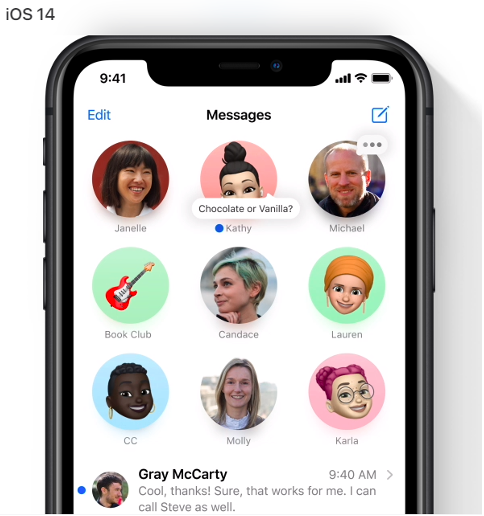
iOS 14 allows you to pin important conversations to the top of the messages screen. It makes it easy to locate those people/groups that you message often. The accompanying image makes it easy to locate who you need in a hurry.
(All images are from Apple)
Pinned conversations will also sync across Messages in iOS, iPadOS and macOS.
Use Widgets on Your Home Screen
Those iPhone widgets that have been in your far-left screen for a while have received a huge update and are more powerful and helpful than ever before.
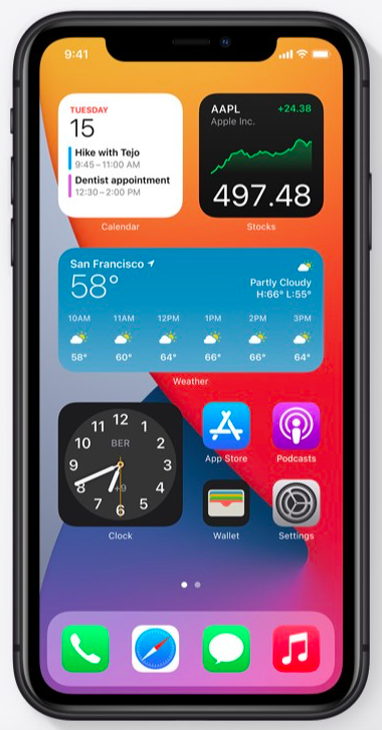
You now have more widgets to choose from and you can bring them over to your home screen. Add a widget for your calendar and you will see the next meeting coming up as soon as you pick up your phone.
You can make widgets small, medium or large and can also stack several in a window. This allows you to use less Home screen real estate while being able to access more of your widgets.
Compact Screen UI Makes Multi-tasking Easier
No more will an incoming call take up your entire phone screen. The new compact UI in iOS 14 has calls now showing up as a small banner that you can easily click to answer or decline.
Other compact UI features include:
- Siri being more compact
- FaceTime calls coming in as a banner
- Third-party VoIP apps like Skype can also support the compact UI.
Do More While on Video
A new Picture in Picture feature allows you to work in another app while on FaceTime or watching a video.
The video will show up in a small box overlaid on top of your screen. You can pinch to resize the video window to make it larger or smaller. You can also drag it to any corner of your screen and minimize the window if needed.
Smart App Library Solves the “Lost App” Problem
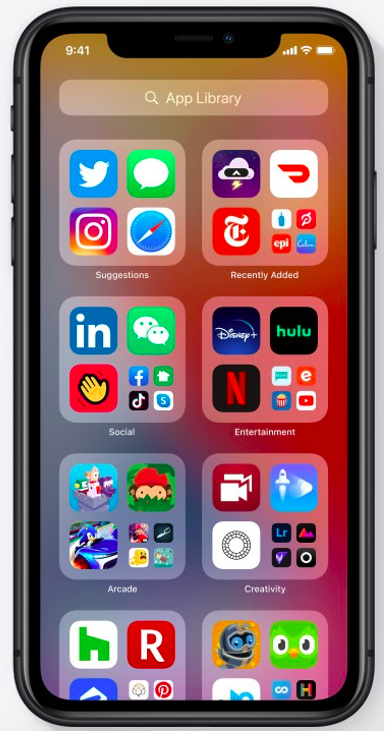
One of the most helpful features that you will find in iOS 14 is a new App Library that automatically organizes and categorizes all your apps as soon as you upgrade.
All apps can now be found in a single screen, instead of having to page through multiple screens. They are easy to see and can be opened with a single click.
Send Audio Messages with Siri
If you are in a rush and don’t have time to type out a detailed text message, you can have Siri send an audio message by text instead. This is much more efficient and less time consuming for long messages that may include directions or detailed instructions.
To send an audio message with Siri:
- Activate Siri (“Hey Siri” or by pushing the home button)
- Say “Send an audio message to (contact name)”
- Siri will prompt you with, “OK, recording”
- Speak your message to Siri
- When you stop speaking for a few seconds, Siri will give you the option to Send, Cancel or Play Back the audio.
More Uses for Maps
If you have not used Maps much on iPhone other than to look up an address from time to time, you will want to explore the new capabilities that iOS 14 brings to this app.
Here are a few of the Maps improvements:
- Maps now routes cyclists along bike lanes
- Get recommendations from Guides for places to visit in a city
- View congestion zones in major cities
- Know when you are approaching speed cameras
- Use Siri to give your ETA to a contact while using Maps.
Get Help Optimizing Your Business Devices from Sound Computers
Most offices in Westbrook and other Connecticut towns now have a mix of computer and mobile device workflows. We can help you optimize to make your processes secure and efficient.
Contact us today to schedule a free consultation. Call 860-577-8060 or reach us online.

Strategic approaches and innovations are part and parcel of informational technology and related fields. Managed service provider (MSP) is another innovation that is partially related to the subscription model. (For more information on what an MSP is, visit this site for more information.)
The majority of the companies are more toward the services which are in the market and required by the IT support. They don’t feel the need of using the services which are related to a subscription model or the relatively new services.
Reasons for using MSP:
One of the reasons for the rapidly growing popularity of Managed Service Provider is the factor of stability. The MSP ensures the stability of the clients and is said to be inexpensive as well. However, another reason why companies are preferring MSP can be the usage of cloud servers. Companies are now digitizing their operations and for that they are using MSP.
MSP and IT support:
Managed Service Provider helps the company to notice the technical issues beforehand. This helps the company to understand the minor issues and also eradicates the chance of losses. However, regular maintenance and proactive services are required by the company to make sure that the network runs smoothly and effectively.
Benefits of utilizing MSP:
Managed Service Providers can be amazingly beneficial. This is especially true for the companies that need technical support and expertise. Maintaining the IT infrastructure can be difficult for companies which is one of the reasons for the preference of MSP. Mitigating the security threats and increasing the life span of the devices are two important factors of the Managed Service Provider.
1. Centralizing the network: System centralization is extremely beneficial as it consumes all the data in a single unit which helps in centralizing the network. Moreover, centralization speeds up the processes and improves the company data.
2. Increased support: System management and continuous monitoring help the IT system to be upgraded with no risk and increased cost. The systems will be updated without any support.
3. Efficient IT budget: MSP helps in budgeting the IT services in the most efficient manner. MSP will allow the systems to be updated without any extra cost which will eventually decrease hardware and maintenance costs.
4. Security and safety of the data: Outsourcing the data with MSP is no longer problematic as MSP is designed in such a way that it ensures the data management regulations and provides backup of the systems.
5. High-level productivity: MSP addresses the technical issues beforehand which saves a lot of time and money. Therefore, with the help of MSP, there will be minimal system failures and breakdowns which will help the employees to work more efficiently and productively.
6. Accountability of the service provider: The specialists associated with MSP are professional people with extensive IT knowledge which can help and guide you at every step. The employees can focus on their work while the assigned specialist takes care of the IT issues.
Nonetheless, to use any service one needs to study and explore it. To get a reliable service, you must look for a specialist who can guide you through the whole process.