

Does your business use a lot of spreadsheets to keep track of different items? This type of manual list process to track devices, visitor logs and content scheduling can be tedious and make sharing that information cumbersome.
In order to optimize your Connecticut business for efficiency, one of the things you should look at is technology solutions that may be able to replace manual processes.
More than 40% of employees spend at least 25% of their work week on manual and repetitive processes.
Some of the top manual processes that surveyed workers said they would like to see automated to save time include:
- Data Collection
- Approvals
- Updates
Each of these areas can be addressed with a brand new app that was just added to Microsoft 365 business and enterprise subscriptions with SharePoint. That app is Microsoft Lists.
How Does Microsoft Lists Work?
Microsoft Lists gives you a way to track information, collaborate on list-based work processes with others and use rules to create automated updates to increase productivity.
Lists can be moved from a basic spreadsheet to a dynamic cloud environment that allows you and others to access them via the web, a mobile app or from inside Microsoft Teams.
Microsoft Lists was rolled out during the summer of 2020 and has the ability to replace manual workflows, all those cumbersome spreadsheets and possibly other paid cloud apps (like a task manager).
Here are some of the things you can do with Microsoft Lists:
Access All List Workflows from One Place
Rather than having spreadsheets saved in different folders, Lists keeps all of your lists instantly accessible from one centralized home page. You can also access and use them from within Teams.
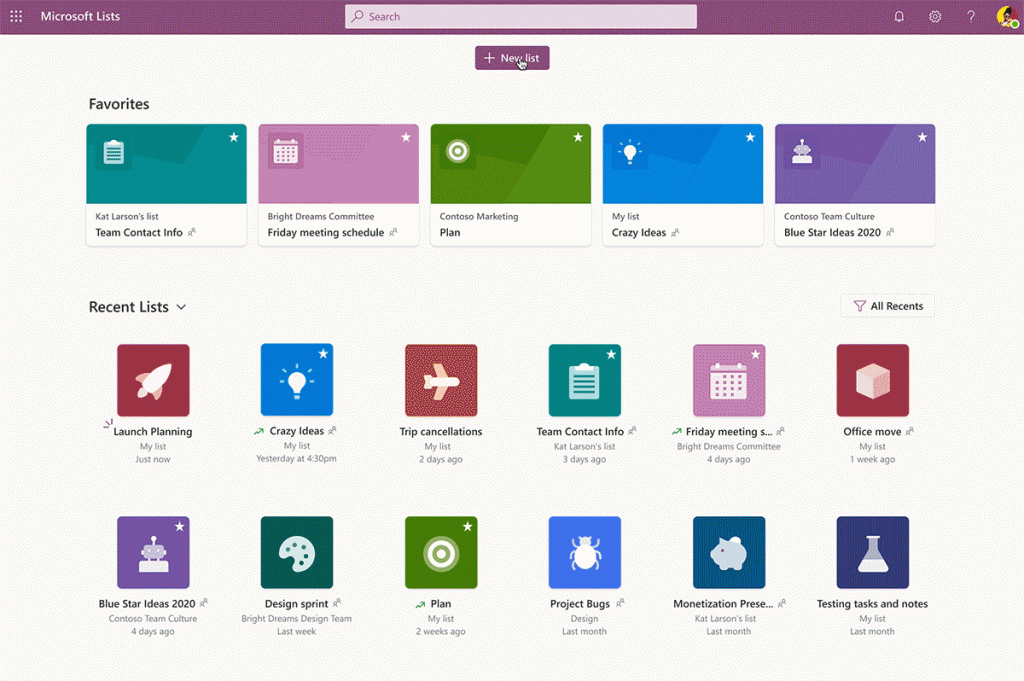
Recently used lists are at the bottom of the home page and those lists that you have designated as “favorites” are at the top. That means no more time wasted searching for your lists.
Quickly Create a List Workflow from a Template
The templates in Lists allow you to easily unleash the power of the platform and get an idea of just how much it can do. You can have two different list workflows that look completely different depending upon the template you use and the view you choose.
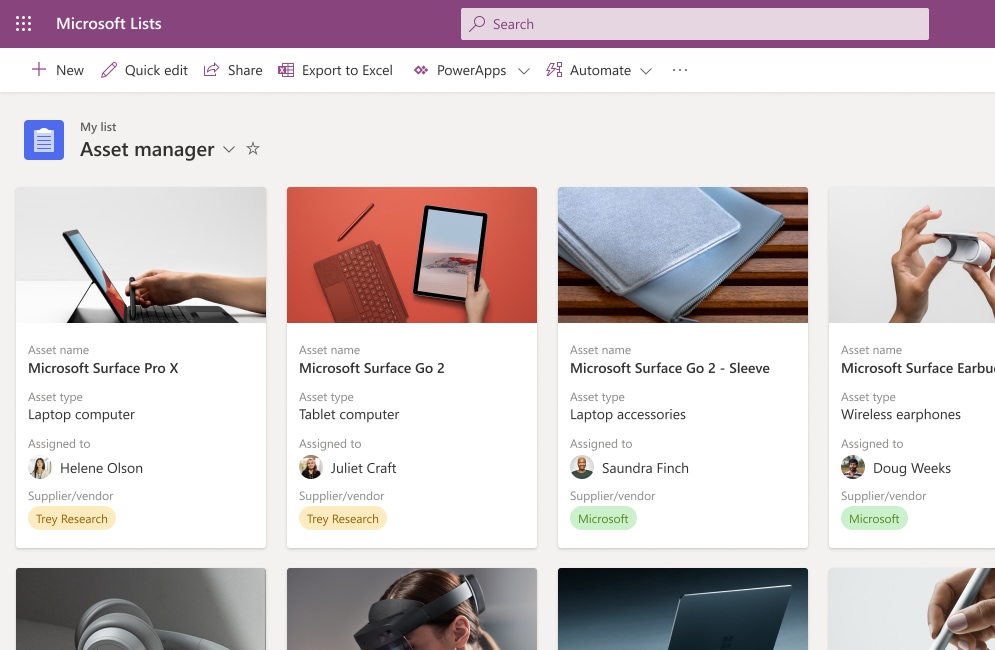
For example, the Asset Manager template allows you to add an asset photo and keep track of things like who has a device checked out and the warranty information.
The Issue Tracker template can give you a data-driven view of current issues being tracked, who is responsible for resolving them and their current status.
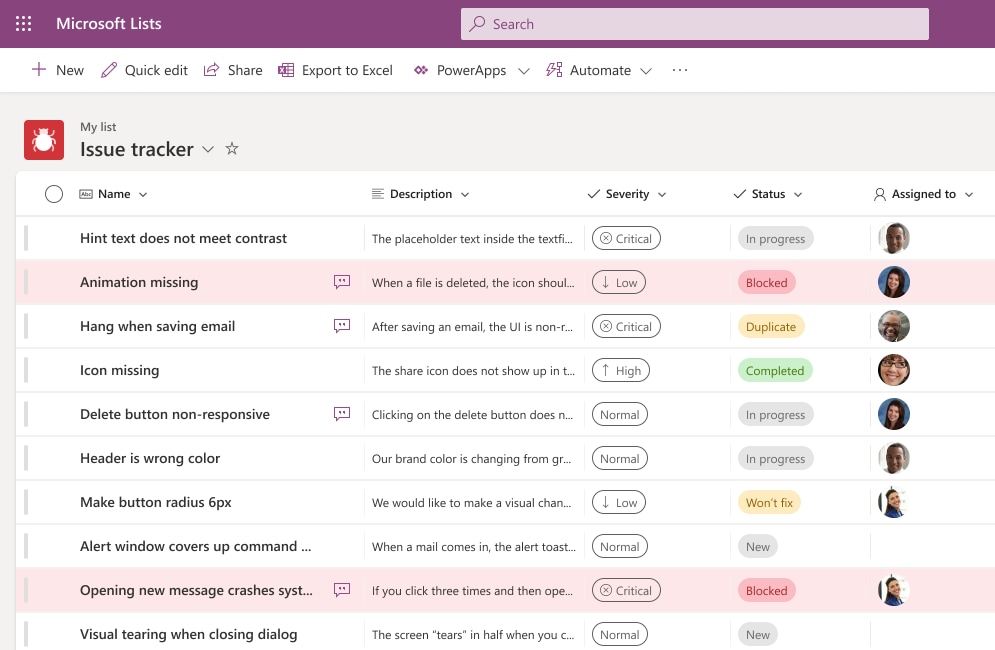
You can see that Lists can be morphed to fit whatever list-based workflow you have.
The current list of built-in templates for Lists include:
- Asset Manager
- Content Scheduler
- Employee Onboarding
- Event Itinerary
- Issue Tracker
- Recruitment Tracker
- Travel Requests
- Work Progress Tracker
Automate Notifications
You can reduce the time you spend following up to see if a task has been done and move an approvals process along more quickly by using the rules in Microsoft Lists.
You can set up rules that send an email notification to a designated address if any of the following activities occur:
- A list column changes
- A column value changes to a specific value (such as from “in-progress” to “done”)
- When a new list item is created
- When an item is deleted
Use Views to See Data in Multiple Ways
Another powerful feature of Lists is the ability to see your data in multiple views. This allows you to use a standard view that looks similar to a spreadsheet to view tasks or use a calendar view that can help with planning according to a schedule.
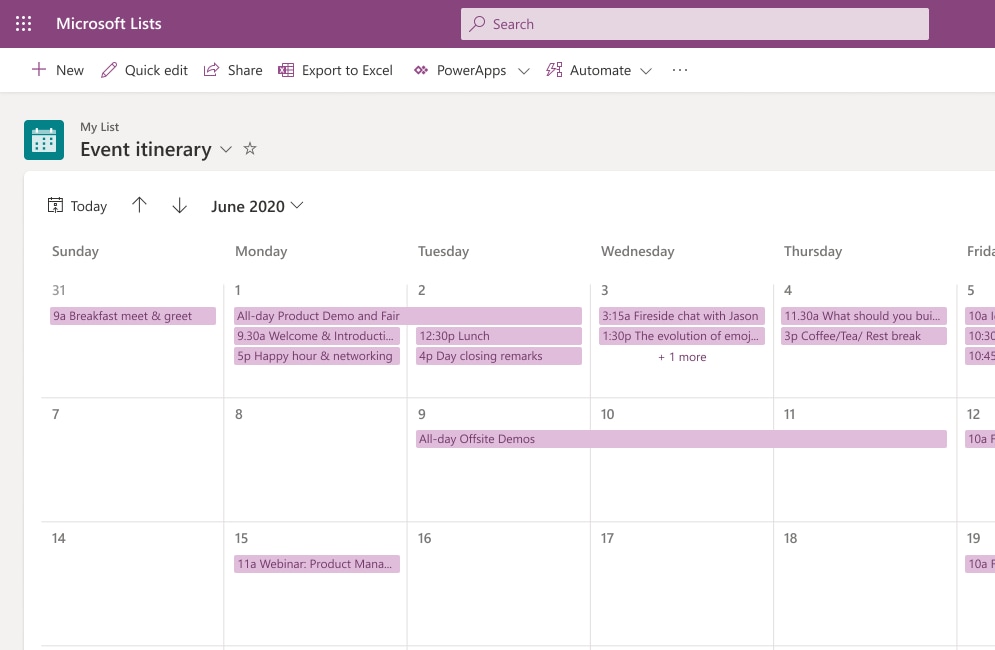
Microsoft Lists Calendar View
Some of the view options you have in Lists include:
- Standard view
- Calendar view
- Datasheet view
- Grid/Gallery view
Collaborate with Others
A feature that makes Microsoft Lists particularly useful to replace manual processes and repetitive apps is the ability to collaborate with others in the app.
Multiple people can work together on the same list-based process and you can even open Lists right inside Microsoft Teams which gives you the ability to message alongside your list workflow.
Giving everyone the ability to stay in sync on list activities removes the need to continually follow up with people and ensures everyone is on the same page. It also removes the need to email static spreadsheets back and forth.
Create Lists from Excel Spreadsheets
You have several options that make it easy to create a list. You can create one from a blank list, use a template, use another list as a base or create one from an Excel spreadsheet.
The ability to use an existing Excel list to create a dynamic Lists workflow makes it easy to replace those cumbersome spreadsheets with a much smoother, automated and more collaborative workflow.
Put Smart Productivity-Boosting Tools In Place at Your Business
Sound Computers can help your business take advantage of tools like Microsoft 365 to boost productivity and lower costs.
Contact us today to schedule a free consultation. Call 860-577-8060 or reach us online.

Strategic approaches and innovations are part and parcel of informational technology and related fields. Managed service provider (MSP) is another innovation that is partially related to the subscription model. (For more information on what an MSP is, visit this site for more information.)
The majority of the companies are more toward the services which are in the market and required by the IT support. They don’t feel the need of using the services which are related to a subscription model or the relatively new services.
Reasons for using MSP:
One of the reasons for the rapidly growing popularity of Managed Service Provider is the factor of stability. The MSP ensures the stability of the clients and is said to be inexpensive as well. However, another reason why companies are preferring MSP can be the usage of cloud servers. Companies are now digitizing their operations and for that they are using MSP.
MSP and IT support:
Managed Service Provider helps the company to notice the technical issues beforehand. This helps the company to understand the minor issues and also eradicates the chance of losses. However, regular maintenance and proactive services are required by the company to make sure that the network runs smoothly and effectively.
Benefits of utilizing MSP:
Managed Service Providers can be amazingly beneficial. This is especially true for the companies that need technical support and expertise. Maintaining the IT infrastructure can be difficult for companies which is one of the reasons for the preference of MSP. Mitigating the security threats and increasing the life span of the devices are two important factors of the Managed Service Provider.
1. Centralizing the network: System centralization is extremely beneficial as it consumes all the data in a single unit which helps in centralizing the network. Moreover, centralization speeds up the processes and improves the company data.
2. Increased support: System management and continuous monitoring help the IT system to be upgraded with no risk and increased cost. The systems will be updated without any support.
3. Efficient IT budget: MSP helps in budgeting the IT services in the most efficient manner. MSP will allow the systems to be updated without any extra cost which will eventually decrease hardware and maintenance costs.
4. Security and safety of the data: Outsourcing the data with MSP is no longer problematic as MSP is designed in such a way that it ensures the data management regulations and provides backup of the systems.
5. High-level productivity: MSP addresses the technical issues beforehand which saves a lot of time and money. Therefore, with the help of MSP, there will be minimal system failures and breakdowns which will help the employees to work more efficiently and productively.
6. Accountability of the service provider: The specialists associated with MSP are professional people with extensive IT knowledge which can help and guide you at every step. The employees can focus on their work while the assigned specialist takes care of the IT issues.
Nonetheless, to use any service one needs to study and explore it. To get a reliable service, you must look for a specialist who can guide you through the whole process.


It is an overwhelming decision to change traditional methods in business. But is it worth it? Most of the time, yes!
Reaching new levels in your business might mean there is a need for improved technologies to excel in this modern world. This is the case in implementing an ‘Enterprise Resource Planning’ system which is commonly known as the “ERP” system. As the name suggests, it helps businesses to resolve complex issues. It is advanced software that has now been adopted by more than 40% of corporations to increase their productivity.
The real question is, “Does it help to improve the productivity of any business?”
A business is more likely to boost sales when managed efficiently and employing time-saving measures. A solid ERP system implemented with the correct features can make a big difference when it comes to common inventory problems.
Today there are several issues driving manufacturing business such as labor turnover rates and even outsourcing making it less profitable. A successful business requires effective strategies to maximize profits with minimal resources. How do you do the same amount of work with less people and not burn them out? ERP is the solution to these modern problems whether be it resource planning or management issues.
Don’t stress about little things you cannot change. Start to focus on big things that you can change or improve. If you are thinking about how to share your burden with an ERP system and how it works, here is how it will help to increase productivity in manufacturing businesses:
Time saver:
Imagine what could have been done with that time that you spent organizing databases and order arrangements. Time is precious. Save it to spend on what grows your business. The best way you can buy yourself some extra time is by getting auxiliary help. This is where ERP comes in and saves a ton of your time by managing huge files sophisticatedly. It can manage the entire resources of your business from Human Resources to Finances and Clients.
Manages excel files:
What has been the most tiring of all tasks? Managing those immensely large excel sheets and keeping a check on them regularly. When I said it solves all the problems, I meant it. ERP systems will help you with all the complex processes despite the size and level of the organization. It can automatically get updates on information and maintains the flow of databases. Getting an awesome ERP system will cut down labor and save an enormous amount of time and energy.
Cost-reduction:
It drastically reduces the cost of labor and outsourcing which eventually helps to improve the quality of the product. When the quality of a product is upgraded, it affects sales and drives more clients towards you. It drops administrative expenses as well as operative costs. The costs saved from these processes can be reutilized for bigger and lucrative purposes.
It also reduces the amount of time spent digging around for human errors. Your finance department will thank you because the amount of inventory errors and shipping issues will decrease. Cycle counts and physical inventories will be a breeze. Workers will be happier and take pride in what they are able to accomplish without burning out. That leads to better employee retention and an invaluable knowledge base in those employees that stick around long term.
All three of the privileges above are interrelated to the effective management of business and ERP is a comprehensive way to increase parameters of each performance: gathering, editing, updating and managing information and databases. Most of the companies have already switched to ERP systems to improve productivity and minimize investment. In this continuously upgrading world, to run a successful business and to compete with large firms it is essential to keep up with the most modern ways to handle traditional problems at a low cost. An ERP system can transform methods to generate maximum workflow and maintaining product quality.


It has been over a year since you purchased that new computer. The once lightning fast computer is starting to slow down. Tasks are seemingly taking longer and longer. You wonder to yourself, “Will this computer ever run as fast as it once did?” Wonder no more. Here is a list of 10 ways to whip your computer back into shape:
Read more
Windows 7 support will end on January 14, 2020. This date is rapidly approaching and Microsoft is holding firm (unlike with Windows XP when Microsoft relented and extended support). What does the end of life for Windows 7 mean? What will happen if you continue using 7 after support stops? Should I upgrade my existing computer or purchase new? Is there any other option other than upgrading to Windows 10? With time quickly running out, choosing a path forward can seem very daunting.
Read more
Apparently, Softpedia is still trolling the Microsoft Community forums, as the site has come across another problem Windows 8.1 upgraders are experiencing: limited or no Wi-Fi connectivity. The site reports that the problem was first related to the Surface tablets, but customers on PCs and other non-Microsoft Windows 8.1 tablets are facing the same issues.
Read more